You exported last week's rankings, saw average position tick from the mid-teens into the low teens, and dropped the file in the leadership channel before standup. The reply came back in one line. Did we sell more? The sheet cannot say. A movement in average position can mean more exposure, a different country mix, a page swap, or a click that an AI answer absorbed before anyone reached the site. Keyword ranking reporting only earns its Monday slot when position sits beside impressions, the URL that showed, and the clicks that never arrived.
Table of Contents
Choosing the KPIs for Keyword Ranking Reports

Google's Performance report standardized keyword reporting around four measures: clicks, impressions, click-through rate (CTR), and average position. The same report can split those measures by query, page, country, device, search appearance, and date. That split is what connects a rank to visibility and traffic instead of leaving stakeholders with a lone position.
Each measure answers a different question.
- Clicks: Someone chose your link. This is the closest Search Console gets to a visit.
- Impressions: A link to your site was shown. Exposure can rise while rank barely moves.
- CTR: Clicks divided by impressions. It shows whether the listing earned the chance it was given.
- Average position: The average of the topmost result from your site across those impressions. It is not a diary of every listing you held.
Google's definition is easy to misread. If your site appears at positions 2, 4, and 6 for one query, the recorded position is 2, not 4. If another query shows you at 3, 5, and 9, the combined average of those topmost positions is 2.5. The model keeps the best visible result for each impression. Read it next to clicks, impressions, and CTR, or you will celebrate a headline that traffic does not support.
What a weekly view can separate
The standard report historically opened on the previous three months of data. Newer views also support closer monitoring, including hourly granularity in a 24-hour view introduced in December 2024. Hourly data is for spotting a launch or an outage. It is a poor basis for a strategy call. A weekly check is long enough to tell a ranking shift from a change in exposure, geography, or device mix, and short enough to catch a broken page before the monthly review.
Practical rule: Never ship average position as the only KPI. Pair every rank move with impressions and clicks for the same query set, country, and device.
For a Shopify catalog, the shortlist is non-brand coverage in positions 1–3 and 4–10, category-URL CTR, and orders or add-to-cart where the join exists. For a SaaS pipeline, use median rank on commercial and comparison terms, branded versus non-branded impression mix, and demo or trial conversions beside clicks. Average position stays in the appendix.
Segmenting Keywords by Search Intent and Position Band
A sitewide average treats a branded product name and a broad category term as the same kind of win. They are not. Split the panel three ways before you talk about movement. First, brand versus non-brand. Second, intent: informational, commercial, and transactional. Third, position band: 1–3, 4–10, and beyond page one.
The reason the bands are unequal shows up in estimated click share. A 2024 CTR curve put position 1 at 27.6%, position 2 at 15.8%, position 3 at 11.0%, position 4 at 8.4%, and position 5 at 6.3%. Positions 6 through 10 landed at 4.9%, 3.9%, 3.3%, 2.7%, and 2.4%.
| Position |
Estimated CTR |
| 1 |
27.6% |
| 2 |
15.8% |
| 3 |
11.0% |
| 4 |
8.4% |
| 5 |
6.3% |
| 6 |
4.9% |
| 7 |
3.9% |
| 8 |
3.3% |
| 9 |
2.7% |
| 10 |
2.4% |
Moving from position 2 to position 1 lines up with an estimated 11.8 percentage-point CTR gain. Moving from position 10 to position 9 lines up with about 0.3 points. Position 1's estimated CTR is roughly 11.5 times position 10's. Actual results still swing with intent, brand familiarity, SERP features, device, country, and layout. The curve is a priority tool, not a forecast you paste into a revenue model.
Same jump, different query
Take a Shopify category term, "linen duvet cover," moving from position 9 to position 4. On the curve, that is a step from a thin 2.7% estimated CTR into 8.4%, and it crosses into the first half of page one where commercial clicks concentrate. The same four-place jump on the brand query "Northline linen duvet" often changes little, because branded searchers already knew the store and the listing was competing with your own sitelinks and ads.
Report medians and band coverage inside each intent cluster. Do not average the whole list. A portfolio can show a prettier mean while a handful of high-volume commercial terms slide and dozens of tiny informational terms improve. Weighted signals, impressions and clicks, tell you whether the business felt the change. Median rank and the share of terms in each band tell you whether the distribution moved.
Stakeholder conversations get concrete once the table has rows they recognize. "Twelve non-brand commercial terms entered the top three" is a decision. "Average rank improved by two" is a slide they will forget.
Attributing Rankings to the Pages That Earn Them
A cluster can "rank" while the URL you optimized is nowhere in the result. Google does not calculate impressions, clicks, position, and CTR the same way when you group by page as when you group by property. Google's guidance on Search Console metrics is explicit that the grouping dimension changes the math. If you paste both views into one column, a stakeholder will read a page swap as a ranking gain.
Keep two views and never blend them.
- Property view: Use it for the health of the site on a query. It answers whether any URL from the property was visible.
- Page view: Use it for the URL you meant to rank. It answers whether that template, product, or article earned the impression.
- Primary URL map: Assign one intended URL to each keyword cluster before the week starts. Store it next to the query, not in a separate doc nobody opens.
- Replacement flag: When Search Console's top page for that query is not the primary URL, mark the row as a swap. Do not count it as a rank improvement for the intended page.
- Cannibalization flag: When two URLs trade the impression across the week, say so. The fix is usually internal links, a canonical, or a merged page, not another content brief.
A map stakeholders can scan
Build the map as a short table: cluster, intent, primary URL, observed URL, country, device. One row per cluster is enough for the weekly note. The full query export stays in the working file.
A category cluster for "wool throw blanket" might list /collections/throws as primary. If /blogs/how-to-style-a-throw starts collecting the impressions, the property position can look stable while the collection loses its chance to sell. Report that as a URL change, then decide whether the guide should link harder into the collection or stop targeting the commercial query.
The trade-off is coverage versus clarity. Property numbers flatter you when several URLs share a query. Page numbers look worse and tell the truth about the template you are paid to improve. Show both, labeled, in separate blocks. A gain only counts for the primary URL when that URL is the one Google showed.
Building a Reporting Cadence and Automating Exports
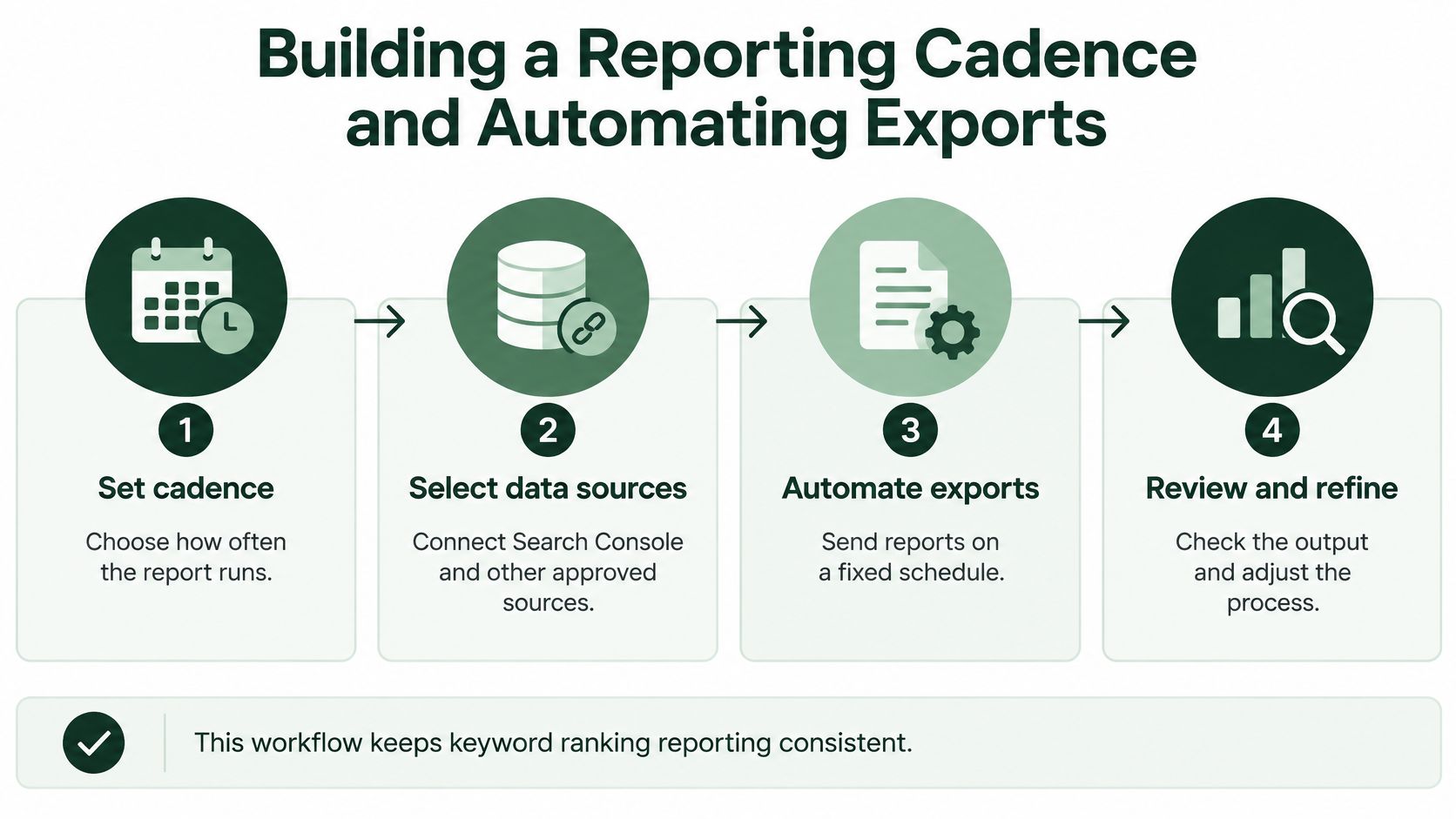
Rankings twitch daily. Most of those twitches are noise from location, device, and layout. A useful system runs on two clocks. Weekly is the operational check for the people doing the work. Monthly is the stakeholder review, with bands, annotations, and a short list of next actions. Daily pulls are reserved for a migration, a template launch, or a small set of revenue terms.
The pipeline, in order
Lock the keyword universe and the segments before you pull anything. Adding queries mid-month makes the comparison fiction. Then collect ranks under the same location, language, device, and time settings every cycle. A mobile rank in one city is not comparable to a desktop rank averaged across a country.
Join that panel to Search Console query and page data. Export keyword, URL, country, device, date, rank, search volume, impressions, clicks, and CTR. Normalize country, language, device, and SERP type so a mix shift cannot masquerade as a gain. Calculate rank change against a fixed baseline. Aggregate by intent cluster, using median rank and top-3 or top-10 coverage rather than a flat mean of every keyword.
Annotate before you send. Note algorithm updates, migrations, seasonality, and content releases on the date they happened. An unexplained drop invites a wrong task. A noted drop next to a template release invites the right one.
Delivery is a one-page summary plus the working export. The summary carries the bands, the URL flags, and three actions. The export is for the person who will do the work.
You can run this with a rank tracker, a Search Console export, and a sheet. The failure mode is drift. Someone changes the location setting, someone else averages CTR across keywords, and the monthly file no longer matches the weekly one. AutoSEO is one way to keep the loop in a single console. It tracks selected keywords, uses Search Console with a DataForSEO fallback, and sends weekly email digests that summarize changes and next actions. Confirm which export formats your plan includes before you build a downstream sheet that depends on them. A digest you cannot reconcile to the raw query export is a slide, not a system.
Check the output against the locked keyword list every month. Automation that silently drops a market will report a clean trend that never happened.
Designing Stakeholder Templates and White-Label Reports

The same numbers fail when the package doesn't match the reader. Three patterns show up in shops and agencies, and each trades something real.
Raw Search Console exports win on honesty and lose on repeatability. Setup is an afternoon. Every client file drifts, filters differ, and a founder will not read a 4,000-row sheet. Use the export as the audit trail, not as the meeting document.
General-purpose BI dashboards win on filters. A Looker Studio view can slice country and device without a new export. Setup is longer, consistency depends on whoever owns the connector, and non-specialists still need a narrator. A dashboard without a written baseline invites someone to change the date range until the chart looks kind.
An agency white-label workflow wins when several clients must see the same structure under their own brand. Setup cost sits in the template, then drops. Team seats matter once more than one person pulls the monthly file. The risk is polish that outruns the method. A branded PDF that leads with average position recreates the original problem in nicer type.
For a one-page template, use four blocks and stop.
- KPI summary: Median rank, share of terms in positions 1–3 and 4–10, impressions, clicks, and CTR, split brand and non-brand. No sitewide average on this page.
- Segment table: One row per intent cluster, with primary URL, observed URL, and the band change versus the locked baseline.
- Annotation log: Dated notes for releases, migrations, seasonality, and algorithm updates. Three lines beat a blank page.
- Next actions: At most three tasks, each tied to a cluster and a URL, not to "improve SEO."
Context that keeps a client from comparing the wrong markets
Semrush's 2025 review of AI Overviews found higher zero-click rates on keywords that displayed an AI Overview, while that rate had declined steadily since January. The pattern is not uniform, and Search Console still cannot separate AI Overview impressions and clicks from ordinary listings. Put the market, language, device, date range, and brand split on every figure, and label each figure observed, sampled, or modeled. A modeled visibility score from a rank tracker is not the same object as a Search Console click. Cross-country comparisons without that label are how agencies lose trust.
The walkthrough below shows one way teams turn a recurring export into a client-ready view without rebuilding the file by hand.
Interpreting Results Without Overstating Causes
A stable position 1 is not proof the page is healthy. A 2025 Pew Research Center analysis, covering roughly 70,000 Google searches from about 900 U.S. users, found traditional-result clicks in only 8% of searches that contained an AI Overview, versus 15% of searches without one. Clicks on links inside AI Overviews showed up in about 1% of searches. An Ahrefs analysis of 300,000 keywords, reported alongside that research, tied AI Overviews to a 34.5% lower average CTR for the top-ranking page in March 2025. These are correlations. They do not prove that any single rank caused or lost your revenue.

The commercial reading is uncomfortable. A page can hold position one and lose the click. A lower-ranking page cited in an AI answer can gain visibility with no conventional rank change at all. If your report only charts position, both events look like "no change" or, worse, like a win.
Three patterns, three jobs
- Ranking loss: The primary URL fell out of the band and impressions fell with it. Check indexation, internal links, and whether a competitor published a closer match. Do not start with a title-tag tweak.
- CTR collapse: Position and impressions held, clicks did not. Look for an AI Overview, a new SERP feature, or a title that no longer matches the query. Treat this as a listing and answer-engine problem, not as a rank-tracking failure.
- More citations, flat clicks: Answer engines mention the brand while Search Console clicks stay flat. Log the citation separately. Do not book it as organic traffic you did not receive.
Google's metric definitions keep impressions, clicks, CTR, and position distinct, and position remains an average rather than the rank one person saw. Recompute CTR as total clicks divided by total impressions. Averaging keyword-level CTR percentages gives a tiny query the same vote as a high-volume one.
Apply a minimum-volume screen before you call anything a win. Low-impression keywords are directional only. Wait for a real impression baseline before you declare a CTR or visibility change meaningful. Segment country, device, search type, brand intent, and landing page, or a mix shift will invent a gain. Label the row observed, sampled, or modeled, and say what you are not claiming. A rank did not cause revenue. It coincided with a set of clicks you can count.
Next Steps for Your First Keyword Ranking Report
You do not need a 2,000-keyword panel to start. You need a baseline you will not edit. The sequence below is the one that survives a first stakeholder meeting.
- Pick a small panel. Fifty to 150 terms is enough for a shop or a SaaS site. Include the queries that already earn impressions, plus the commercial terms you intend to win. Freeze the list.
- Tag intent and brand. Mark each term brand or non-brand, then informational, commercial, or transactional. This is the grouping you will refuse to average across.
- Map one primary URL. Write the intended page beside every cluster. That map is how you later tell a rank gain from a page swap.
- Set the two clocks. A weekly operational check for the practitioner. A monthly review for everyone else. Same location, language, and device every time.
- Draft the one-pager before the meeting. KPI summary, segment table, annotation log, three actions. If a figure is modeled, say so on the page.
- Connect Search Console and pull the baseline this week. Store the export. The next report is only meaningful against that file, not against a fresh average you calculate later.
Copy that list into the project tool and assign an owner to the baseline pull. The first monthly review should answer four questions only. Which clusters entered positions 1–3 or 4–10? Which primary URLs lost the impression to another page? Where did clicks fall while position held? Which three tasks follow from those rows?
Skip competitor theater and estimated-traffic columns until the baseline has been compared once. Those additions are useful later. They are how a first report becomes a second spreadsheet nobody trusts. When the second file matches the first on keyword set, device, and country, you have a reporting system. Until then you have a screenshot.
AutoSEO connects rank tracking, Search Console data, and weekly digests so a keyword ranking report can show position bands, page changes, and click loss in one workflow, including AI-visibility checks. If you want that cadence without maintaining the exports by hand, visit AutoSEO and run a baseline from the keywords you already have.