Your new website looks ready. The product pages are populated, the navigation works, and someone's asking whether you can launch today. But nobody has checked what happens when a smartphone crawler requests a category page, a product API fails, or JavaScript replaces the page's original metadata.
A useful new site SEO checklist should answer those questions before publication. Treat launch readiness like a software release: define acceptance criteria, test representative templates, assign owners, and keep evidence of what passed.
Table of Contents
Why Most New Sites Struggle After Launch
Consider a hypothetical storefront launch. The team approves the desktop design, tests a purchase, and publishes. Later, the owner searches for a product and can't find the page.
The dashboard says the deployment succeeded. That doesn't answer whether search engines can access useful content. A working checkout and a search-ready product template are different acceptance criteria.
A polished interface isn't a complete test
In this scenario, the product description appears after an API request. The mobile navigation omits category links. A staging directive remains in a shared template, while the sitemap lists URLs that redirect elsewhere.
These aren't cosmetic defects. They're reasons to investigate the deployment before rewriting copy or publishing more articles.
A launch review should separate the questions:
- Access: Can a crawler request the intended public page and its required resources?
- Content: Does the response expose something useful, rather than an empty application shell?
- Consistency: Do page directives, metadata, navigation, and mobile output agree?
- Evidence: Has someone tested the deployed version, rather than only approving a design preview?
Don't treat every warning as equally urgent. A missing description on a secondary article needs attention, but an indexability problem across product pages deserves the release team's attention first.
Assign responsibility before launch
SEO defects become harder to resolve when nobody owns the affected component. The content manager may control descriptions, while the developer controls rendering and the hosting team controls redirects.
Give each launch-blocking issue an owner, a reproduction method, and a retest condition. “Fix product SEO” isn't actionable. “Product descriptions disappear after the inventory request fails” is.
Launch principle: Approve the behavior you tested, not the appearance you expected.
Keep enhancements separate from blockers. Additional editorial content, richer supporting resources, and expanded keyword coverage can follow launch. Public pages that don't reliably expose their essential content need a decision before release.
The practical standard isn't perfection. It's a site whose important templates behave predictably, with remaining limitations documented and accepted.
Technical Setup Before You Publish
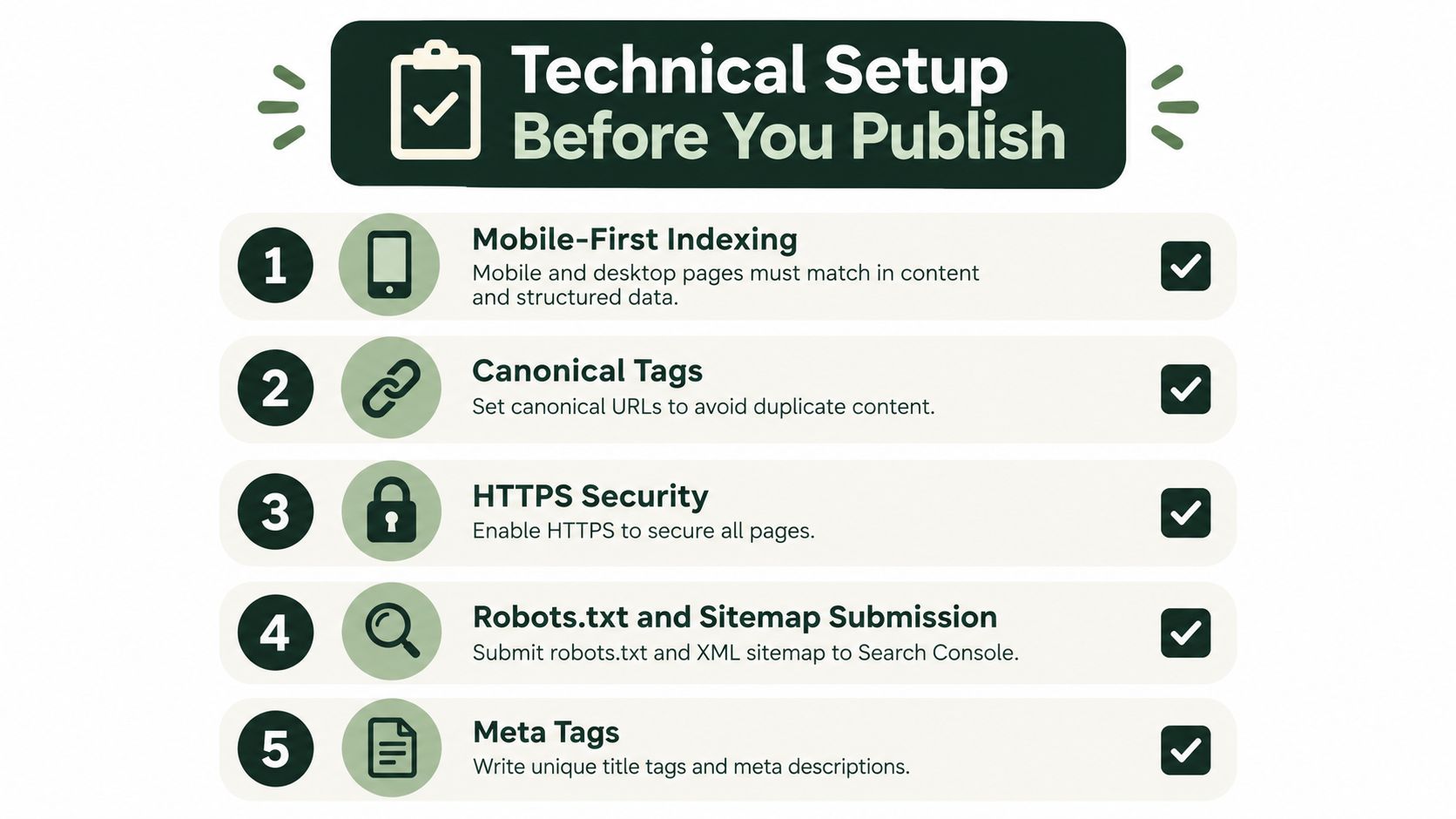
Start with the mobile experience, not a desktop crawl followed by a quick screen resize. Google uses the mobile version of content for indexing and ranking, so its mobile-first indexing guidance makes mobile content and technical parity a foundational launch check.
That means equivalent essential text, images, links, metadata, and structured data. Equivalent does not require identical layouts. A compact mobile design is fine; removing product information isn't.
Use this visual as a planning aid, then validate the actual deployment.
Verify the production response
Work through the technical checks in dependency order. There's little value in polishing a canonical tag on a page the crawler can't access.
- Smartphone access: Request representative pages with a smartphone crawler configuration. Investigate blocked resources and missing mobile content.
- Robots directives: Review robots.txt separately from page-level robots metadata. Compare mobile and desktop directives, especially accidental
noindex or nofollow differences.
- Status codes: Check valid pages, redirects, and deliberately nonexistent pages. Record whether each response matches the intended behavior.
- Canonical URLs: Confirm that templates reference the intended public URLs, not staging addresses or unrelated destinations.
- XML sitemap: Review the generated file against the pages you intend to make discoverable. Remove accidental staging references and reconcile conflicting destinations.
- Secure delivery: Test HTTPS across navigation, assets, and checkout paths. Don't approve only the homepage.
The infographic groups robots.txt and sitemap work together, but the operational tasks differ. Review robots.txt on the deployed site; submit the XML sitemap through Search Console. Don't treat robots.txt as a sitemap submission.
Test meaningful differences
For a storefront, compare a normal product with an unavailable product and a product containing optional content. Include category pages with pagination or filters, not just the simplest category.
On mobile, verify that names, prices, availability, images, eligible reviews, and category links remain accessible. Expandable sections need testing too. A tidy accordion doesn't excuse content that never reaches the page.
Keep the results in a release record with the URL, expected behavior, observed behavior, and owner. That record gives the team something more useful than a general statement that “technical SEO passed.”
A fast-looking homepage doesn't establish that the site performs well. Test the templates customers will use, including image-heavy categories, product variants, long articles, campaign landing pages, and checkout interactions.
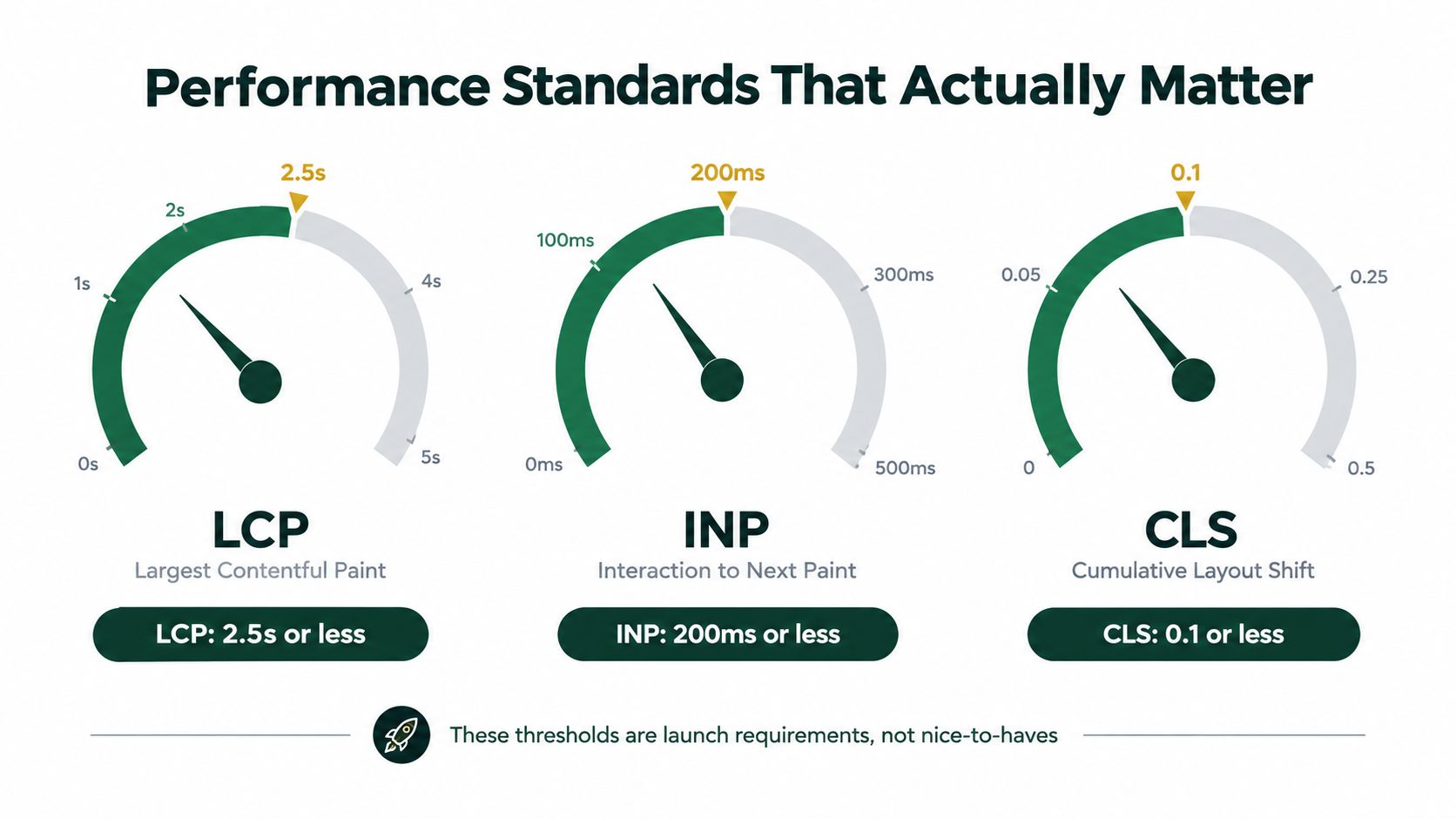
The performance targets are concrete: Google classifies LCP at 2.5 seconds or less, INP at 200 milliseconds or less, and CLS at 0.1 or less as good in its Core Web Vitals guidance.
The chart summarizes those targets for the release team.
Separate laboratory evidence from user evidence
Prelaunch testing is a diagnostic baseline, not proof of real-user performance. Record the device profile, network conditions, page state, and scripts included in each test. Otherwise, comparisons between builds can mislead the team.
Where field measurements are available, assess them at the 75th percentile, as described in the guidance linked above. Keep synthetic results clearly labeled instead of presenting a laboratory run as a field-data pass.
Search Console groups URLs using actual-user data and assigns a group's status according to its poorest-performing metric. That makes template-level investigation more useful than chasing a single homepage score.
| Test case |
What to investigate |
| Image-heavy category |
Oversized images and delayed primary content |
| Product with selectors |
Slow interaction handlers and third-party scripts |
| Article with embeds |
Layout movement as media loads |
| Campaign landing page |
Render-blocking resources and tracking scripts |
| Checkout journey |
Responsiveness during validation and updates |
Fix the component, then retest the journey
Match the fix to the observed problem. Compressing images won't resolve a delayed interaction handler. Removing unused JavaScript won't reserve space for an image whose dimensions are missing.
Start with oversized media, render-blocking resources, expensive third-party scripts, and unstable image or advertising containers. Test the production configuration, including consent controls and marketing integrations, rather than a stripped-down demonstration build.
Use the embedded video as supporting material alongside your own measurements.
A small team may need to defer an optional widget rather than rebuild the storefront. That's a reasonable trade-off when testing identifies the widget as the problem. Don't commission a broad performance rewrite without evidence connecting the work to a failing template or interaction.
On-Page Foundations for Every Template
Treat on-page SEO as a template specification with page-specific inputs. The specification defines what must exist. Editors supply accurate titles, descriptions, headings, content, and relevant links.
A template can pass while individual pages fail. A title field may exist but contain the same default everywhere. A product description component may work perfectly while the catalog still contains supplier placeholders.
Map intent before drafting
Start with the pages the business needs to explain its offering. Assign each a clear purpose: help someone choose a category, evaluate a product, understand a service, or solve a related problem.
Prioritize by relevance, intent, and feasibility, not an attractive keyword alone. A specialist buying guide may be a more manageable launch asset than a broad industry guide that the team can't make useful.
For each planned page, document:
- Reader need: What decision or task brought someone to this page?
- Required substance: What must they understand before taking the next step?
- Supporting evidence: Which specifications, examples, policies, or genuine experience can you provide?
- Next destination: Where should someone go if they need a related product, deeper explanation, or contact option?
Don't publish an empty section merely because the navigation includes it. A smaller, complete launch is preferable to a broad structure filled with promises of future content.
For a hypothetical outdoor retailer, a category title could be Waterproof Hiking Jackets | Brand. A product title could use the actual model and product type. Neither needs a string of loosely related keywords.
A category description might read: Compare waterproof hiking jackets by fit, fabric, and intended conditions. Explore the range and check individual product specifications. That's proposed copy, not a claim about a real store.
Review metadata coverage across both experiences, but don't mistake field presence for editorial quality.
Metadata Coverage Across the Web
| Element |
Desktop |
Mobile |
| Title tag |
Check presence and page-specific wording |
Confirm equivalent wording survives rendering |
| Meta description |
Check completeness and relevance |
Confirm the intended description remains present |
Use a descriptive main heading and useful subheadings. On a service page, headings such as What the service includes, Who it's for, and How delivery works are more informative than repeated variations of the target phrase.
Metadata should describe the page you're shipping, not the page you hope to build later.
Audit fallback behavior as well. What happens when an editor leaves a field empty? A sensible template default may help, but it shouldn't become identical copy across unrelated pages.
Connect content and structured data
Plan structured data alongside the content model. If you choose JSON-LD, generate it from the same maintained information used by the visible page rather than creating a disconnected copy.
For mobile parity, Google's guidance cited earlier prioritizes Breadcrumb, Product, and VideoObject when resources are limited. Apply relevant markup to the appropriate templates. Don't add Product markup to an editorial page merely because it discusses products.
Check that structured information agrees with visible content:
- Breadcrumbs: Match the intended navigation hierarchy.
- Products: Reflect the product information presented.
- Videos: Describe the video that users can access on the page.
- Optional fields: Handle missing values without publishing placeholders or invented details.
Don't present schema as a guarantee of rankings, rich results, or citations in AI answers. Keep AI-search preparation grounded in accessible, useful content and reliable technical output, rather than promises about a particular markup format.
Build links into the publishing workflow
Give important pages a deliberate place in navigation and relevant surrounding content. A jacket-care article could point to the jacket category, while the category could offer the care guide as practical support.
Use descriptive anchors that identify the destination. Don't insert a commercial link into every paragraph, and don't rely exclusively on a sitemap as the site's navigation plan.
Before publication, crawl the site and review the actual linking paths. Ask whether a visitor can move from a broad topic to the appropriate detail page without guessing. Fix missing relationships in the template or publishing process so editors don't have to rediscover the same problem with every new page.
Analytics and Monitoring Setup
Set up measurement before publication, then test it on the deployed site. An analytics installation isn't complete because a tag appears in the source code. You need to know which actions it records and whether those records represent genuine activity.
Keep search visibility and visitor behavior separate. A page can receive search impressions without attracting visits, and a visit can occur without producing a useful business outcome.
Use a compact measurement stack with explicit responsibilities. More dashboards won't resolve unclear definitions.
| Tool or record |
Operational purpose |
| Google Search Console |
Review indexing, search queries, and search performance |
| Google Analytics |
Examine acquisition, landing pages, and configured actions |
| Rank tracker |
Follow selected queries in defined markets and devices |
| Release log |
Connect observed changes with deployments and edits |
Verify Search Console ownership, submit the sitemap, and confirm that the team responsible for maintenance has access. Don't leave the only working account with a departing contractor.
Configure analytics around real business actions. For e-commerce, that may include purchases; for a service business, completed inquiries. Test the full journey and check for duplicate events, especially when an application changes pages without a conventional reload.
Make reporting lead to action
Create a launch baseline containing the published page inventory, deployment date, analytics configuration, and selected priority queries. Keep internal testing identifiable so the team doesn't mistake its own activity for customer demand.
- Weekly digest: Summarize indexing changes, landing-page signals, and unresolved technical tasks.
- Issue alerts: Route crawl failures, unexpected directive changes, and broken destinations to an accountable owner.
- Deployment annotation: Record changes to navigation, templates, scripts, and publishing rules.
- Resolution evidence: Attach the affected URL and a successful retest to completed tasks.
Avoid reporting only sitewide traffic. Review important landing pages and template groups so a healthy blog doesn't distract from a broken product section.
Sparse early data calls for restraint. Don't rewrite a page after an isolated ranking movement or declare a channel successful because someone tested a form. Establish that collection works, then interpret the evidence in the context of what changed.
Testing JavaScript Rendering Like a Release Engineer
“Google can render JavaScript” isn't a release acceptance test. It doesn't establish that your implementation preserves content, links, and directives when dependencies fail.
Google states that pages must be accessible to Googlebot, return a successful HTTP status, and contain indexable content. Its guidance on succeeding in AI search also warns that meeting technical requirements doesn't guarantee crawling, indexing, or serving.
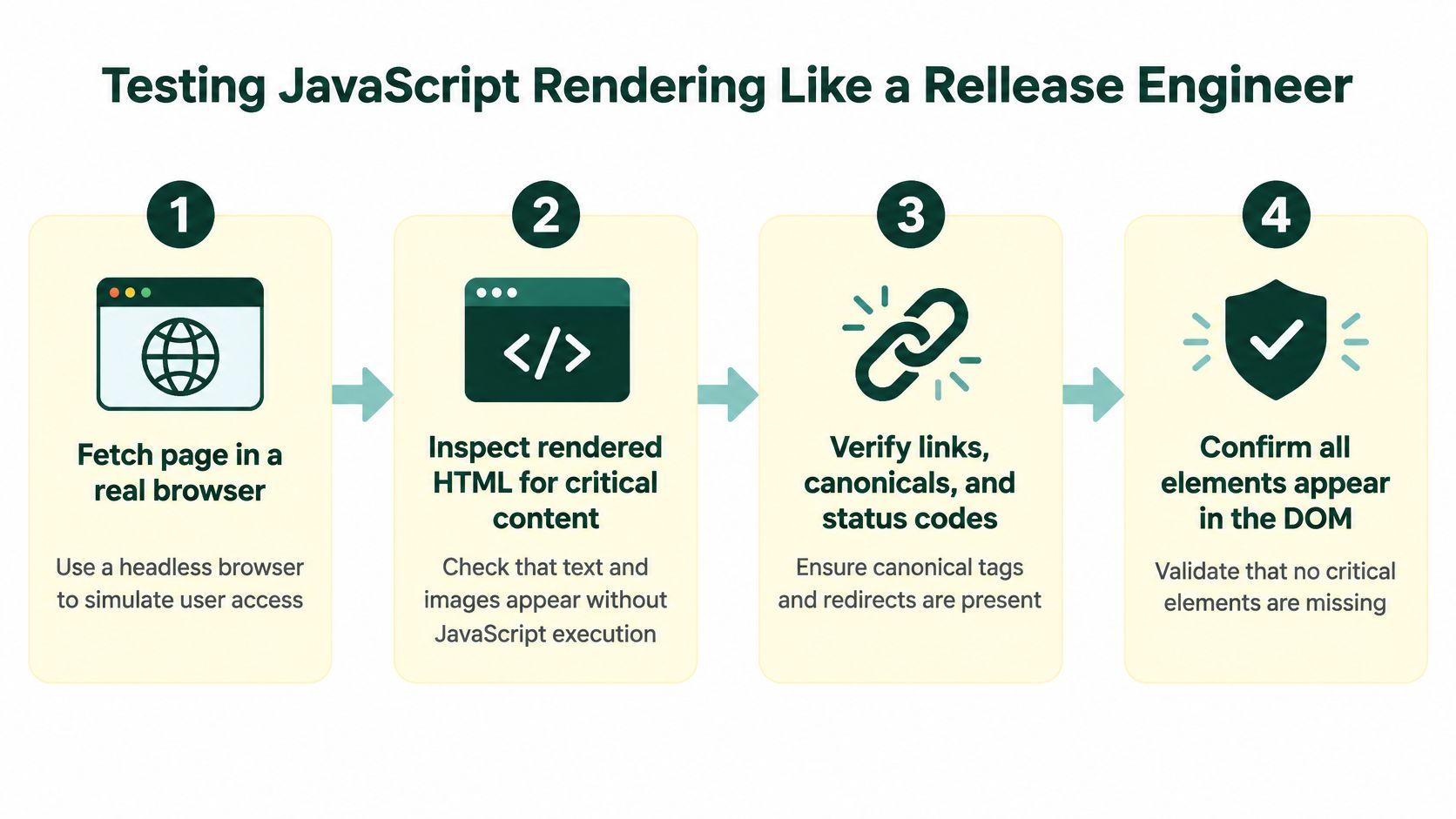
Use a repeatable rendering workflow rather than a browser spot-check.
Compare source and rendered output separately
The infographic combines browser rendering with source checks. Keep those as distinct tests: inspect the initial response without JavaScript, then execute JavaScript and inspect the resulting DOM. Content appearing in the rendered DOM doesn't prove it existed in the original HTML.
For a headless Shopify storefront, React application, or custom site, save both outputs for representative URLs. Compare:
- Essential content: Product descriptions, category copy, article text, and availability.
- Navigation: Real destinations that remain available after hydration.
- Head elements: Titles, descriptions, canonicals, and robots directives.
- Failure states: Missing products, failed requests, and unavailable dependencies.
The useful question is what changed, not merely whether rendering completed.
Test conditions that expose defects
Throttle or fail the content API. Open a product directly rather than navigating from the homepage. Test mobile output and inspect whether essential content depends on a click.
Look for soft-404 shells: pages that appear to load successfully but display an empty template or missing-content message. Also check whether hydration replaces correct server output with incomplete client state.
Acceptance test: A successful render must preserve the intended content and directives, not merely finish without a visible crash.
Use Search Console URL Inspection on representative public URLs to investigate Google's observed output. Keep failures reproducible with the URL, build, request conditions, and expected result. Then add a regression test at the shared component level instead of patching individual pages indefinitely.
Post-Launch Monitoring in the First 30 Days
Keep the release checklist open after publication. The production environment, real visits, and subsequent deployments create conditions that a staging review can't fully reproduce.
The first month should produce a clear operational picture: which important pages are available, what Google has observed, whether users encounter performance problems, and which defects need an owner. It shouldn't become a daily exercise in reacting to every ranking movement.
Investigate patterns before isolated URLs
Review Search Console for unexpected indexing outcomes and inspect affected examples. If several product pages share a problem, investigate the product template and its dependencies before treating each URL as unrelated.
Use a response process tied to evidence:
- Important page not indexed: Inspect its availability, content, directives, canonical choice, and internal linking. Don't assume resubmission alone resolves the cause.
- Performance deterioration: Compare affected templates with recent changes to media, applications, consent tools, and tracking scripts.
- Structured-data errors: Trace the error to the shared schema generator or source field, then validate other affected pages.
- Crawl anomalies: Review server behavior, redirects, and deployment records before making broad changes.
Where field performance data is available, compare it with the prelaunch baseline without treating the measurements as interchangeable. If real-user evidence isn't available yet, retain that limitation in reporting.
Keep observation separate from intervention
Review priority queries and landing pages together. A ranking change matters more when it helps explain a broader pattern, not when it appears alone in a tracker.
Competitor reviews can inform the content backlog. Note useful comparisons, clearer product explanations, or unanswered customer questions. Don't copy a competitor's structure without checking whether it serves your audience.
For AI-visibility checks, record the prompt, date, market, cited pages, and observed answer. Treat those observations as directional evidence, not a guaranteed diagnosis of why a site was included or omitted.
Finish the launch period with a prioritized backlog. Put unresolved access and rendering defects ahead of optional content expansion, and require retesting after fixes. The lasting benefit of a new site SEO checklist is a repeatable release process, not a completed spreadsheet.
AutoSEO offers technical audits with a prioritized task queue, alongside keyword research, content publishing, and visibility measurement. Visit AutoSEO to connect launch checks with an ongoing workflow for assigning fixes, publishing approved updates, and monitoring outcomes.