Your product pages are getting impressions, but clicks are weak. The shoppers who do arrive still have to hunt for sizing, delivery details, or the difference between nearly identical variants. You've edited the titles and added keywords, yet the underlying buying experience hasn't changed.
Effective SEO for ecommerce product pages starts with harder operational decisions: which URLs deserve to exist, which product facts shoppers need immediately, and how to publish changes without spreading mistakes across the catalog. Better metadata helps, but it can't compensate for an unclear product or an unreliable publishing process.
Table of Contents
Why Product Page SEO Matters More Than Ever
A product page can attract the right visitor and still fail commercially. A shopper lands on the correct item, selects a color, then discovers that the photograph, availability message, and delivery estimate don't clearly describe that selection. Another title rewrite won't resolve that uncertainty.
Treat discoverability and usability as one program, while measuring them separately. Search impressions tell you whether people encounter your pages. Clicks tell you whether the result looks relevant. Add-to-cart and purchase behavior help you evaluate what happens after arrival.

The usability gap is substantial: Baymard's benchmark found that only 48% of desktop sites and 38% of mobile sites achieved a decent-or-better product-page experience, based on more than 30,000 manually reviewed usability scores, according to its research on ecommerce product-page UX.
That's a reason to audit mobile independently, not merely shrink the desktop layout. Open a product page on a phone and try to answer a purchase question without relying on your knowledge of the catalog. If essential information sits behind an ambiguous accordion label, treat that as a practical problem to investigate.
Start with a representative page from each product template. Follow the shopper's actual decision rather than checking whether the page contains enough text.
- Identity: Can someone immediately identify the product and selected variant?
- Purchase conditions: Are price, stock status, delivery information, and returns easy to locate?
- Suitability: Can shoppers find dimensions, materials, compatibility, and relevant limitations?
- Evidence: Are photographs, specifications, and applicable reviews accessible without excessive promotional content?
Practical rule: If shoppers need customer support to uncover a basic product fact, add that fact to the page before expanding the sales copy.
Separate page-specific gaps from template-level defects. A missing material field affects an individual product record. A specification block that disappears on mobile requires a template fix, followed by checks across affected products.
Prioritize work by the decision it improves. Correcting contradictory availability deserves attention before polishing a decorative headline. Establish a baseline by template and device, then evaluate search visibility and buying behavior together rather than declaring success from rankings alone.
Start with the product's identity, not a list of keywords. The title should distinguish the item from neighboring products and make sense outside your storefront.
The following examples are illustrative copy patterns, not claims about an actual product. Replace every attribute with verified catalog information before publishing.
| Element |
Weak version |
More useful version |
| Search title |
Premium Everyday Collection |
Canvas Tote Bag with Zip Closure | Brand |
| Product heading |
Your New Favorite Carryall |
Zip-Top Canvas Tote Bag |
| Meta description |
Shop amazing bags at amazing prices. |
Explore the zip-top canvas tote. Check dimensions, available colors, delivery options, and returns. |
| Opening description |
Designed to elevate every moment. |
A canvas tote with a zip closure and an internal pocket. Review the dimensions below to check whether it fits your everyday essentials. |
Front-load the product name or product type, then add the attribute that distinguishes the item. Don't append every synonym you found during keyword research. If an attribute doesn't describe the selected product, it doesn't belong in the title.
Write for clarity before length
Use title and description previews as editorial checks rather than chasing a universal character limit. Put essential meaning early, remove repeated wording, and check whether the result still makes sense if the ending isn't visible.
For meta descriptions, write a concise invitation to inspect the product. Avoid fixed delivery promises, prices, or promotional conditions unless your publishing process can keep them current. A modest, accurate description is more useful than an attractive promise the storefront can't honor.
Variant titles need deliberate handling. Where a variant has an independently indexable page, identify its meaningful distinguishing attribute. Where variants remain selections on a shared page, don't generate separate search titles merely because the inventory system stores separate SKUs.
Build product copy around questions a shopper must resolve. Describe what the item is, what it does, who it suits, and where its limitations matter.
Use ordinary, crawlable text for specifications rather than embedding essential details only in graphics. Keep concise positioning copy near the purchase area, with a clearly labeled specification table and deeper explanation where needed. Length should follow the product's complexity, not an arbitrary word target.
Before approving the template, check:
- Distinct identity: The title and heading identify the actual item.
- Supported benefits: Each benefit follows from a verified attribute.
- Visible specifications: Essential details aren't buried beneath campaign messaging.
- Useful distinctions: Copy explains meaningful differences from similar products.
- Maintainable promises: Shipping, stock, and promotional wording have an owner responsible for updates.
The strongest edit is often subtraction. Remove language that sounds persuasive but adds no information, then use the space to answer a real purchase question.
Implementing Product Structured Data the Right Way
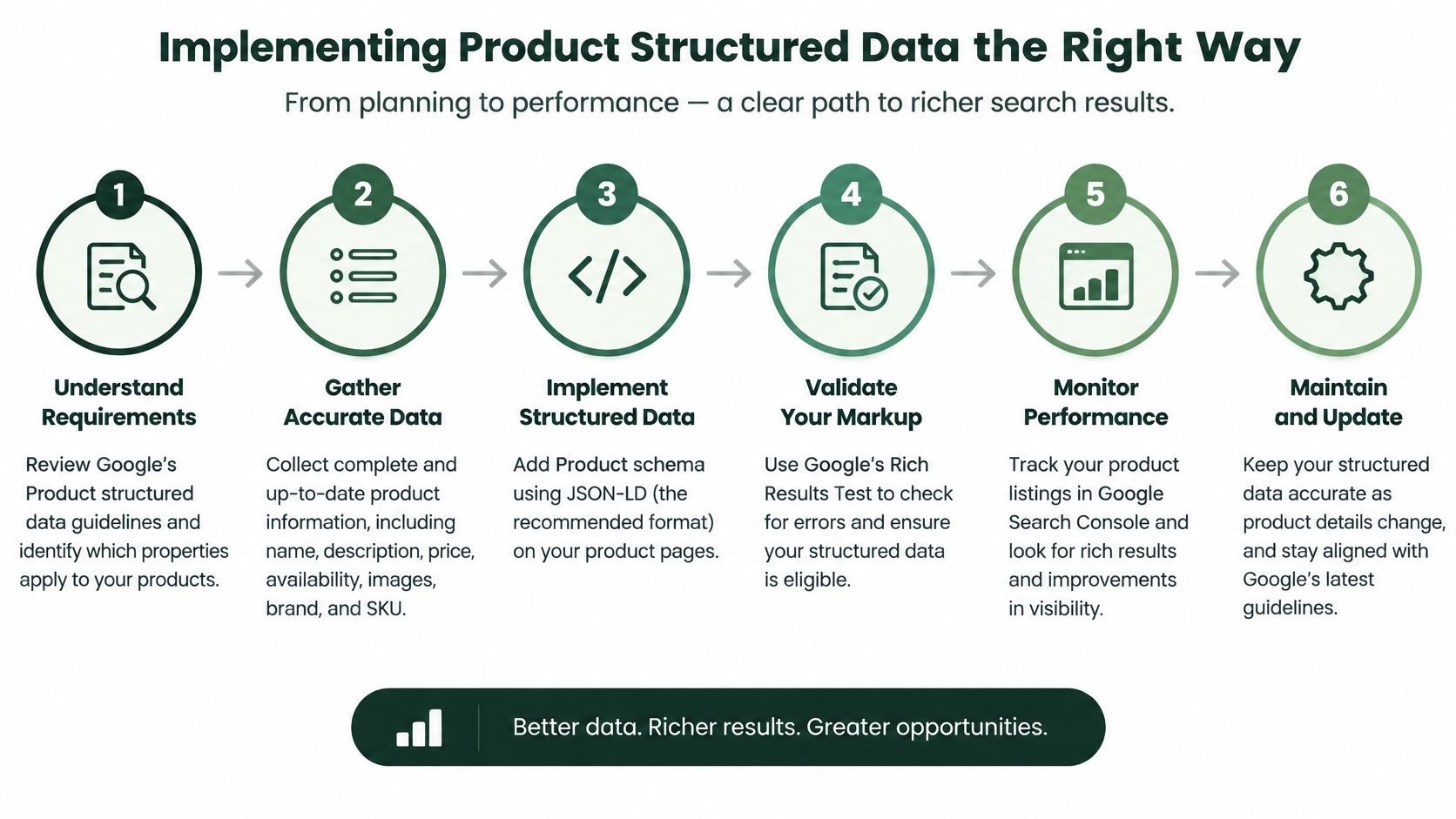
Product structured data is a deployment workflow, not a code snippet to install and forget. Begin by deciding what kind of page you're describing, then validate the relationship between the page, its markup, and the underlying product record.
Google's Product structured data documentation distinguishes purchasable merchant listings from non-transactional product snippets, recommends combining on-page markup with a Merchant Center feed to maximize eligibility and validate information across Search, Images, and Lens, and makes clear that eligibility doesn't guarantee rich-result display.
Establish the page's commercial purpose
A page where shoppers can purchase the item needs a different implementation from an editorial page discussing a product. Make that classification before selecting fields or copying markup from another template.
For a purchasable product, map accurate, applicable information from your catalog into the markup: product identity, price, availability, reviews or aggregate rating, shipping, and return-policy details. Don't manufacture review objects to make a validation report look more complete.
Keep the visible page and machine-readable data tied to the same underlying records wherever possible. If separate teams maintain the storefront price, feed price, and schema price independently, resolving discrepancies becomes an ongoing operational task.
Validate a representative deployment
Use a small release that deliberately includes different product conditions. Include straightforward products alongside variants, unavailable items, and products with and without reviews.
A workable release sequence is:
- Inspect the output. Compare the rendered product information with the structured data, especially the selected variant and its offer.
- Run Google's Rich Results Test. Record errors and warnings by template so developers can fix the underlying generation logic.
- Check URL Inspection. Confirm that Google can access and render the deployed page.
- Verify access conditions. Check for robots.txt restrictions, noindex directives, authentication barriers, and rendering failures before requesting recrawling.
- Approve wider deployment. Expand only after the representative pages pass both technical validation and a human accuracy review.
A passing test isn't the same as a complete quality check. Validation may establish that the markup has an acceptable structure, while a human comparison reveals that it describes the wrong color or an outdated offer.
Treat a successful schema test as permission to continue checking, not proof that the product information is correct.
After deployment, assign ownership for price and availability drift, missing offers, invalid review objects, variant mismatches, and discontinued products. Run checks when catalog records change, not only when someone edits the theme.
Maintain a release log linking template changes to affected URLs and test results. That makes regressions easier to trace when a theme update, review integration, or inventory connection changes the generated markup.
Canonicalization and Variant Indexing Decisions
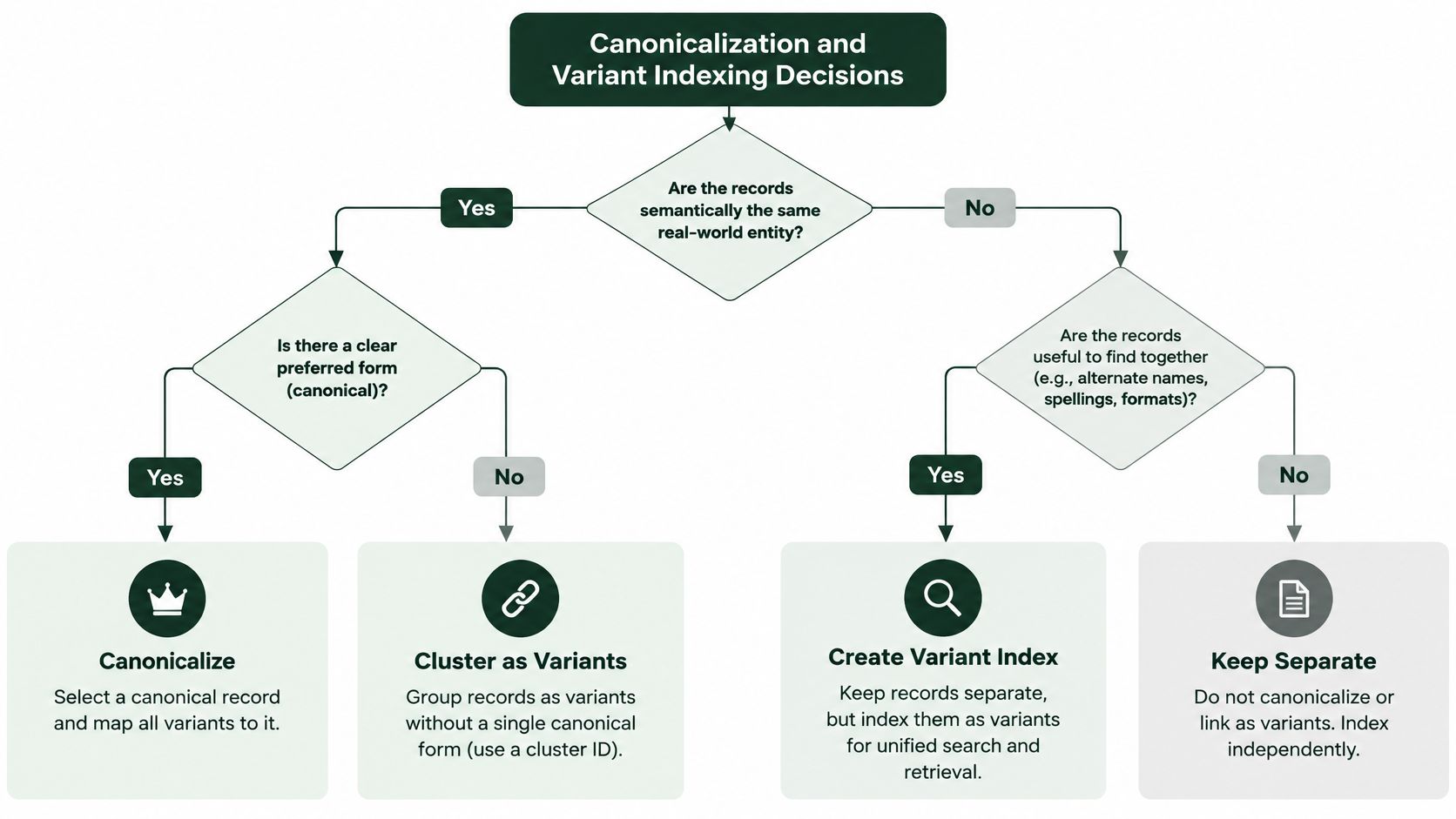
A separate SKU isn't automatically a separate search landing page. Inventory teams need distinct records for operational reasons. Search visitors need distinct pages only when those pages provide a meaningful difference.
Treat variant indexing as an information-architecture decision before treating it as a schema task. Otherwise, you risk building many URLs that differ in a selector but offer little independent value.
Decide whether the variant deserves a landing page
My recommended threshold is independent search demand plus materially different user value. Demand alone doesn't justify a page that gives visitors no useful distinction. Unique photographs alone don't establish that people need a separate search result.
| Situation |
Recommended starting position |
| A color changes appearance but not suitability, with no distinct demand |
Keep it as a selectable state on the parent page |
| A material changes care requirements and intended use, with relevant demand |
Consider an independently indexable variant |
| A model changes compatibility and serves a distinct purchase intent |
Evaluate a dedicated landing page |
| A size changes only the selected inventory record |
Avoid creating an indexable page by default |
| A variant URL contains almost no independently useful information |
Consolidate rather than expand |
These are decision criteria, not universal rules. Compare query demand, existing impressions, inventory continuity, images, and substantive product differences before committing to an indexing policy.
The trade-off is straightforward: separate pages offer more precise landing experiences, but they also require distinct content, maintenance, and consistent URL handling. Consolidation is often the more manageable choice when the differences are minor.
Keep relationships separate from indexing policy
Google recommends ProductGroup with variesBy, hasVariant, and productGroupID to explain variant relationships, and that markup can support eligibility for variant information in merchant listings, as described in its product variant documentation.
That relationship markup doesn't replace your URL decisions. Keep the variant data complete even when you choose not to give every selection an independently indexable page.
For implementation, define an intended canonical URL for each product family or independent variant. Place the canonical declaration in the document head through a controlled template or SEO configuration, then inspect the generated output rather than trusting the settings screen.
Check that category links, variant links, and sitemap entries follow the intended policy. Investigate alternate URLs created by collection paths, tracking parameters, or inconsistent linking before generating more product pages.
Indexing test: Would someone arriving directly on this variant understand why it deserves its own page?
If the answer is no, improve the shared product experience instead of writing near-identical descriptions for every SKU.
Technical SEO for Product Pages
Technical work should begin with a basic acceptance test: can a visitor reach the intended product, and can Google access the same essential information? Use the access and rendering checks established during schema validation as the release gate for template changes.
Then inspect the parts of the shopping experience most likely to introduce unnecessary complexity: galleries, recommendations, navigation, and product-list loading.
Make images useful without making pages cumbersome
Keep product images detailed enough to support inspection, but avoid delivering oversized files when a smaller display asset will do. Test compression on products where texture, color, or fine detail affects the buying decision.
Write descriptive alt text that explains what the image shows, such as “olive canvas tote showing zip closure and internal pocket.” Don't turn every image description into the same keyword list.
- Primary image: Make the main product image available without waiting for a shopper to scroll or interact.
- Secondary gallery: Consider lazy-loading less urgent images, then test that they still appear reliably.
- Layout stability: Reserve image space so the purchase controls don't shift as assets load.
- Image-only details: Repeat essential measurements and compatibility information in text.
Review Core Web Vitals alongside actual mobile interactions. During performance testing, isolate the effect of review widgets, personalization scripts, video embeds, and promotional overlays rather than assuming the gallery causes every slowdown.
A fast initial screen isn't enough if the variant selector becomes unresponsive when someone tries to buy.
Preserve clear routes through the catalog
Build internal links around useful shopping relationships. Link category listings to the intended product URLs, and use related-product modules for genuine alternatives or complementary items rather than arbitrary catalog exposure.
Prefer descriptive anchors such as “compatible replacement filter” over vague labels where context allows. Review products that receive no meaningful internal links and decide whether to connect, consolidate, or retire them.
For pagination and load-more experiences, test whether shoppers and crawlers can reach products beyond the initially displayed set. Don't make a scroll gesture the only route to later products. Provide accessible page URLs and navigation, then assess canonical handling according to what each page contains rather than treating every later page as a duplicate.
Assign each fix to a reusable component: image delivery, gallery behavior, category navigation, recommendation links, or pagination. Retest those components after theme and app updates so improvements remain part of the publishing system.
Preparing Product Pages for AI Search Engines
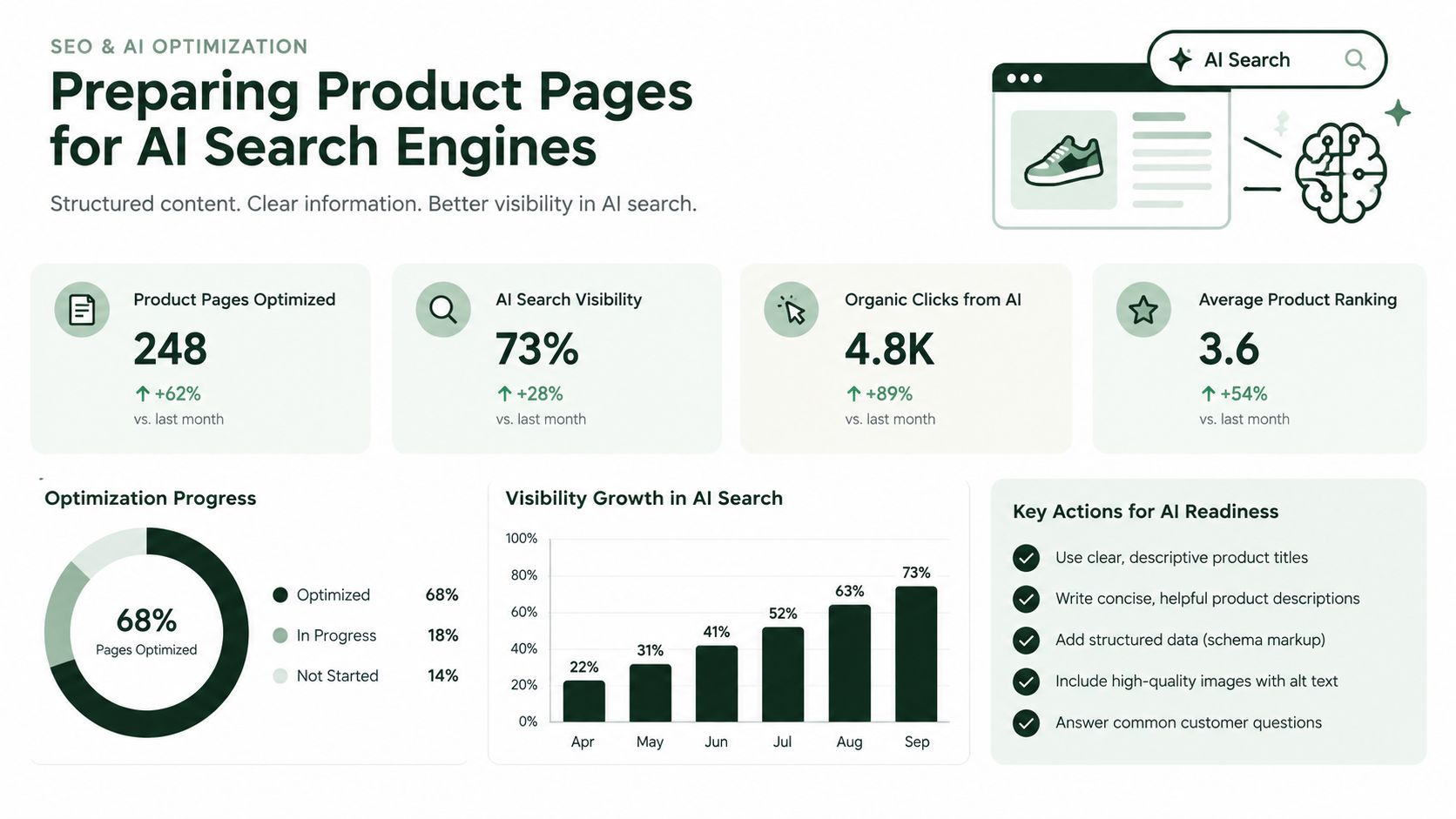
AI search deserves measurement, but it doesn't justify another layer of vague marketing copy. The useful question is whether your page contains reliable facts that could support a product recommendation.
A reported analysis found AI Overviews on 14.0% of more than 20.9 million shopping keywords, up from 2.1% in November 2025, while a separate monitored dataset recorded ecommerce presence rising from 14.4% to 20.7% in 23 days; the datasets differ and shouldn't be combined into a single trend line, as the report on AI Overviews and shopping queries explains.
Publish evidence that supports a decision
Treat extractable product evidence as the editorial objective, not a promise of citations. A concise compatibility statement is more useful than calling an item versatile without explaining its limits.
Add direct answers to questions such as who the product suits, what it fits, what it won't work with, and which alternative addresses a different requirement. Use verified specifications and independently verifiable reviews where available. Apply the purchase-condition and schema standards already established rather than creating a separate version of the product truth for AI.
Keep evaluation content distinct from the product's commercial record:
- Direct product intent: Make the product page authoritative about the specific item.
- Comparison intent: Use comparison content to explain meaningful trade-offs between alternatives.
- Selection intent: Use category guides to help shoppers choose among product types.
Track citations without overclaiming causation
Monitor a defined set of queries grouped by intent. Record the answer engine, query wording, observation date, cited URLs, and whether the cited material supports the answer.
When a product page isn't cited, investigate missing evidence before adding more prose. Convert a factual gap into a page-edit task, validate the relevant markup, and observe subsequent results.
A citation change alone doesn't prove that an edit caused it. Keep the query set consistent, retain unchanged comparison pages where practical, and assess AI visibility separately from organic clicks and purchases.
Publishing Optimized Pages on Shopify, WooCommerce, and Wix
Publish through the layer that owns each field. Before editing, identify whether the product record, theme, SEO configuration, or an installed integration controls the output. Otherwise, teams can overwrite one another's changes without noticing.
Choose a clear owner for each output
| Platform |
Practical publishing approach |
Check before release |
| Shopify |
Update product information and search-listing fields, then inspect theme or app-generated markup |
Confirm which component controls canonical tags, redirects, and Product data |
| WooCommerce |
Coordinate product edits with the WordPress SEO plugin and any schema extension |
Check for overlapping markup generators and unintended permalink changes |
| Wix |
Review product content alongside SEO settings and structured-data configuration |
Inspect the published canonical URL and rendered product information |
Don't install another schema tool until you've inspected what the site already generates. When outputs conflict, assign responsibility rather than adding another layer.
For Shopify, keep product-copy edits separate from theme-level changes in the release record. For WooCommerce, review plugin interactions before changing schema or URL configuration. For Wix, verify the published page after saving settings rather than assuming the editor preview represents every output.
Publish as a controlled experiment
Use an approval queue that includes the affected templates, proposed changes, validation results, and rollback instructions. Release to a representative group while retaining comparable unchanged pages.
Compare organic impressions, clicks, add-to-cart rate, and conversion by template and device. Note promotions, stock changes, and unusual demand alongside the results so you don't credit an SEO edit for an unrelated sales movement.
Scale the changes that improve the intended outcome without creating accuracy or usability problems.
AutoSEO connects keyword research, technical audits, content production, publishing, and measurement in an approval-first workflow, with AI-visibility monitoring included. Visit AutoSEO to turn product-page gaps into a prioritized task queue and track what changes after publication.