You publish a deployment and organic traffic disappears. The homepage still loads in a browser, paid campaigns keep running, and your CMS shows no obvious error. Then someone checks /robots.txt and finds a single Disallow: / line left over from staging. That small text file has just told compliant crawlers to stop visiting the entire site.
A reliable robots.txt file example is less about filling a template and more about matching crawl rules to the site's architecture, search strategy, and bot policy. The file controls crawling, not security, and a careless rule can block product pages, JavaScript assets, images, or an entire production domain. The guidance below focuses on practical templates, precise directives, AI crawler management, and a publishing workflow that catches mistakes before they reach Google.
Table of Contents
What a Robots.txt File Is and Where It Lives
A robots.txt file is a plain-text, UTF-8 document that gives crawl instructions to compliant web robots. The convention began in July 1994, when Dutch software developer Martijn Koster proposed a simple exclusion file, and it later became formalized in RFC 9309 in 2022. Zyte's overview of robots.txt reports that 75.8% of the world's 11,100 most popular landing pages publish one, which illustrates how a lightweight convention became common web infrastructure.
The location is essential:
`
The filename is lowercase, the file sits at the root of the domain or subdomain, and it isn't placed in /seo/, /public/, or another subdirectory. Google's robots.txt documentation describes the file as a plain-text document made of rule groups, with each group beginning with a User-agent line. RFC 9309 defines the location as scheme:[//authority]/robots.txt, along with formal handling for errors and caching.
What the file can and cannot do
A rule such as this asks a compliant crawler not to request URLs under the site root:
Disallow: /
It doesn't remove URLs from search results, prevent a user from opening a page, or protect passwords and customer data. Use authentication, authorization, or server-level access controls for sensitive resources. Use a page-level noindex instruction through a meta robots tag or X-Robots-Tag when the requirement is to keep an accessible URL out of an index.
Google documents a 500 KiB size limit, so content beyond that boundary may not be processed. Paths are also case-sensitive in practice, especially on Linux-based servers. /Admin/ and /admin/ can be different paths, while a missing leading slash can make a rule ineffective.
Why deployment checks matter
Search engines fetch robots.txt independently from ordinary page requests and may cache the result. A typo at the root can therefore affect the crawler's view of the whole site before anyone notices a page-level problem. Compliant crawlers select the most specific applicable user-agent group, then apply the longest matching path within that group.
Practical rule: Treat robots.txt like production code. Review it, diff it, test it, and deploy it with the same care as routing or redirect logic.
Core Directives Explained with Minimal Examples
Keep each directive isolated while learning. Combining unrelated rules in a test file makes it difficult to tell which instruction caused the result.
User-agent
User-agent identifies the crawler group. An asterisk targets every crawler that follows the protocol. A named token targets one crawler or bot family.
User-agent: *
User-agent: Googlebot-Image
Google's documentation describes each robots.txt group as starting with User-agent, followed by Allow or Disallow rules. If you're generating a file rather than writing it manually, this robots.txt file generator can help create a correctly structured starting point, but review every path before publishing.
Disallow
Disallow tells the matched crawler not to fetch a path. An empty value means nothing is blocked.
User-agent: *
Disallow:
A slash blocks the entire site for that group:
User-agent: *
Disallow: /
A directory path applies to URLs beginning with that path, so choose the spelling and trailing slash carefully.
User-agent: *
Disallow: /private/
Allow
Allow reopens a more specific path inside a blocked area. Use it when a broad rule is necessary but one child resource must remain crawlable.
User-agent: *
Disallow: /media/
Allow: /media/logo.svg
The crawler evaluates matching specificity, not just the last line in the file. Don't assume moving Allow below or above Disallow will fix an overly broad rule.
Sitemap
Sitemap points crawlers to an XML sitemap and isn't tied to a user-agent group.
Sitemap:
Use an absolute, publicly reachable URL.
Crawl-delay
Crawl-delay asks some crawlers to wait between requests.
User-agent: Bingbot
Crawl-delay: 5
Google doesn't honor this directive. If Googlebot is placing too much load on a server, use Google's crawl controls and server monitoring rather than assuming this line changes Google's behavior.
Request-rate and Visit-time
These less common directives appear in some crawler ecosystems:
User-agent: Bingbot
Request-rate: 1/10
User-agent: Yandex
Visit-time: 0600-1800
Support varies by crawler, so test against the bot's current documentation before relying on either rule.
Noindex
Noindex appeared in older unofficial robots.txt examples, but Google retired support for it. Don't use it as a substitute for a meta robots directive or X-Robots-Tag.
Two syntax rules cause a disproportionate number of failures. Paths need a leading slash, and the longest matching path wins, so /shop/ and /shop/sale/ don't have equivalent scope.
Full Robots.txt File Example for a Public Production Site
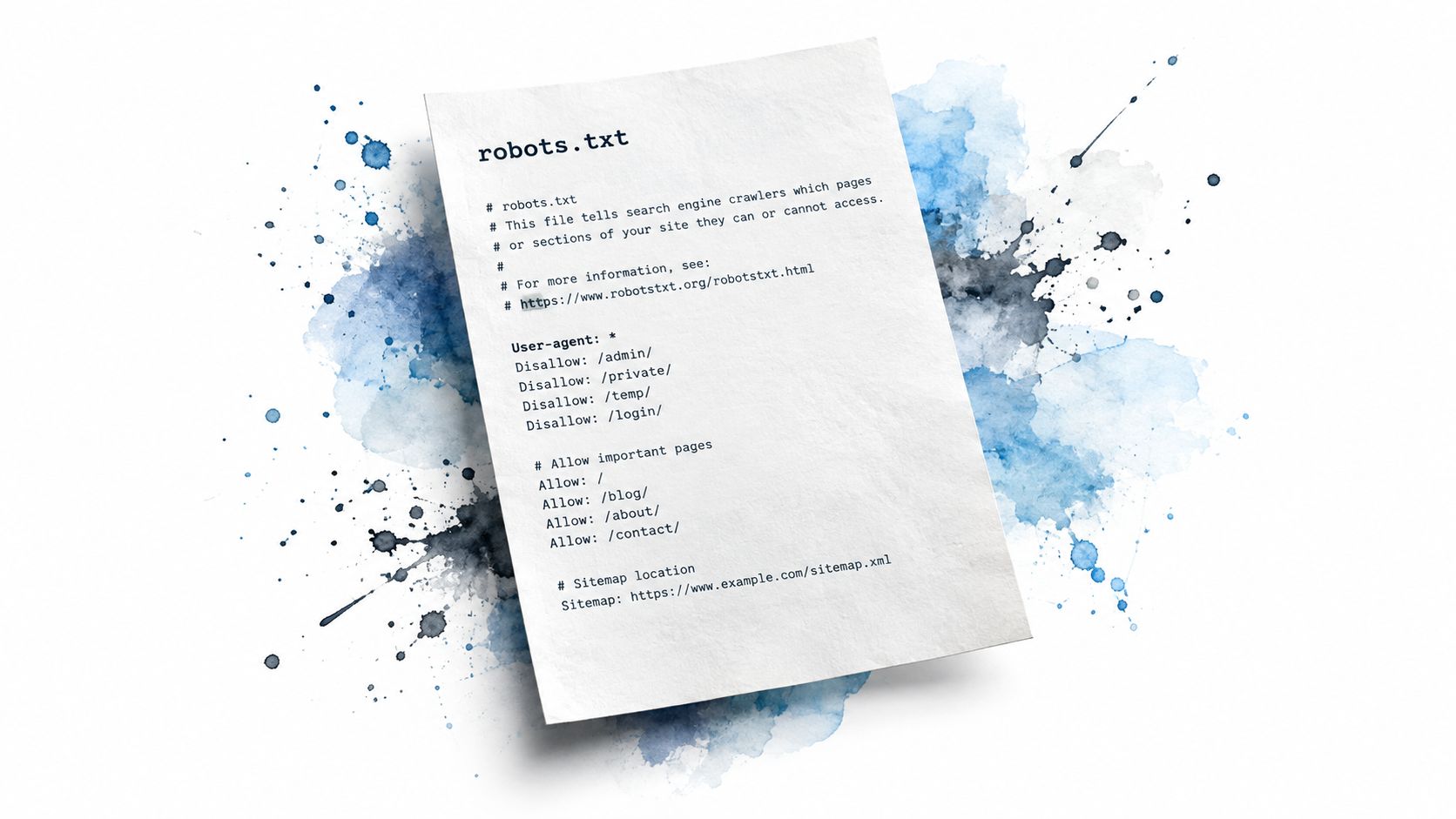
A production file should be deliberately boring. It should allow valuable content by default, then exclude areas that create crawl waste or represent user-state URLs. The following example is suitable as a starting point for a content-led ecommerce or WordPress site, but every path must match the actual application.
# robots.txt for example.com
Last updated: 2026-09-18
User-agent: *
Allow: /
WordPress administration
Disallow: /wp-admin/
User-state and transaction URLs
Disallow: /cart/
Disallow: /checkout/
Internal search and common result paths
Disallow: /search/
Disallow: /search-results/
Parameterized tracking and internal-search URLs
Disallow: /*?s=
Disallow: /*?q=
Disallow: /*?utm_
Disallow: /*&utm_
Keep product photos available to Google image crawling
User-agent: Googlebot-Image
Disallow: /media/
Allow: /media/product-photos/
Permit Google's renderer to access preview content
User-agent: Googlebot
Allow: /preview/
XML sitemaps
Sitemap:
Sitemap:
Sitemap:
The User-agent: * group establishes the default policy. Allow: / makes that intent explicit, while the Disallow lines remove only administrative, transactional, internal-search, and tracking-heavy URL patterns. The Googlebot-specific groups then create narrower exceptions. A named group doesn't automatically inherit the wildcard group in every crawler implementation, so test the resulting behavior rather than relying on assumptions.
Production gotchas
- Directory boundaries: Use
/cart/ when the application's directory convention includes the trailing slash. If the site serves /cart without redirecting, test that exact URL too.
- API paths: Don't block
/api/ reflexively. Search rendering, product data, or critical assets may depend on it. Block private endpoints through authentication and authorization instead.
- Same-origin assets: If your CDN serves CSS, JavaScript, or images from the same host, confirm that
/assets/ remains allowed. Blocking render resources can make a page difficult for search engines to interpret.
- Preview paths: Reopening
/preview/ for Googlebot is a policy decision, not a universal recommendation. Preview URLs should be controlled separately if they expose unpublished content.
- Sitemaps: Keep each absolute sitemap URL on its own line and verify that every file returns successfully to public crawlers.
Robots.txt Templates for Staging, Dev, and Admin Sections
Environment-specific files should be short enough that an engineer can understand the entire policy during a deployment review. A staging blanket block is appropriate when the host contains unfinished or duplicate content, but it isn't access control. Anyone who knows the URL can still request the pages.
Staging server
# Staging only. Never use this file on production.
User-agent: *
Disallow: /
Permit infrastructure health checks
Allow: /health/
The health-check exception is useful only if the monitoring crawler identifies itself in a way that follows the rule. It doesn't make the rest of staging private.
Internal development environment
# DEVELOPMENT ONLY
Do not copy this file to production.
User-agent: *
Disallow: /
The warning comment protects against the most expensive copy-paste error. Store the production file separately, ideally in version control with an environment-specific deployment step.
Production admin and account areas
# Production crawl policy
User-agent: *
Allow: /
Disallow: /admin/
Disallow: /account/
Disallow: /checkout/
Disallow: /search/
Disallow: /*?q=
Disallow: /admin/ also matches paths beginning with that prefix, which can include names such as /admin-styles/ and /administrators/. If you need to block only an exact directory boundary, use end-of-path syntax where the crawler supports it and validate the result carefully.
| Environment |
Key Directives |
Common Mistake |
| Staging |
Disallow: / with a monitored health-path exception |
Treating robots.txt as a security barrier |
| Development |
Blanket block plus a production warning comment |
Copying the development file into production |
| Production admin |
Targeted blocks for admin, account, checkout, and search |
Blocking shared assets or matching unintended path prefixes |
A subdomain needs its own file at its own root. The main domain's robots.txt doesn't control staging.example.com, cdn.example.com, or another host.
Sitemap Lines and Multi-Sitemap References in Robots.txt
Place sitemap declarations outside user-agent groups, usually after the crawl rules. The directive is case-sensitive in operational contexts, so write Sitemap consistently, and use a complete HTTPS URL that resolves publicly.
For a basic site:
Sitemap:
For a site with several sitemap files:
Sitemap:
Sitemap:
Sitemap:
Sitemap:
Each line stands alone. Don't put a sitemap path after User-agent, Allow, or Disallow, and don't add a query string unless the sitemap service explicitly requires one. Keep the protocol aligned with the canonical public site, normally HTTPS, and avoid a trailing slash unless it is part of the actual sitemap URL.
A root-domain file can reference publicly reachable sitemap files on subdomains:
Sitemap:
Sitemap:
Sitemap:
The subdomain must serve the referenced file successfully. A third-party CDN URL is acceptable only when it resolves publicly and consistently for crawlers. A sitemap hidden behind authentication, an access restriction, or a host-level robots policy won't help discovery.
Listing sitemaps in robots.txt gives crawlers a direct discovery route without depending entirely on a separate submission workflow. For Shopify teams, sitemap ownership and indexing checks fit naturally alongside Google Search Console for Shopify, especially after theme, collection, or product-template changes.
Robots.txt Example for AI Bots and Agent Crawlers
The difficult policy question in 2026 isn't just whether search engines may crawl. A site may want Googlebot and Bingbot to access public pages while limiting AI training crawlers, agentic browsing, or access to monetized content. Google's robots.txt introduction still presents the file as a crawl-control mechanism, while recent industry reporting describes Cloudflare categorizing bots as Search, Agent, and Training and blocking Training and Agent crawlers by default on ad-carrying pages for newly joining domains.
That shift makes a blanket Disallow: / policy too blunt for many businesses. Search visibility, AI training permissions, and user-triggered retrieval are different decisions, even when a platform uses related bot names.

A layered policy template
# Search crawlers may access public content
User-agent: Googlebot
Allow: /
User-agent: Bingbot
Allow: /
AI training crawlers blocked by default
User-agent: GPTBot
Disallow: /
User-agent: ClaudeBot
Disallow: /
User-agent: anthropic-ai
Disallow: /
User-agent: Bytespider
Disallow: /
User-agent: Google-Extended
Disallow: /
Agent and AI-search crawler policy
User-agent: PerplexityBot
Disallow: /
User-agent: Amazonbot
Disallow: /
User-agent: Applebot-Extended
Disallow: /
Licensed partner feed exception
User-agent: GPTBot
Disallow: /
Allow: /licensed-ai-feed/
The final exception is intentionally narrow and needs validation. If the same bot receives multiple groups, crawler behavior can vary, so avoid duplicating a token across groups unless you've tested the parser and the intended policy. A cleaner production implementation may use one group per bot with only the paths that should be accessible.
Google-Extended is not Googlebot. It is a separate token used to manage certain Google AI model and product uses, so blocking it doesn't automatically block Google's ordinary search crawler. Likewise, blocking a training crawler doesn't necessarily block a user-triggered fetcher or a search-index bot from the same platform.
Wildcards in User-agent names are another trap. Don't assume a pattern such as AI* will cover every AI crawler or match across a bot's full identifying string. List each user-agent explicitly when the policy matters.
Policy distinction: Decide separately whether a bot may build a training corpus, serve AI search results, or fetch a page because a user requested it.
Robots.txt remains a request to compliant crawlers. A bot can impersonate a browser, ignore the file, or change its user-agent. Use a WAF, rate controls, authentication, and contractual controls when access must be enforced. Review this block quarterly because bot names, product roles, and platform policies change.
Testing and Verifying Your Robots.txt File
Test the live file, not just the local text in your editor. A valid-looking document can still be served from the wrong host, returned with the wrong status, or replaced by a CMS-generated version.
Verification sequence
Fetch the root file. Open ` in a browser or run:
curl -I https://example.com/robots.txt
Confirm a successful HTTP response and a Content-Type of text/plain. If the server returns an HTML error page, your directives aren't being evaluated as intended.
Test representative paths. Use the robots.txt testing interface in Google Search Console under Settings, Crawling, if it is available for your property. Check at least one public page, one deliberately blocked path, and one exception nested inside a blocked directory. The result should clearly show whether each URL is allowed or blocked.
Use URL Inspection. Recheck the same URLs in Google Search Console's URL Inspection tool. This helps separate a robots.txt crawl block from other indexing states, such as canonical selection or an unavailable page.
Simulate a compliant crawler. Request a target path with a Googlebot user-agent:
curl -A 'Googlebot/2.1' https://example.com/private/
This tests the server response, not whether Google has accepted the URL into its index. A robots.txt rule can stop crawling while the server still returns a normal page.
Check staging behavior. A blocked staging URL should still respond normally to authorized testers. Robots.txt controls crawler requests, not browser access, so a 200 response doesn't prove that the file failed.
For an independent parsing check, a robots.txt file checker can compare declared rules with live URLs. It shouldn't replace Search Console or server-log review, but it can expose path and group mistakes quickly.
Remember the host boundary. A robots.txt file on example.com doesn't control staging.example.com; each host needs its own root file.
Debugging Checklist for Common Robots.txt Problems
Most robots.txt failures come from a small set of repeatable mistakes. Start with the symptom, then inspect the live file before editing templates or plugins.
| Symptom |
Most Likely Cause |
One-Line Fix |
| Entire site loses crawl visibility |
A stray Disallow: / applies to the default group |
Remove the blanket rule, publish the intended allow policy, and retest key URLs |
| Staging appears in Google |
The staging host has no blocking file |
Serve User-agent: * followed by Disallow: / at the staging root |
| AI scrapers ignore the policy |
The bot uses a browser-like user-agent or ignores robots.txt |
Add explicit bot groups and enforce access controls at the WAF |
/admin/ remains crawlable |
The rule targets the wrong path spelling or case |
Use the exact deployed path, for example Disallow: /admin/ |
| Sitemap isn't discovered |
The directive is grouped incorrectly or uses a relative URL |
Put `Sitemap: outside all groups |
| Product images disappear from image search |
A broad media rule blocks the image directory |
Reopen the required path with a specific Allow rule |
| CSS or JavaScript rendering breaks |
Shared assets live under a blocked directory |
Remove the asset block or allow the required resource paths |
Don't use robots.txt to conceal an exposed admin panel, preview URL, or customer record. If a crawler must never access the resource, remove public access instead. If the URL can be crawled but shouldn't appear in search, use an appropriate indexing control on the response or page.
Quick Reference and Rules to Remember Before Publishing
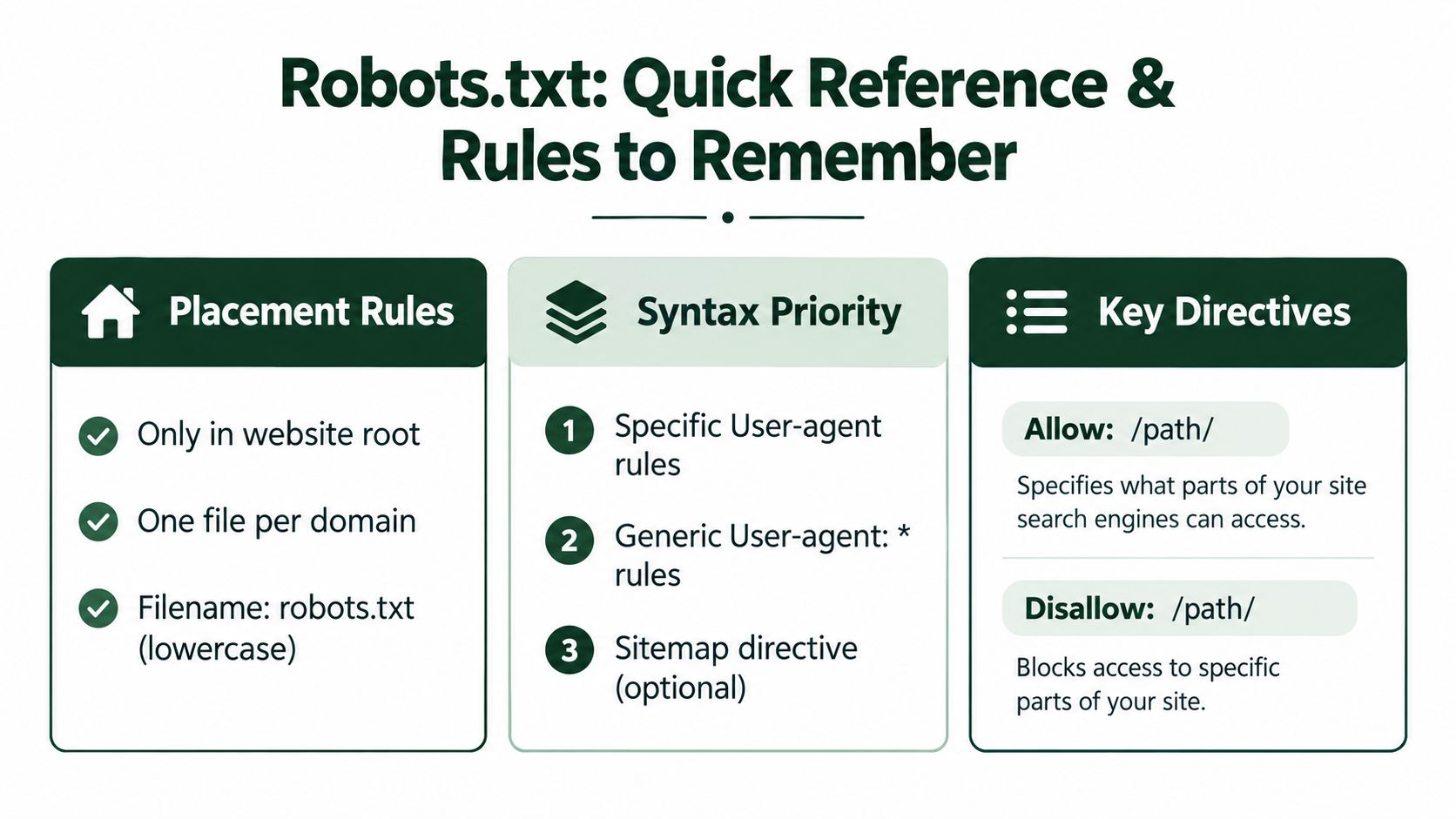
Use this as a deployment checklist:
- Placement: Serve one lowercase
robots.txt at the root of each domain or subdomain.
- Default behavior: URLs are allowed unless a matching rule blocks them.
- User-agent priority: A specific crawler group takes precedence over the generic
User-agent: * policy.
- Path priority: Within a matching group, the longest matching path wins.
- Access control: Robots.txt isn't authentication, authorization, or a security mechanism.
- Sitemap syntax: Use absolute HTTPS sitemap URLs outside user-agent groups.
- AI policy: List training and agent crawlers individually when the distinction matters. Don't assume one wildcard covers every bot.
- Asset review: Check CSS, JavaScript, images, APIs, previews, and CDN paths before blocking directories.
- Case review: Match the exact capitalization used by the server.
- Release process: Diff the file in version control, test representative URLs, and inspect crawl signals after deployment.
A useful workflow pairs manual review with a crawler check and, where relevant, local seo software for broader visibility operations. AutoSEO can also generate a formatted robots.txt file, check the live file, and connect crawl-access issues with wider technical SEO tasks, so teams don't have to maintain the policy in isolation.
Keep the file small, readable, and purpose-driven. After a CMS, plugin, theme, routing, or CDN change, run the same URL tests again rather than assuming the old policy still matches the new site.
AutoSEO helps you generate and validate robots.txt rules, audit crawl and indexation issues, publish technical updates across supported CMS platforms, and monitor search and AI visibility from one workflow. Visit AutoSEO to check your live robots.txt file and turn any crawl-policy problems into actionable SEO tasks.