You've got a product page that ranks, attracts impressions, and still underperforms. The price appears in the visible layout, inventory changes correctly, and customer reviews are prominent, yet search systems may still have to infer which number represents the current price, whether the item is available, and what entity those reviews describe. That ambiguity is where technical SEO schema earns its place.
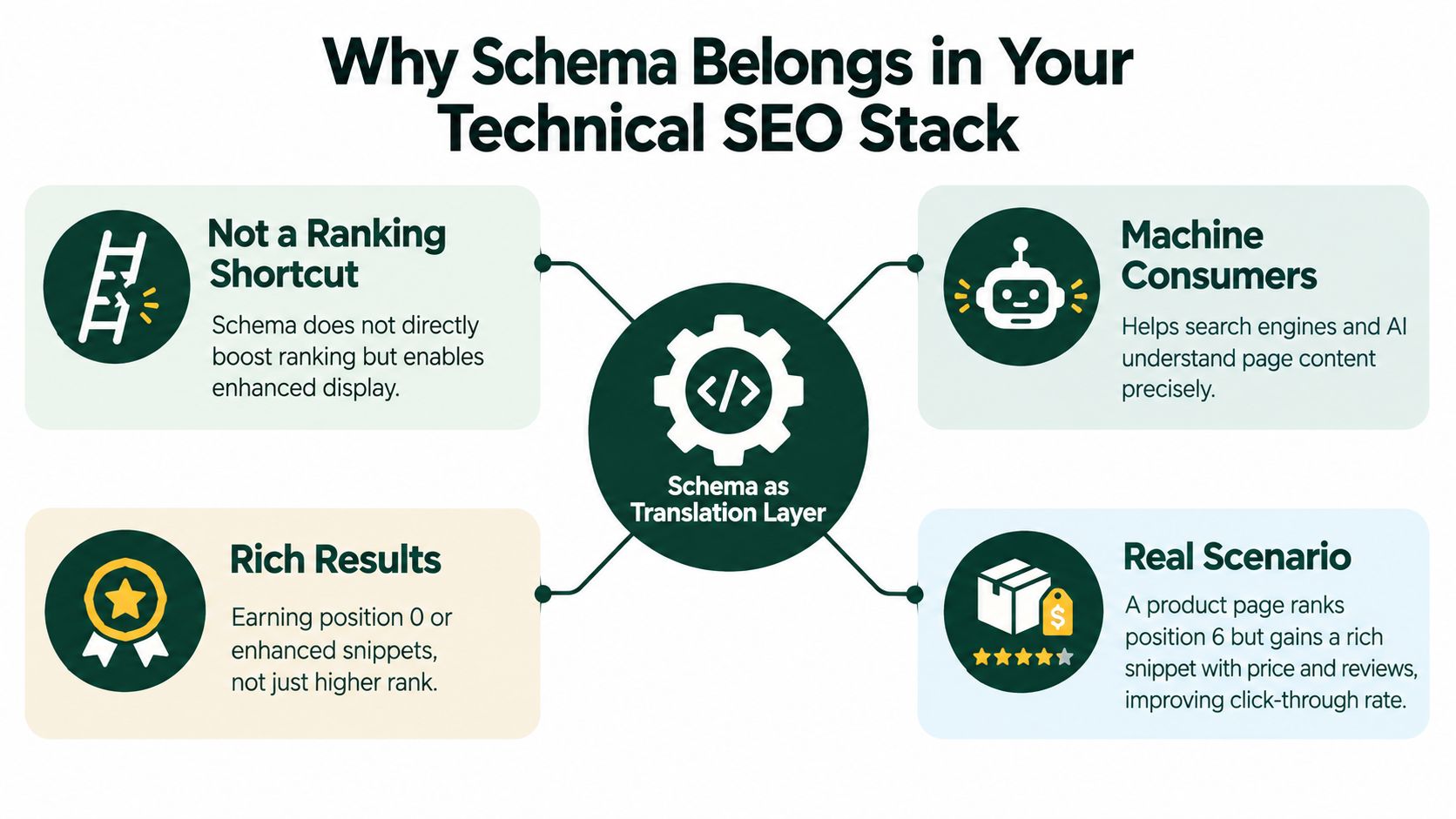
Schema markup won't magically move a page from the bottom of the results to the top. It gives search engines and other machine consumers a clearer description of the page, its entities, and the relationships between them. In 2026, that distinction matters because structured data supports more than traditional rich-result eligibility. It also contributes to the machine-readable infrastructure behind crawling, entity understanding, retrieval, and generative search.
Table of Contents
Why Schema Belongs in Your Technical SEO Stack
A product page can be perfectly usable for a person while remaining difficult for a machine to interpret. A shopper sees a product name, a price, an availability label, and a review summary because the page's visual design groups those elements together. A crawler may need to infer those relationships from HTML structure, text proximity, scripts, and template conventions.
Schema acts as a translation layer. It labels the page's main entity and describes its attributes in a standardized vocabulary. A Product can contain an Offer, the Offer can identify a price and availability state, and a review can be connected to the item it evaluates. The markup doesn't replace visible content. It makes the relationships explicit.
That technical role is broader than the familiar “add schema to win stars” advice. Google describes structured data as a machine-readable layer that helps it understand page content and determine eligibility for supported rich results. Google supports JSON-LD, Microdata, and RDFa, and recommends JSON-LD for implementation, while also requiring publishers to follow its structured-data guidelines and validate markup before deployment through the Google Search Gallery documentation.
The most useful mental model places schema beside other technical systems:
- Canonicalization helps search engines select the preferred URL.
- Robots directives communicate crawl and indexing controls.
- XML sitemaps expose important URLs and update signals.
- Schema markup describes the entities and relationships represented on those URLs.
These systems solve different problems. A valid Product block won't make a blocked page crawlable, and an Organization entity won't repair a conflicting canonical tag. Schema only helps when the underlying page is accessible, indexable, and consistent with the content people can see.
Practical rule: Treat schema as a page-level data contract. If the visible page changes, the structured data must change with it.
The 2025 Web Almanac SEO chapter reported structured data usage at 50% on both desktop and mobile pages, compared with 48% of desktop home pages and 49% of mobile home pages in 2024. The same report found WebSite schema on 36% of mobile pages in 2025, up from 35% in 2024 and 30% in 2022 (summary and source). Adoption has moved schema from an advanced experiment toward a mainstream technical layer.
That makes governance more important. If competitors and platforms increasingly publish machine-readable entities, leaving your organization, products, authors, and page hierarchy ambiguous can create avoidable interpretation problems. For adjacent paid and organic planning, a resource such as search ads for financial planners can help teams think about the relationship between search visibility, intent, and conversion, while schema handles the technical clarity of the page itself.
For a broader technical foundation, compare your implementation against these technical SEO best practices. The key question isn't “Can we add more markup?” It's “Does this markup accurately describe the page and connect it to the rest of the site?”
How Search Engines Read Structured Data
Google supports three structured-data formats. They use the same general vocabulary, but they place that vocabulary in different parts of a page.
JSON-LD stores the description in a script block, usually in the document head or near the end of the body. It stays separate from the visible HTML, which makes it easier for a development team to generate from CMS fields and update without rewriting every content element.
A simple organization block might look conceptually like this:
@context identifies the vocabulary, while @type identifies the entity being described. The remaining properties, such as name, url, and logo, provide attributes that search systems can interpret.
Microdata attaches properties directly to HTML elements. A product card might use itemscope to define the item, itemtype to identify Product, and itemprop attributes to label the product name or offer. This approach keeps markup close to the visible content, but template edits can break the data when developers move, rename, or replace HTML elements.
RDFa also embeds structured properties in HTML attributes. An article wrapper might declare an RDFa vocabulary and then label the headline, author, and publication date within the rendered document. RDFa can be useful in systems already built around semantic HTML, but it often requires more discipline from developers working across complex templates.
| Format |
Syntax |
Placement |
Maintenance |
| JSON-LD |
Standalone JSON object inside a script element |
Head or end of body |
Usually easiest to centralize and regenerate |
| Microdata |
HTML attributes such as itemscope and itemprop |
Directly around visible elements |
Can break during template edits |
| RDFa |
Semantic HTML attributes such as vocab and property |
Embedded in the document structure |
Powerful, but more dependent on HTML conventions |
What parsing looks like in practice
When Googlebot fetches a page, its systems can inspect the HTML and identify a JSON-LD payload or embedded semantic attributes. A valid JSON-LD object must use correct syntax. A missing comma, malformed quotation mark, or broken nesting can prevent the payload from being parsed, even if the visible page looks fine.
The schema vocabulary and the Google-supported rich-result feature are related but not identical. Schema.org defines a broad vocabulary, while Google documents the structured-data types and properties it can use for specific search features. A property can be valid in Schema.org and still provide no visible Google enhancement for a particular page.
Keep one primary representation for each entity. Mixing JSON-LD, Microdata, and RDFa for the same product or article creates more opportunities for conflicting values.
In 2026, JSON-LD is the practical default for most WordPress, Shopify, and headless implementations. Generate it from the same fields that produce the visible title, author, price, image, and update date. Then validate both the syntax and the eligibility requirements before publishing.
The Schema Types That Actually Move the Needle
Schema.org's publicly observed dataset showed 958 schema types and 4,587 properties in live use as of May 2026. Yet only 12 schema types appeared on 10 million or more domains, while about 77% of tracked types and properties appeared on fewer than 1,000 domains (dataset summary). The ecosystem is vast, but real-world implementation concentrates around a small group of reusable entities.
That concentration makes sense. Most websites run a familiar set of templates: homepages, articles, product pages, location pages, software pages, and navigation paths. The useful schema type usually follows the page's primary purpose rather than the publisher's desire to describe every possible detail.
| Schema Type |
Page Placement |
Required Properties |
Organization |
Homepage or organization page |
Use the properties required by the chosen Google feature and provide accurate identity details |
WebSite |
Homepage |
Describe the site entity and connect it to the canonical site URL |
BreadcrumbList |
Pages within a clear hierarchy |
Represent the ordered breadcrumb items and their URLs |
Article |
Blog, news, or editorial article |
Identify the article, headline, author, image, and relevant dates |
Product |
Product or product review page |
Describe the product and connect relevant offer or review information |
FAQPage |
Page containing visible, qualifying questions and answers |
Mark up the actual questions and answers shown to users |
LocalBusiness |
Location or service-area business page |
Describe the business entity and accurate location information where applicable |
SoftwareApplication |
Software or app detail page |
Identify the application and provide properties supported by the relevant feature |
The table is a planning aid, not permission to add every type to every URL. Google's eligibility rules can differ by feature, and required properties depend on the specific rich-result format. Missing a required property can make the item ineligible even when the broader Schema.org type is valid.
Start with the page, then the entity
A practical selection sequence prevents most over-markup:
- Identify the page type. Is it a product detail page, article, location page, software page, or homepage?
- Identify the main entity. Is the page primarily about a product, organization, person, article, or business location?
- Add the relevant property set. Include information that is visible, accurate, and supported for the intended search feature.
For example, a software landing page shouldn't become an Article because it contains explanatory copy. A product review shouldn't claim purchase-offer details that the page doesn't present. A FAQ block shouldn't mark up questions hidden behind unrelated interface elements or absent from the visible page.
The 2026 adoption pattern supports a conservative approach. Organizations will gain more operational value from clean Organization, WebSite, WebPage, BreadcrumbList, Article, Product, Person, and ImageObject relationships than from implementing a niche type that search systems rarely encounter.
The right schema is the smallest accurate model that explains the page clearly.
Implementation Patterns That Survive Real Content
A schema block belongs in the page document, not inside an interaction handler or a decorative HTML element. Server-rendered JSON-LD in the head or near the closing body is generally easier to inspect and maintain than markup that appears only after a client-side event.
A durable implementation begins with a single source of truth. If the CMS stores an article title, author, publication date, modification date, and featured image, the visible page and its JSON-LD should read from those same fields. The template shouldn't ask one system for the headline and another system for the schema headline.
Build templates around page types
For an Article template, generate the headline, author, image, datePublished, and dateModified values from the article record. For a Product template, connect the Product entity to its Offer, then retrieve price, currency, availability, and product URL from the commerce system that controls the purchase experience.
Useful patterns include:
- Article: Keep author identity and modification dates synchronized with the editorial record.
- Product: Nest
Offer within Product, and update availability as inventory changes.
- FAQPage: Mark up only the questions and answers displayed on the page.
- BreadcrumbList: Generate positions and URLs from the same navigation hierarchy users see.
- Organization: Maintain one authoritative identity record for the company name, logo, URL, and related profiles.
A Review or AggregateRating must describe the correct parent entity. If a rating belongs to a product, connect it to that product. Don't attach unrelated ratings to an organization because the page contains testimonials.
Keep generation inside the publishing workflow
On WordPress, a plugin can generate schema, but the team still needs to check whether the plugin's output matches the actual template. Shopify implementations should pull product and offer fields from the store's product data rather than hard-coding values in theme files. In Next.js or another headless framework, generate JSON-LD during server rendering from the same API response that builds the page.
| Placement |
Crawl Reliability |
Indexing Latency |
Recommended For |
| Server-rendered head block |
Strong when the URL is crawlable |
Usually lowest operational risk |
Core templates and important landing pages |
| Server-rendered end-of-body block |
Strong when included in the initial response |
Suitable for most templates |
Sites that centralize metadata near page output |
| Client-side JavaScript injection |
Dependent on rendering and execution |
Can introduce delay or inconsistency |
Cases where server rendering isn't available |
| Event handler or post-interaction injection |
Weak for crawler discovery |
Unpredictable |
Avoid |
Google can render JavaScript, but rendering introduces another processing stage. Independent coverage has also highlighted that many AI crawlers don't reliably render JavaScript during retrieval (schema adoption audit coverage). That doesn't make every client-side implementation invalid, but it makes server-rendered JSON-LD the safer operational choice for important entities.
Use the body's visible content as the source of truth. Don't hide schema in CSS-only elements, inject it through click handlers, or allow a plugin to infer product details from presentation markup after the page has already been assembled.
Crawl, Index, and Schema Drift
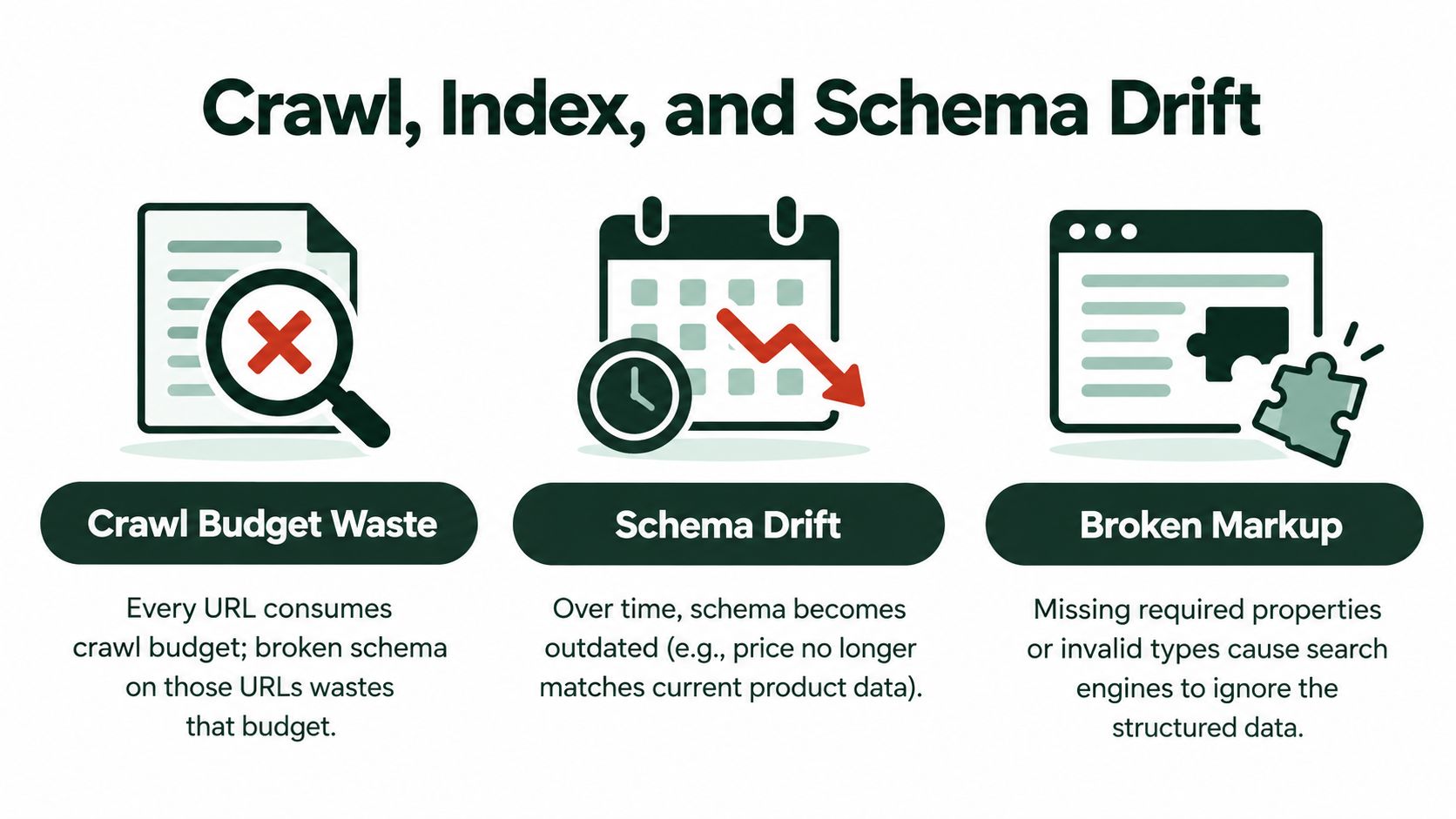
Structured data doesn't consume crawl capacity as a separate resource. The URLs carrying that markup still need to be fetched, rendered when necessary, evaluated for indexing, and revisited when their content changes. A flawless JSON-LD block on a URL Google can't access has no practical search value.
Three failure patterns appear repeatedly.
Blocked or unavailable URLs prevent Googlebot from reaching the markup. Robots.txt rules, authentication walls, server errors, and security layers can all interrupt access. Google's guidance says structured data should sit on accessible pages, not pages blocked by robots.txt, marked noindex, or restricted behind login requirements. Check server logs for Googlebot requests and inspect response failures rather than assuming a sitemap entry guarantees access.
Noindex pages create a common false positive. A Rich Results Test may detect valid markup on a page that carries a noindex directive, but that page still isn't eligible to appear as an indexed rich result. Use URL Inspection to confirm the live URL's index status and understand which directives Google received.
Schema drift happens when visible content changes but the JSON-LD doesn't. A product manager updates the price in the commerce platform, an editor changes the headline, or inventory moves to out of stock, while a cached or separately generated schema block retains yesterday's value. Search systems then receive conflicting signals.
Detect the mismatch instead of guessing
Use log sampling to find blocked or failing URLs, URL Inspection for crawl and index status, and a scheduled comparison between the rendered page and stored JSON-LD for fields likely to change. Product teams should prioritize price, availability, seller, shipping, and rating values. Editorial teams should watch headlines, authors, images, and modification dates.
Schema is a freshness signal only when your publishing system refreshes it with the page.
A schema audit should therefore sit alongside canonical, hreflang, sitemap, and status-code checks. It's not a substitute for those systems. If Google reports a page as crawled but currently not indexed, investigate the page's overall quality, accessibility, canonical signals, and rendered content through this crawled currently not indexed troubleshooting guide, rather than treating schema as the sole explanation.
For a visual walkthrough of structured-data troubleshooting, review the following technical SEO video after checking your own crawl and index evidence.
Schema Signals for AI Assistants and Generative Search
Dense markup doesn't guarantee that ChatGPT, Perplexity, Gemini, or Google AI features will cite your page. Recent independent reporting describes schema as an uncertain AI-visibility lever, including controlled tests that found no consistent traditional-ranking or AI-citation lift from markup alone, while a page-level study of 1,885 pages found that citation effects varied by platform and schema type (reported findings).
That uncertainty should change how teams prioritize schema. AI retrieval systems need clear entities and trustworthy facts, not a high tag count. A well-connected organization, person, product, and page model can reduce ambiguity, but the markup still needs to match visible content and broader site signals.
Use schema where it clarifies an entity
Organization can clarify who publishes or operates the site. Person can connect an author to authoritative profiles through sameAs, provided those profiles represent the same person. Product can connect the item to an Offer, Review, and AggregateRating when those details are visible and accurate.
FAQPage may help systems identify question-and-answer structures, but it won't turn thin or unsupported answers into trusted references. Likewise, Article can clarify authorship and dates, yet it can't compensate for unclear writing, weak sourcing, or stale content.
Some types are usually lower priority for general business sites:
- Speakable: Relevant only to suitable content and supported use cases, not a default AI-citation mechanism.
- ClaimReview: A specialized format that most publishers don't need.
- Recipe: Useful for food content, but maintenance overhead for unrelated businesses.
The same caution applies to llms.txt. It's an emerging convention distinct from robots.txt, and it shouldn't be treated as a ranking switch or guaranteed instruction channel for AI crawlers. Keep access controls in the systems that govern crawling, and focus schema work on accurate entity relationships.
A practical test is simple: remove the markup mentally and ask whether the page's visible content still communicates the same entity, facts, and relationships. If nothing changes in the interpretation, the extra markup may be decoration. If it clarifies which organization, product, author, offer, or answer the page represents, it has a stronger technical justification.
Validation and Troubleshooting Workflow
Validation should be a recurring publishing control, not a launch-day ritual. Begin with Google's Rich Results Test to check whether the page qualifies for a supported visible enhancement and to catch syntax or required-property problems. A passing test doesn't guarantee that Google will show a rich result, but it confirms that the implementation meets the test's interpretation of the feature.
Use a layered checking process
- Test the source or live URL. Paste the JSON-LD into the Rich Results Test during development, then test the live URL after deployment.
- Inspect Google's version. Use Search Console URL Inspection to compare the fetched page with the page your team intended to publish.
- Audit at scale. Crawl the site with Screaming Frog, Sitebulb, or a log-aware crawler to find missing fields, invalid values, duplicate entities, and schema types used on unsuitable templates.
- Recheck after releases. Template changes often cause more schema failures than individual content edits, so include structured-data checks in release QA.
A site-wide review should distinguish between errors, warnings, and unsupported additions. Fix blockers first. Don't spend development time filling optional properties while the page remains inaccessible, malformed, or inconsistent with its visible content.
| Failure Pattern |
Likely Root Cause |
Practical Fix |
| Invalid value |
Wrong data type, malformed URL, or unsupported enum |
Compare the value with the relevant Google and Schema.org documentation |
| Missing required field |
Template omitted a field or CMS record is incomplete |
Make the field required in the publishing workflow or remove the unsupported feature |
| Warning ignored |
Optional property is absent or incomplete |
Add it when it's visible and useful, otherwise prioritize errors |
| Multiple parent types |
Several plugins or templates describe the same entity differently |
Choose one owner for the entity and consolidate output |
| Valid markup, no enhancement |
Page, feature, or content may not meet Google's eligibility conditions |
Review the feature guidelines and confirm indexability and visible-content alignment |
| Markup not detected |
Script wasn't rendered, was malformed, or was injected too late |
Move generation into server-rendered output and retest the live URL |
For a focused first pass, use this schema tester tool to identify implementation issues before escalating to a full crawl. Teams that want one workflow for technical audits, JSON-LD generation, publishing, and AI-visibility monitoring can also evaluate AutoSEO as an option. It connects schema tasks with indexation checks, content workflows, CMS publishing, and measurement instead of leaving each activity in a separate tool.
Visit AutoSEO to audit schema, generate page-specific JSON-LD, prioritize crawl and indexation fixes, and publish approved changes across supported CMS platforms. Use its validation and AI-visibility monitoring workflows to keep structured data aligned with the content your visitors and search systems receive.