Most SaaS technical SEO advice starts with the wrong question. Teams ask how to produce more crawlable pages, improve Lighthouse scores, or add another layer of schema. The better question for technical SEO for SaaS is: can the pages that explain and sell the product be found, parsed, understood, and cited by both search engines and AI answer systems?
That distinction matters. A marketing page can perform well in a browser and still expose little useful text to a crawler. A documentation site can be valuable to buyers and developers but remain blocked by robots directives. A pricing page can be indexed while its actual plan logic is hidden behind client-side interactions. These failures reduce discovery even when a conventional audit reports a clean technical baseline.
Core Web Vitals, sitemaps, canonicals, and crawl hygiene still matter. They're the substrate. But for SaaS teams planning visibility in AI-assisted search, citation eligibility is the organizing principle. Public, stable, text-rendered pages with clear entities and relationships give Google, Bing, ChatGPT, Perplexity, and Claude something they can use.
Table of Contents
Why Most SaaS Technical SEO Playbooks Optimize the Wrong Surface
The popular checklist assumes more technical fixes create more traffic. That assumption is too broad to guide prioritization. Fixing a blocked pricing page can expose existing demand. Fixing a small performance variance on a page that already meets user experience thresholds may produce no measurable commercial change.
Google's Core Web Vitals remain a useful benchmark for SaaS page experience. The current thresholds are LCP under 2.5 seconds, INP under 200 milliseconds, and CLS under 0.1, while industry coverage reports that 55.7% of origins meet all three thresholds (Core Web Vitals guidance for B2B SaaS). These measures identify meaningful problems, particularly on JavaScript-heavy product, pricing, comparison, and signup pages. They do not show whether an AI system can retrieve and cite the page's commercial facts.
A site can pass performance checks and still create citation blind spots through:
- Login walls that hide product capabilities, setup guidance, and support answers.
- JavaScript-only rendering that keeps important feature text out of the initial HTML.
- Fragmented subdomains that separate marketing context from documentation and changelogs.
- Unclear app architecture that exposes authenticated routes or points public pages to an app shell through canonicals.
- Thin programmatic pages that list integrations without meaningful, indexable detail.
Practical rule: Prioritize a fix when it improves access, understanding, or action on a revenue-relevant surface, not simply because an audit tool has identified it.
The underaddressed issue is the boundary between what Google can index and what AI crawlers can cite. Guidance on SaaS technical SEO highlights how login walls, docs subdomains, and app architecture can affect discovery by non-Google agents (technical SEO guidance for SaaS). Many AI crawlers do not execute JavaScript reliably and cannot authenticate. An answer engine may therefore ignore the clearest explanation of your product when it exists only inside the application.
That changes the order of work. A publicly rendered integration matrix may create more visibility than another small LCP improvement. A comparison page that states differences in plain HTML can contribute more to citation eligibility than generic FAQ markup attached to a thin template. Technical SEO still provides the foundation, but the deliverable is a site where important facts are public, explicit, stable, and attributable.
Map Your SaaS Site Into Marketing, App, and Docs Surfaces
Start the audit by splitting the property into three operational surfaces. Don't let one global robots policy or one sitemap hide the different jobs these surfaces perform.
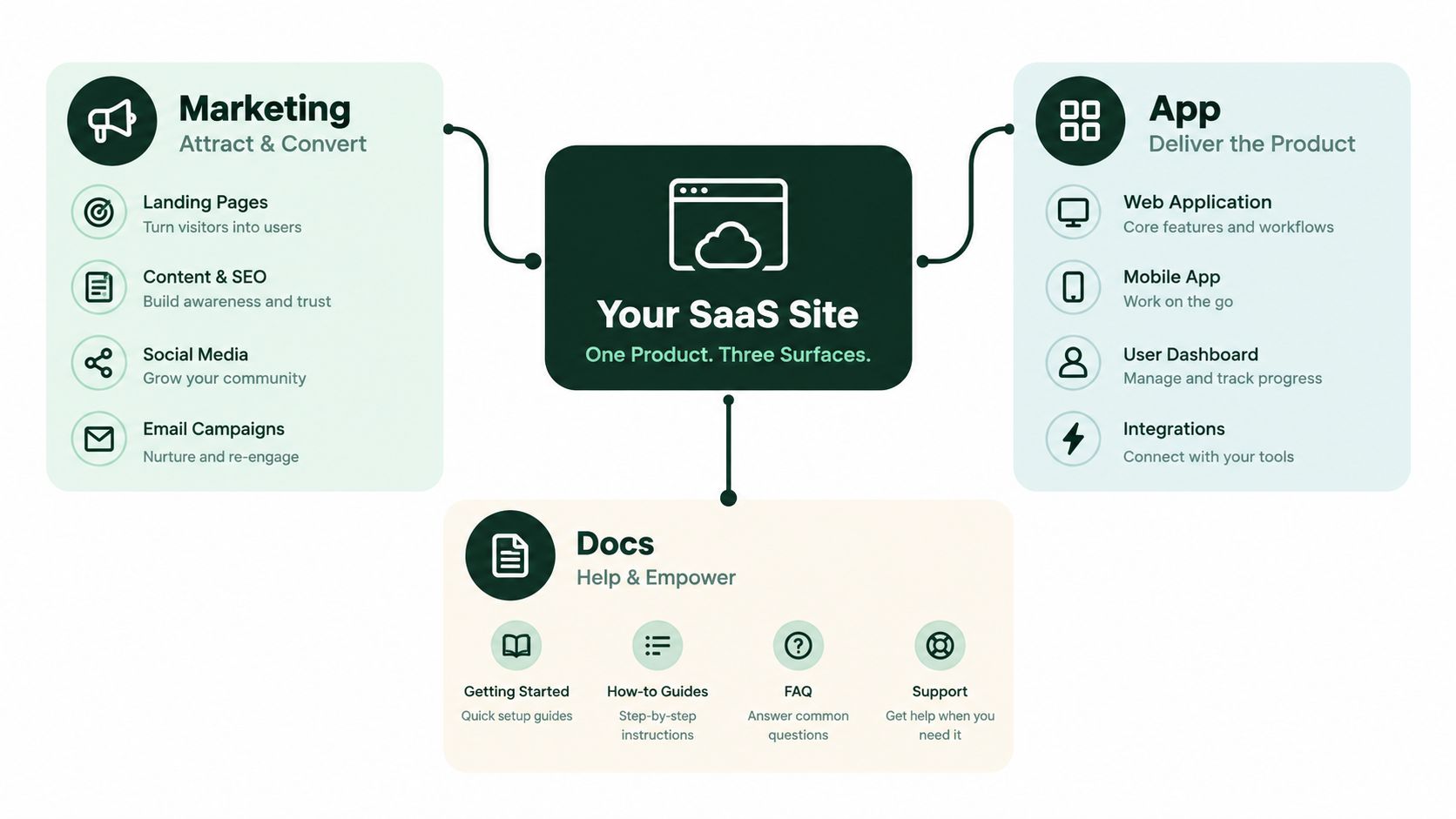
Marketing pages need complete first-load HTML
The marketing surface includes the root domain, product pages, feature pages, use cases, comparisons, pricing, integrations, and editorial content. These pages should be crawlable, indexable, internally linked, and rendered with their key content available without a user login.
Check the initial response, not only the DOM after every script finishes. A crawler should be able to find the title, headings, product claims, plan details, navigation links, and contextual links in the rendered HTML. If a feature page displays its differentiators only after a client-side request, the page may look complete to a buyer while remaining incomplete to a crawler.
The app should be private by default
The authenticated product is different. Dashboard routes, onboarding screens, account settings, and private reports typically have no search value. Protect them with authentication and apply a deliberate indexation policy to any public app route. Don't assume that a login wall alone solves discovery. URLs can still leak through links, sitemaps, hydration data, browser history, or public previews.
Inspect query strings and route variants as well. A public app host that exposes multiple thin states can create duplicates and make it difficult to distinguish the product interface from the marketing site.
Docs are a discovery surface, not a support drawer
Documentation often carries the clearest explanations of features, integrations, limitations, and implementation details. Keep public guides, API references, changelogs, and knowledge-base pages crawlable when they answer questions prospects and users search for.
The hosting choice requires judgment. A docs subdomain can be operationally convenient, but it needs its own crawl, indexation, canonical, and internal-link review. The important question isn't whether the docs live in a subfolder or subdomain in isolation. It's whether the content is publicly accessible, text-rendered, connected to the product context, and eligible to be retrieved and cited.
Build a Surface Audit spreadsheet
Create one row per URL pattern, not merely one row per URL. Use these columns:
- URL pattern: For example,
/pricing/, /integrations/*, /app/*, or /docs/*.
- Robots directives: Record
robots.txt, meta robots, and HTTP header behavior.
- Index status sample: Compare canonical, indexable, indexed, and excluded examples.
- Render method: Note static HTML, server-side rendering, client-side rendering, or mixed delivery.
- Crawler access: Test whether GPTBot, ClaudeBot, and PerplexityBot can access the rendered DOM.
- Business role: Mark the pattern as acquisition, activation, support, product, or private.
- Owner: Assign marketing, product, engineering, or documentation responsibility.
Flag accidental indexed login routes, blocked documentation, and canonicals that point marketing URLs at an app root. Also look for public pages whose meaningful copy appears only after hydration. Those are often more urgent than cosmetic audit warnings because they affect whether external systems can understand the page at all.
Take Control of Crawl Budget on Large SaaS Catalogs
Crawl budget is not a fixed quota that a team can spend however it wants. Google describes it through crawl rate limit and crawl demand, which means server capacity, site quality signals, freshness, architecture, and URL importance influence how Google allocates crawling (Google crawl budget concepts for SaaS sites).
Most smaller SaaS sites don't face severe crawl constraints. The problem becomes more material as a site grows into large inventories of integrations, templates, localized pages, documentation, community content, and generated variants. At that point, a crawler can spend attention on parameter combinations and retired pages instead of pricing, product, and comparison URLs.
A useful operating table looks like this:
| Site Size, indexable URLs |
Realistic Daily Crawl Budget |
Top Crawl Waste Patterns |
First Cleanup Action |
| Under a few thousand |
Usually sufficient for core marketing content |
Duplicate parameters, blocked assets, stale sitemap entries |
Align sitemaps, canonicals, and robots directives |
| 10,000 or more |
More vulnerable to inefficient discovery |
Facets, near-duplicate templates, paginated archives, expired integrations |
Consolidate URL patterns and remove low-value variants |
| 1 million or more |
Discovered-but-not-indexed URLs can become a major issue |
Programmatic duplication, localization sprawl, community URLs, rendering failures |
Establish strict indexation rules and segment monitoring by surface |
Find where the catalog bleeds attention
Faceted navigation is a common source of waste. URLs such as /integrations?category=crm&sort=popular may create many combinations that don't deserve independent indexing. User-generated reviews, comments, and community threads can do the same when each interaction creates a crawlable URL.
Near-duplicate commercial pages create a different problem. Separate pages for closely related capabilities may divide signals and confuse both users and crawlers. Retired integration pages also deserve a policy. If a partner has completely left and there's no close replacement, a 410 can communicate intentional removal more clearly than maintaining a thin page.
Don't apply pagination rules mechanically. A blanket noindex policy can make deeper content harder to discover if internal links depend on those pages. Review the template, canonical behavior, and link paths together rather than treating one directive as a universal fix.
Measure allocation by surface
Split XML sitemaps for marketing, integrations, blog, and docs. Keep each sitemap limited to canonical, indexable, successful URLs, then compare sitemap submissions with crawl and indexation behavior. A sitemap workflow can help standardize that process, especially when teams need repeatable checks for inclusion and exclusions (sitemap implementation guidance).
Review server logs and Search Console crawl reports on a recurring cadence. If crawlers repeatedly request filters, redirects, dead integrations, or app routes, the response isn't automatically more content. It's usually better URL governance.
Hit Core Web Vitals Where SaaS Pages Break
Optimizing the homepage template rarely fixes the pages that strain performance. Pricing calculators, comparison tables, interactive tours, feature pages, and integration directories combine content, JavaScript, third-party tools, and asynchronous components in different ways. Those surfaces need separate tests and fixes.
The thresholds are clear, while the failure modes depend on the template:
| Metric |
Threshold |
SaaS Page Pattern That Fails |
Root Cause |
Fix Class |
| LCP |
Under 2.5 seconds |
Pricing or feature hero |
Hero image, heading, or critical font waits on hydration |
Sprint fix or rendering change |
| INP |
Under 200 milliseconds |
Calculator, product tour, plan toggle |
Event handlers trigger heavy component re-renders |
Sprint fix or JavaScript redesign |
| CLS |
Under 0.1 |
Comparison page or CMS-led landing page |
Late content, banners, widgets, or images shift the layout |
Usually a sprint fix |
The shift from FID to INP means responsiveness now reflects the broader interaction experience, not only the first input. INP became a Core Web Vital in 2024. Treat these thresholds as a baseline, then connect each failure to the template and rendering path that caused it.
LCP belongs to the first meaningful answer
A pricing page can wait for a hero image, font, or client-side plan component before its main message feels complete. Serve the largest visible asset efficiently, reserve its dimensions, and send the primary value proposition in the initial response. If the commercial explanation depends on hydration, test server rendering or a statically generated shell.
The right target is not a faster decorative hero. It is the earliest point at which a buyer can understand the offer and continue.
INP exposes interaction architecture
INP problems appear after a visitor clicks. A plan toggle may re-render the entire pricing tree. A product tour may attach too many listeners. A comparison filter may recalculate every row on the main thread.
Record a performance trace during live user interaction, not just on initial page load. Defer chat, heatmaps, and other nonessential marketing scripts. Break long tasks, reduce unnecessary component work, and avoid shipping a large application bundle for a page that needs one small control.
CLS is often a layout contract failure
Late CMS blocks, cookie banners, embedded review widgets, and images without reserved dimensions push content around. Give every above-the-fold element a predictable box. Reserve space for third-party components, and do not insert promotional content above text the visitor is already reading.
Use this Core Web Vitals improvement guide for implementation patterns and diagnostic steps.
Pass the thresholds on important page types, then spend engineering time where pages still feel slow or where important content remains inaccessible. A perfect tool score is not the objective. A fast, complete, parseable page is.
Cannons, Internals, and Internal Linking That Compound
A SaaS site can publish excellent pages and still create ambiguity about which URL deserves to rank. Canonicals, hreflang, URL rules, and internal links need to describe the same architecture. If they disagree, crawlers receive conflicting instructions.
Canonicals should reflect the page a buyer should use
Use one canonical policy per template. A clean marketing URL should remain the preferred version when tracking parameters appear. UTM-tagged campaign URLs should resolve to the same canonical page, and internal links should point directly to the clean version rather than relying on redirects.
Feature indexes need more care than a generic “canonicalize everything to the hub” rule. If paginated pages contain unique links to deeper features, each page should represent itself appropriately rather than erasing the path to that content. Enforce one trailing-slash convention, one protocol, and one host format across the property.
Hreflang must describe complete page clusters
For multilingual SaaS sites, build hreflang clusters from equivalent pages, not from whichever translations happen to exist. A translated pricing page should reference its matching market versions. A marketing feature page shouldn't point to an unrelated translated docs page merely because both discuss the product.
Review the clusters across marketing, app landing pages, and docs. Missing return references, mismatched language codes, and translated pages with different canonical targets can undermine the signal. Keep the localized page self-canonical where appropriate, and ensure the language version is useful to that market.
Internal links should express commercial relationships
A hub-and-spoke structure works well when it mirrors how buyers evaluate the product. A feature hub can link to use cases, integrations, comparison pages, pricing, and implementation guides. Blog posts should link contextually to the product pages that resolve the reader's problem, not only to a generic product page in the footer.
Use templates where the relationship is predictable, but preserve editorial judgment where intent differs. Integration pages should connect to the relevant feature and workflow pages. Comparison pages should link to supporting evidence in docs or product guides. Filter-generated pages need explicit rules so valuable pages don't become orphaned.
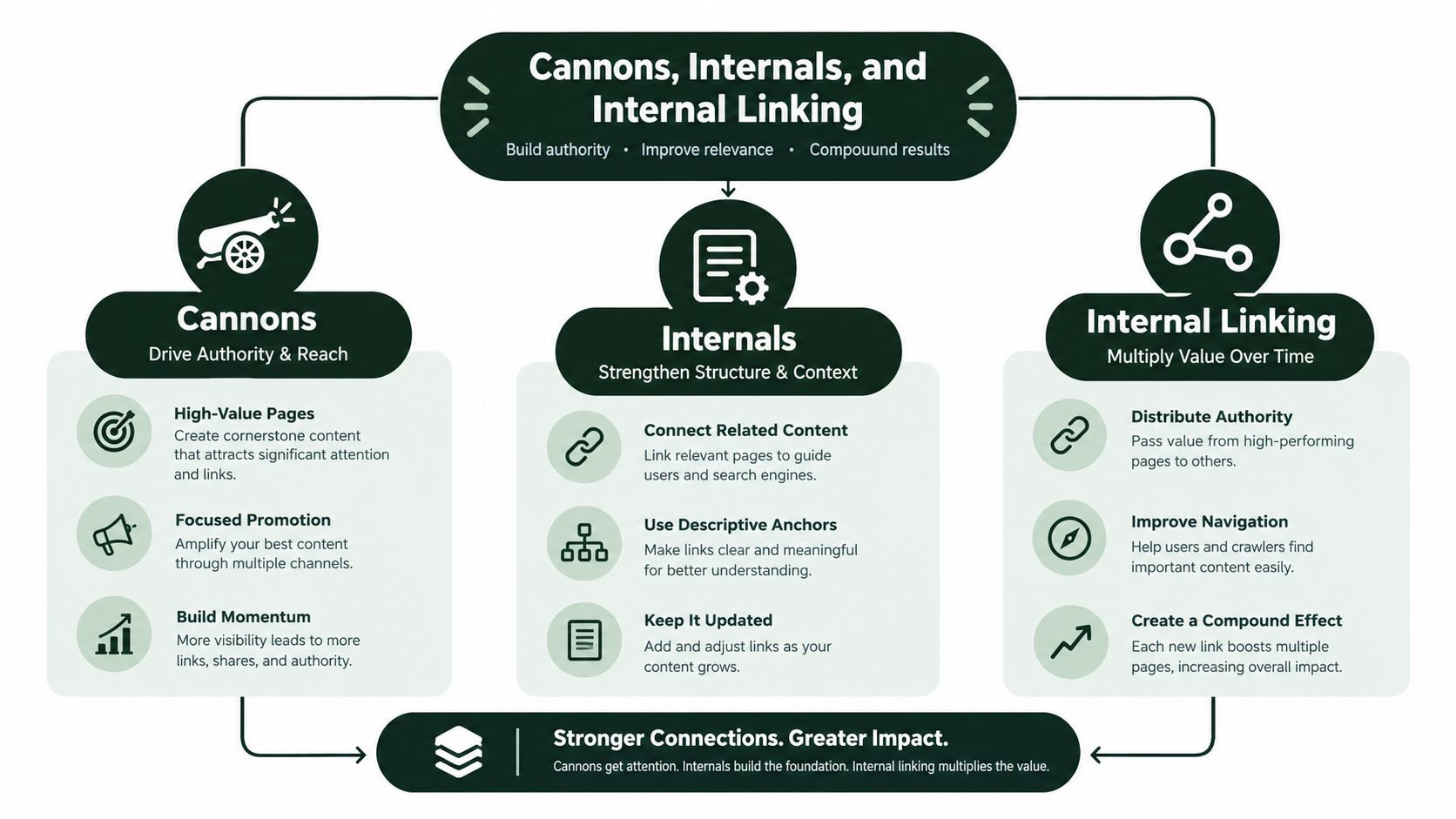
Internal linking is most useful when it tells a crawler and a buyer why two pages belong together.
Inspect orphan pages after every large catalog release. A page that exists in a sitemap but has no meaningful internal path may be technically discoverable, yet it lacks the contextual signals that explain its role in the product architecture.
Treat Schema as AI Citation Infrastructure
Structured data should support what the page visibly explains. It isn't a substitute for clear copy, and it shouldn't be used to decorate every URL with an unrelated entity. For SaaS, schema becomes useful when it makes the relationship between the company, software, plans, documentation, and integrations explicit.
Use the page type to choose the entity:
- Organization: Describe the company, brand identity, logo, and official relationships on pages about the organization.
- SoftwareApplication: Describe the software itself, its category, and legitimate offers on product-focused pages.
- Product: Use it where a plan or product package is the primary subject and the visible content supports that interpretation.
- FAQPage: Mark up genuine support questions and answers that users can see on the page.
- BreadcrumbList: Reflect the actual hierarchy from the URL and navigation.
- Article or BlogPosting: Identify editorial content, its headline, author, publication context, and modification details.
Make the data agree with the visible page
A pricing page should expose plan names, included capabilities, eligibility conditions, and trial information in readable content. JSON-LD can reinforce those facts, but it shouldn't claim an offer that the page doesn't show. An integration page should identify the partner and explain what the connection does, rather than attaching generic software markup to a thin template.
For example, a plan entity might describe an offer with a name, a product relationship, and an availability condition. A free-trial page can identify the trial offer only when the page clearly explains who qualifies and how the trial works. An integration template can connect the software to the partner entity while keeping the visible description as the primary source of meaning.
Use technical SEO schema guidance when mapping templates, but validate the output against the page itself. Don't add review properties merely to obtain stars, and don't copy ratings from external review platforms into first-party markup without a legitimate, visible basis.
Treat schema as a governed product surface
SaaS offerings change often. Plan names, feature availability, trial terms, integrations, and documentation structures can drift away from templates. Assign ownership between SEO, product marketing, engineering, and documentation. Run a schema review whenever a template changes and include it in recurring technical QA.
The most useful schema graph is consistent across surfaces. The Organization entity should connect the brand context. Software and Product entities should describe what buyers can obtain. Breadcrumbs should explain where a page sits. Article and FAQ markup should identify content types without overstating what the page contains.
AI systems can use structured signals as part of their interpretation, but no schema implementation guarantees citation. Citation eligibility still depends on public access, crawlable rendering, useful content, and a stable information architecture.
Ship It in 90 Days and Monitor What Matters
A workable rollout starts with surfaces and indexation, not a long list of low-impact warnings. The sequence below gives engineering, marketing, and documentation owners a shared delivery plan.
| Phase |
Days |
Core Actions |
Monitoring Metric |
Alert Threshold |
| Foundation |
1 to 30 |
Audit marketing, app, and docs surfaces. Correct canonicals, robots directives, sitemap inclusion, and access controls. Begin log analysis. |
Indexed versus canonicalized URLs, crawler requests by surface |
Alert on new indexed app routes, blocked priority pages, or noncanonical sitemap entries |
| Structure and speed |
31 to 60 |
Remediate page-type Core Web Vitals issues. Rewire internal links. Deploy template-level schema. |
CWV status, internal-link coverage, schema validation |
Alert when priority templates fall outside their target thresholds or markup fails validation |
| AI readiness and monitoring |
61 to 90 |
Confirm public rendering, entity relationships, hreflang clusters, citation eligibility, and regression tracking. |
Priority URL rankings, branded search, demo-page impressions, AI citation inclusion |
Alert on citation loss, ranking drops, new rendering gaps, or hreflang drift |
Days 1 to 30 should remove uncertainty
Create the Surface Audit spreadsheet, sample each URL pattern, and verify what crawlers receive without authentication. Submit segmented XML sitemaps containing only canonical, indexable URLs. Review logs in BigQuery or an equivalent analysis environment to identify repeated requests to parameters, redirects, app routes, and dead pages.
This phase should also establish a baseline for priority URLs. Record canonical status, rendered text, index status, page type, and whether AI crawlers can access the content. Don't wait for a ranking decline to discover that a release changed the robots policy.
Days 31 to 60 should improve page templates
Group Core Web Vitals work by template. A fix to the pricing shell can improve every plan page, while a one-off homepage tweak may have limited reach. Replace orphaned internal links with contextual paths between features, use cases, integrations, comparisons, and docs.
Deploy schema at the template level and validate representative pages. Keep the implementation aligned with visible content. If the product team changes plan logic during this phase, update the schema contract at the same time.
Days 61 to 90 should make regressions visible
Track citations for priority comparison and category queries alongside conventional rank tracking. Watch branded search lift, demo-page impressions, and inclusion in AI answers instead of relying on vanity keyword totals. A keyword count can rise while commercial pages lose visibility, and a ranking report can miss whether an answer engine is citing your documentation instead of your product page.
Set up a daily rank-and-citation diff for priority URLs, automated Core Web Vitals alerts through Search Console and CrUX, and a weekly comparison of indexed URLs against canonicalized URLs. Re-audit the three surfaces after every significant product release, pricing change, documentation migration, or CMS template update.
The operating model: technical SEO isn't a quarterly fire drill. It's release QA for every public surface that explains why a buyer should choose your product.
AutoSEO can support this workflow by combining technical audits, prioritized tasks, schema checks, internal-link diagnostics, publishing workflows, rank tracking, and AI-visibility monitoring in one platform. Whether you use it, Search Console, log analysis, or a specialist crawler, assign owners and connect every alert to a decision.
The teams that make technical SEO work for SaaS don't celebrate a larger issue backlog. They reduce the number of important pages hidden behind authentication, incomplete rendering, duplicate URL patterns, and disconnected documentation. Then they monitor whether those pages remain accessible and citable as the product evolves.
Use AutoSEO to audit crawlability, indexing, canonicals, redirects, schema, internal links, and AI visibility across your SaaS surfaces. Start with your marketing, app, and docs inventory, turn the highest-impact gaps into assigned tasks, and monitor the pages that influence discovery and pipeline.