Submitting a sitemap is often presented as the final step. It isn't. Uploading an XML file and pasting its path into Google Search Console only gives Google another way to discover your URLs. Google still has to crawl each page, process the response, evaluate canonical signals, and decide whether the page belongs in its index. A sitemap can support that process, but it can't force an outcome.
The practical way to learn how to do a sitemap is to treat it as both a discovery artifact and a measurement artifact. The file tells search engines which URLs you consider important. Search Console then gives you a way to compare those submitted URLs with what Google processes, excludes, or leaves unindexed. That difference is where the useful SEO work begins.
Table of Contents
Why Submitting a Sitemap Is Not the Finish Line
The common workflow looks tidy: generate sitemap.xml, submit it, see a success message, and close the ticket. That workflow confuses file acceptance with page indexing. Google's indexing guidance makes the distinction clear: a sitemap helps discovery, but it doesn't guarantee that URLs will be crawled, indexed, or ranked. The Google Search sitemap FAQ also makes clear that sitemap submission should be used alongside other diagnostic tools, including URL inspection and verified Search Console properties.
A submitted URL can still have a noindex directive, redirect to another destination, conflict with its canonical tag, return weak content, or fail to provide a useful search result. Google may discover the URL through the sitemap and still decide not to index it. That isn't a sitemap failure. It's a signal that the URL or its surrounding technical setup needs investigation.
Use the report as operational telemetry
The Sitemaps report is valuable because it lets you inspect sitemap performance at scale. Instead of asking only whether Google downloaded the file, ask:
- Submitted URLs: Which canonical URLs are you actively presenting to Google?
- Processed URLs: Is Google able to read and evaluate the sitemap?
- Indexed URLs: How much of the submitted set appears in the index?
- Excluded URLs: Which pages are being left out, and what reason does Google provide?
A widening gap between submitted and indexed URLs deserves attention, but it isn't automatically a problem. Some pages may be duplicates, recently published, intentionally excluded, or poor candidates for search results. The useful question is whether the gap is explained by deliberate decisions.
Practical rule: A sitemap isn't a success message. It's a standing test of whether your preferred URL set matches the URLs Google can and wants to index.
I've seen teams maintain a perfectly valid XML file while their site accumulates redirected product URLs, accidental noindex pages, and obsolete canonical targets. The file remained technically correct, but it no longer represented the site's search strategy. That's when sitemap work stops helping and starts creating noise.
Anatomy of an XML Sitemap That Actually Helps
A sitemap helps Google discover your preferred URLs, but it does not guarantee indexing. Its value depends on whether the file describes real, indexable pages and whether its update signals deserve trust.
An XML sitemap is a UTF-8 document with a urlset root. Each entry uses a url element, while loc contains the fully resolved absolute URL. The practical distinction is between fields that identify useful pages and fields that express preferences Google ignores.
Start with loc. List the version you want indexed, including the correct protocol, hostname, path, and trailing-slash convention. The URL should load successfully and match the page's canonical tag. Exclude tracking URLs, parameter variants, redirect destinations, and pages carrying a noindex directive.
lastmod is the field site operators can control most directly. Use a valid ISO 8601 date or timestamp for the last meaningful content change. Do not refresh it because a deployment ran, a plugin regenerated the file, or a template rebuilt every page. Accurate dates help crawlers identify genuine updates. Repeated false freshness signals weaken that trust and reduce the sitemap's value as a discovery and measurement artifact.
For localized sites, xhtml:link alternate annotations can describe separate language or regional versions. Use them only when those versions exist. The alternate set must be complete and consistent with the page-level hreflang annotations. A partial language map introduces ambiguity.
Google ignores priority and changefreq, despite their continued presence in older tutorials. Neither field pushes an important page into the crawl queue or controls recrawl timing. The official sitemap documentation from Google identifies XML as the most versatile supported sitemap format and explains its limits and extensions.
XML Sitemap Fields Used vs. Ignored by Google
| Field |
Status |
What It Means in Practice |
loc |
Used as the URL reference |
List the absolute canonical URL you want Google to discover. |
lastmod |
Useful when accurate |
Report a genuine, meaningful content change. |
xhtml:link alternates |
Used for supported localized variants |
Keep language and regional annotations aligned with page-level hreflang. |
priority |
Ignored by Google |
Do not use it to signal business importance or crawl urgency. |
changefreq |
Ignored by Google |
Do not rely on it to set recrawl timing. |
A sitemap file supports 50,000 URLs and 50MB uncompressed. If the URL set exceeds either limit, create child sitemaps and reference them from a sitemap index. Split files by content type, locale, or publishing system so operators can isolate stale dates, missing URL groups, and generation errors during later checks.
Building Your First XML Sitemap From Scratch
For a small static site, manual generation is often faster than installing a plugin or adding a third-party crawler. The work starts with the URL set, not the XML syntax. Crawl the site and retain pages that are indexable, canonical, internally relevant, and intended to attract organic visitors.
Export the approved set into a spreadsheet with columns for loc, lastmod, and any required alternate URLs. Review the list before generating the file. Remove URLs that redirect, resolve to errors, carry noindex directives, or canonicalize elsewhere. Leaving an unwanted page out of the sitemap doesn't block indexing by itself, so use the correct page-level directive when a URL must stay out of search results.
A simple hand-built workflow
- Collect canonical URLs. Use a crawler, CMS export, or controlled spreadsheet. Compare the exported URL with the canonical URL returned by the page.
- Assign meaningful dates. Use the last substantive update, not the date when the sitemap script ran.
- Generate valid XML. The document needs a
urlset root, the sitemap namespace, and one url block per entry.
- Escape special characters. Ampersands and reserved XML characters must be encoded correctly.
- Publish at the site root. A common location is
/sitemap.xml, served over HTTPS.
- Check the response. Confirm that the file loads successfully and returns an XML-compatible content type.
- Reference it in robots.txt. Add a
Sitemap: line with the absolute sitemap location so crawlers can discover it independently of Search Console.
A minimal adaptable structure looks like this:
<?xml version="1.0" encoding="UTF-8"?>
<urlset xmlns="http://www.sitemaps.org/schemas/sitemap/0.9">
<url>
<loc>https://your-domain.example/page</loc>
<lastmod>YYYY-MM-DD</lastmod>
</url>
</urlset>
The exact syntax matters, but the URL selection matters more. A hand-rolled file gives you tight control over what enters the indexation workflow. Once the site has hundreds of pages or content changes frequently, a generator becomes more practical because it can update entries from the CMS rather than relying on manual exports.

Generating Sitemaps on WordPress, Shopify, and Webflow
The right sitemap workflow depends on who controls URL creation. WordPress gives you extensive control through core settings and SEO plugins. Shopify gives you a dependable generated file but less control over individual entries. Webflow sits between those models, with a generated sitemap and project-level settings that require more deliberate review for CMS and static content.
WordPress
WordPress sites generally expose a sitemap through the core installation, while plugins such as Yoast SEO, Rank Math, and SEOPress can add controls over public post types, taxonomies, and exclusions. The default output is convenient, but it may not reflect the editorial decisions you want for thin archives, internal utility pages, or custom content types.
Check the sitemap index and each child sitemap directly. If a plugin is active, review its search-appearance settings rather than editing the generated XML manually. A plugin should exclude content through the CMS's indexability rules, so the canonical, robots, and sitemap decisions remain aligned.
Shopify
Shopify generates a sitemap at /sitemap.xml and organizes the store's discoverable areas around products, collections, pages, and blog content. You generally won't edit individual entries in the file. That makes the surrounding controls more important, especially canonical behavior, product availability, collection architecture, and whether discontinued or low-value pages remain eligible for search.
Treat Shopify's generated sitemap as an output to audit, not a file to customize line by line. If an unwanted URL appears, solve the cause in the storefront structure or indexability configuration.
For a focused workflow around the platform, use this Google Search Console guide for Shopify alongside the sitemap review.
Webflow
Webflow exposes a sitemap through the project's SEO settings. Review the generated file after publishing and check whether important static pages and CMS-driven URLs are included as expected. Template-based content deserves particular attention because the sitemap's dates and inclusion behavior may not reflect every editorial change automatically.
| Platform |
Default Sitemap URL |
What It Includes |
Customization Limits |
| WordPress |
Core or plugin-generated sitemap location |
Public content types selected by the installation or SEO plugin |
Strong control through plugin and indexability settings |
| Shopify |
/sitemap.xml |
Store pages, products, collections, and blog areas generated by the platform |
Limited per-URL editing, so structure and canonicals do more of the work |
| Webflow |
/sitemap.xml when enabled |
Published static and CMS content according to project settings |
Requires careful review of inclusion and update behavior |
Don't replace a platform-generated sitemap just because it isn't hand-authored. Replace or extend the workflow only when the output contains the wrong URL set, fails to reflect meaningful updates, or lacks the segmentation needed for useful diagnosis.
Validating and Submitting Through Google Search Console
Validation should happen before submission. First parse the XML locally or with a trusted sitemap validator. This catches malformed tags, invalid nesting, unescaped characters, duplicate entries, and encoding problems before Google has to interpret the file.
Then inspect representative URLs from the list. Open the canonical page, check its status, review the robots directive, and confirm that the sitemap's loc matches the canonical version. A syntactically valid sitemap can still be strategically wrong if it contains pages that redirect, canonicalize elsewhere, or aren't eligible for indexing.
A reliable submission sequence
- Choose the correct property. Use the verified Search Console property that covers the protocol and hostname represented in the sitemap.
- Submit the path carefully. In the Sitemaps report, enter the sitemap path expected by that property. Don't paste a full URL into a field that already supplies the site prefix.
- Read the processing result. A successful fetch means Google could retrieve the file. It doesn't mean every listed URL was indexed.
- Inspect the URL gap. Compare submitted and indexed URLs, then open samples from excluded groups.
- Use live URL inspection. Test priority pages individually when the report shows a discrepancy or when a recent change matters.
- Fix the cause before resubmitting. Repeatedly resubmitting an unchanged, inaccurate file won't resolve canonical conflicts or noindex directives.

Coverage warnings should lead to a URL-level review. A submitted page marked as a duplicate may need a canonical decision. A page excluded for noindex may be behaving exactly as configured. A page discovered but not indexed may need stronger content, better internal links, or a clearer canonical relationship. Magnitude Marketing's prioritized playbook for indexing is useful when the sitemap report points to broader indexation problems rather than an XML error.
Keep the robots.txt reference current as well. If you need to create or review that file, the robots.txt generator workflow can help you confirm that the sitemap declaration is present and correctly formatted.
Keeping the Sitemap Honest as Your Site Grows
A technically valid sitemap can still mislead search engines. Treat it as a controlled list of URLs worth discovering and evaluating, not a dump of everything a CMS generates. Filters, faceted navigation, regional versions, archives, redirects, and retired products can quickly make that distinction difficult.
The field that deserves the closest operational scrutiny is lastmod. Google ignores priority and changefreq, and submitting a URL never guarantees indexing. In 2026, trustworthy lastmod values are the practical signal operators can improve. Change the date when the page receives a meaningful update, not whenever a deployment rebuilds the site. The page, response headers, and visible content should support the reported date.
Split by purpose, not just by size
Use a sitemap index with child files when the documented sitemap limits are reached. Earlier segmentation can still make diagnosis faster. Separate product, editorial, location, or language files show which area has an indexing gap without forcing you to inspect one undifferentiated list.
Keep every child sitemap internally coherent:
- Canonical pages: Include the URL the page declares as canonical.
- Indexable pages: Exclude URLs carrying noindex instructions.
- Live destinations: Remove redirected URLs and destinations returning errors.
- Useful archives: Keep category or collection pages only when they provide a meaningful search result.
- Consistent alternates: Ensure localized entries reference the same alternate set as their corresponding pages.
Maintenance rule: Do not refresh lastmod to make a file look active. Refresh it when the page changed in a way a searcher would notice.
Audit after a migration, domain change, theme replacement, template revision, or major information architecture update. Each event can change canonical tags, status codes, robots directives, or URL paths without anyone editing the sitemap directly.
A quarterly review suits stable sites. Re-export the intended URL set, validate the XML, compare submitted and indexed groups, sample exclusions, and retire URLs that repeatedly fail to provide a useful search destination. If Search Console shows many submitted URLs as crawled but not indexed, use this crawled but not indexed fix guide to examine canonical, content quality, and internal linking causes. Fast-changing stores and publishers may need more frequent checks after large catalog or editorial releases.
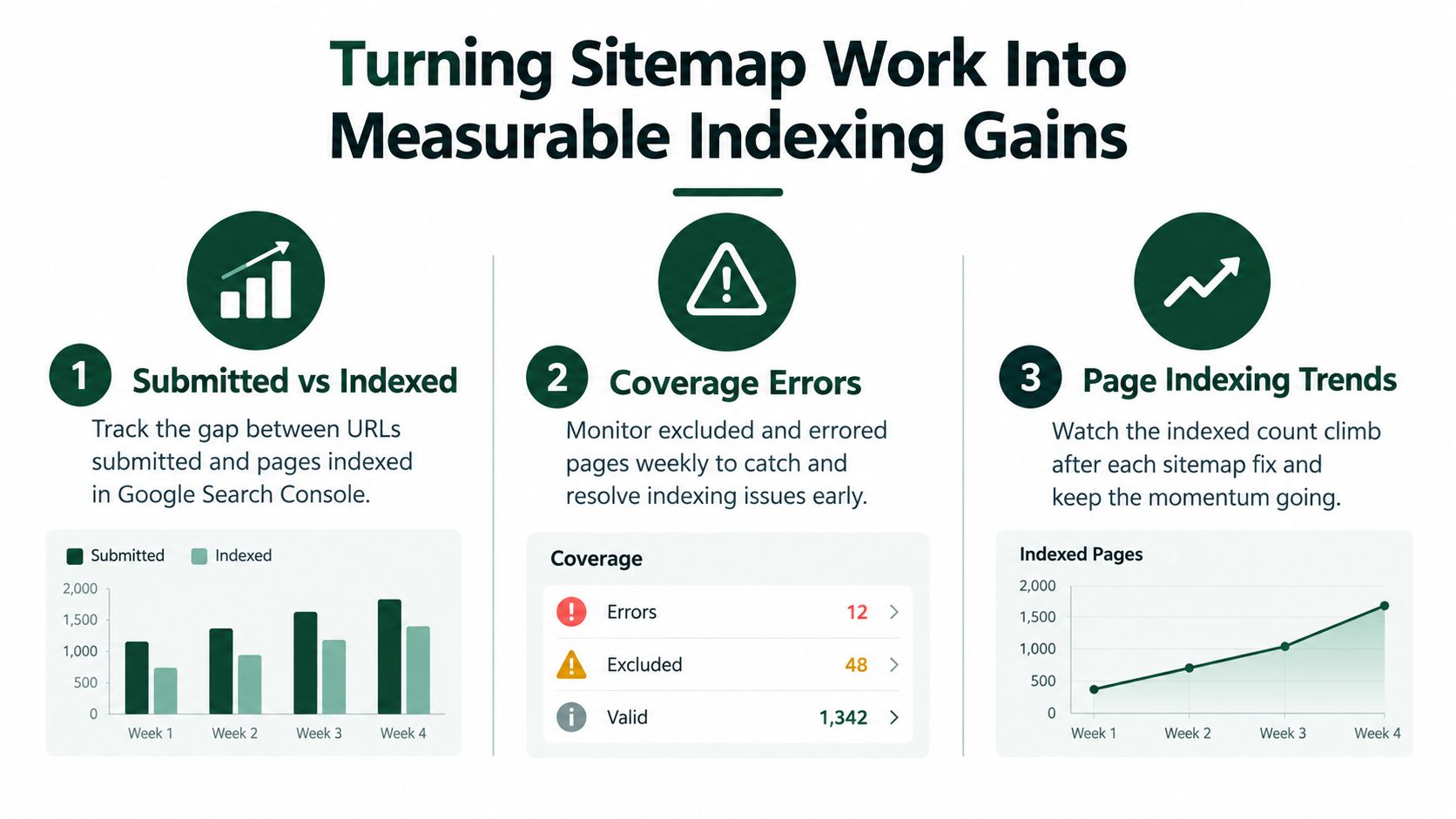
Turning Sitemap Work Into Measurable Indexing Gains
A sitemap earns its place in the SEO stack when it helps you detect and explain indexing change. After a meaningful update or submission, use Search Console as the measurement layer rather than relying on a downloaded-file status.
Track these signals together:
- Submitted versus indexed URLs: Look for a gap that grows without an intentional reason. Segment the comparison by sitemap or content type so a problem in one area doesn't disappear inside the site total.
- Discovered but not indexed pages: Sample these URLs for thin content, duplication, weak internal linking, and unclear canonical signals.
- Duplicate exclusions without the preferred canonical: Confirm whether Google selected a different URL or whether your canonical implementation is inconsistent.
- Soft 404 changes: Watch for a rise after a crawl, particularly following product removals, migrations, or template changes.
The URL Inspection tool can show the last modification information Google has reported for a page. Compare that view with the lastmod value in your sitemap and with the actual content change. A consistent set of signals gives Google a clearer basis for rediscovering updated URLs, while contradictory dates make diagnosis harder.
A practical measurement loop
Use a defined review window after a sitemap correction or substantial content release. Record the submitted set, indexed set, excluded reasons, and representative URL inspection results. Then ask whether the issue is sitemap-related.
- If Google can't fetch the file, fix hosting, response, or XML problems.
- If Google fetches it but excludes many URLs, inspect canonicals, noindex directives, duplication, and content quality.
- If important pages are indexed slowly, improve internal links and page discoverability.
- If the sitemap is clean but crawling remains constrained across a large site, investigate broader crawl and server performance signals.
- If the indexed set is healthy but visibility is weak, move beyond sitemap work into content, intent, and ranking analysis.
The short checklist is straightforward: list canonical indexable URLs, report honest lastmod values, validate the XML, submit it to the correct property, inspect exclusions, and measure the submitted-to-indexed relationship over time. A sitemap won't manufacture rankings, but it can make indexing problems visible early enough to fix.
AutoSEO brings sitemap validation, URL checks, technical SEO tasks, publishing workflows, and indexing measurement into one connected workspace. Use AutoSEO to check your sitemap output, identify indexation gaps, and turn the findings into prioritized SEO actions.