Publishing more product pages isn't SEO for dropshipping. It's often the fastest way to waste it.
The popular advice says import the catalogue, rewrite every description, add a blog, and wait for traffic. That sequence puts the hardest, slowest work first and the decision that matters most last. You don't have an SEO asset because a supplier feed created 800 URLs. You have 800 chances to split crawl attention across near-identical titles, stale prices, and variants nobody searches for.
I would reverse the order. Decide which URLs deserve to be indexed, lock that architecture, rewrite only the products that can pay back the work, and keep price, stock, and shipping accurate after publication. Supplier-copy risk and product-data drift aren't launch tasks. They're operating workflows you run every week, because suppliers keep changing the catalogue underneath you.
Table of Contents
Which Dropshipping URLs Deserve an Index
An imported catalogue is inventory data, not a search strategy. When the same supplier title, specifications, and images appear across many stores, Google can keep one representative version and spend crawl time discovering the rest. Your copy of a generic product page doesn't earn visibility just because it's live.
Start by labeling every URL pattern in the store. Don't write descriptions yet.
Index Decision by Dropshipping URL Type
| URL type |
Index decision |
Content action |
Canonical or redirect |
| Priority product with demand and margin |
Index |
Unique specs, shipping, returns, original images |
Self-referencing canonical |
| Variant with its own search demand |
Index if the query is distinct |
Only the attributes that change the query |
Self or parent via ProductGroup |
| Near-duplicate variant |
Do not index separately |
Fold into the parent page |
Canonical to the parent |
| Facet, sort, search or parameter URL |
Keep out of the index |
No unique copy |
Canonical to the clean category |
| Thin supplier import |
Noindex until it qualifies |
Rewrite only after it enters the priority set |
Exclude from the sitemap |
| Discontinued SKU |
Remove from the index |
Preserve useful internal links |
301 to closest live product or category |
| Language or market version |
Index |
Localized price, shipping and returns |
Self-referencing canonical plus hreflang |
| Use-case or buying guide |
Index |
Original buying advice tied to products |
Self-referencing canonical |
A priority product clears three tests at once. Shoppers search for it in terms you can match, the margin survives shipping and returns, and the supplier holds stock reliably enough that the page won't be stale next week. That product gets a unique URL, original material, and a self-referencing canonical.
Variants need a stricter test. A size, color, or compatibility option earns its own URL only when shoppers search that difference as part of the query. If they don't, the variant belongs on the parent page as a selector, not as a second page with three words changed. Two near-identical URLs don't double your chances. They usually halve the clarity of both.
Practical rule: If you can't write a different search intent for a variant URL in one sentence, it doesn't need its own indexable page.
Facet, sort, internal-search, and parameter URLs are navigation, not landing pages. Shoppers need them to narrow a grid, but Google doesn't need to index every combination of color plus price plus sort order. Keep the clean category indexable and point the filtered versions back to it, or keep them out of the index by your platform's approved method.
Thin supplier imports stay unpublished or noindexed until they qualify. That's not lost opportunity. A noindexed product you can still sell through ads or internal links costs you nothing in crawl terms, while an indexed thin page competes with every other store carrying the same copy.
For a discontinued SKU, don't leave a soft 404 that says the item is gone but returns a success status, and don't send the URL through a chain of redirects. Use a single 301 redirect to the closest live replacement or its parent category. If nothing close exists, let it return a proper gone status instead of redirecting shoppers somewhere irrelevant.
International versions follow the opposite logic. Each language or market version keeps its own self-referencing canonical and a correctly paired hreflang annotation. Don't canonicalize every locale to one default page, because that tells Google the localized price, shipping, and returns pages are duplicates when they're the right result for different shoppers.
Buying guides can be indexed when they answer a use case the product grid can't, such as choosing between materials or checking compatibility. A guide that repeats category copy adds another thin URL. A guide with a decision the shopper has to make before buying earns its place.
Your next step is an export, not a rewrite. Pull every URL pattern from your sitemap, navigation, filters, and internal search, then tag each pattern with one row from the table. If you need the mechanics first, work through how to build a sitemap that lists only canonical URLs before you tag anything. Once every pattern has a row, you know what you're asking Google to index.
How to Lock the Catalogue Before You Scale
Locking the catalogue means freezing the rules for what gets a URL before you add volume. The Shopify enterprise guide to ecommerce technical SEO makes the same foundational point, that you should build an indexation-safe product architecture before publishing at scale, with one canonical URL for each primary product or category and crawl expansion from filter, sort, search, and parameter URLs prevented.
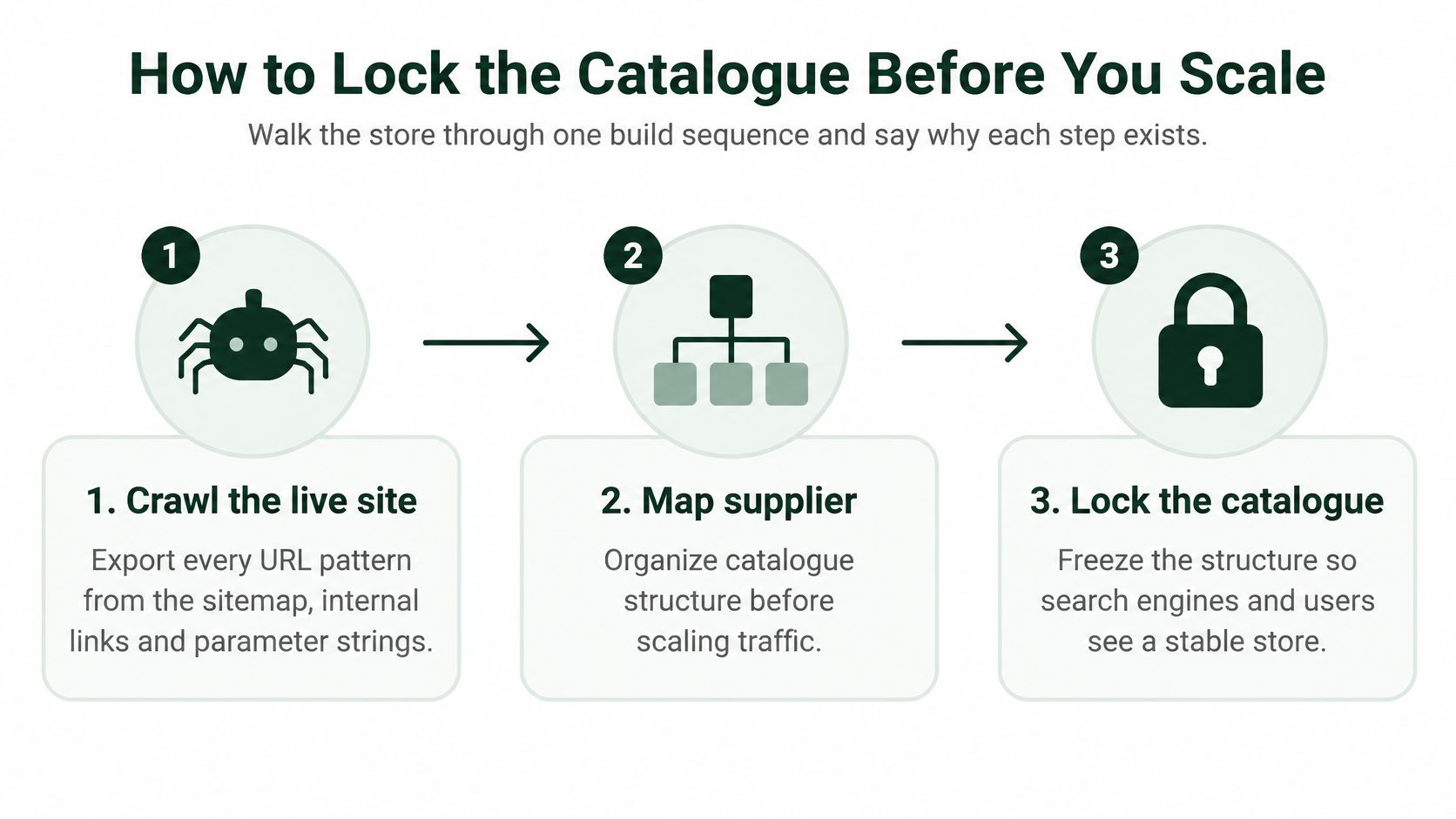
Work through these seven steps in order.
Crawl the live site and export every URL pattern. Use your sitemap, internal links, category navigation, and parameter strings. You're looking for patterns, not individual pages yet. One bad filter pattern can hide thousands of URLs. The failure mode here is auditing only the sitemap, because parameter URLs rarely appear there.
Map supplier items to intent-based landing pages. Don't paste supplier titles into your URL structure. A supplier title stuffed with every attribute doesn't tell you whether shoppers search by size, use case, or compatibility. Map each priority product to the query a buyer types. Skip this and your categories mirror the supplier's warehouse, not shopper language.
Give each primary product and category one canonical URL. Canonicalization tells search engines which similar page you prefer. Duplicate or near-duplicate variants should be consolidated unless they provide substantial unique value. The failure mode is treating the canonical as a cleanup tool for pages you shouldn't have published separately at all.
Stop filters from creating new indexable URLs. Block the expansion from filter, sort, on-site search, and tracking parameters. Faceted navigation can generate large numbers of low-value combinations from a small catalogue. Test this by clicking through your own filters and checking whether each click creates a new crawlable, indexable URL.
Check discontinued products and redirect chains. Confirm that discontinued products return the appropriate status and that redirects go directly to the live target. Chains slow crawlers and shoppers, and they accumulate every time you redirect a page that was itself a redirect target. Deleting unavailable products without preserving useful links or redirect targets is the common pitfall.
Limit the XML sitemap to canonical, indexable URLs. Your sitemap is a statement of what matters. If it lists noindexed imports and parameter URLs, you're asking Google to crawl the pages you just decided don't deserve attention. Link the sitemap URLs internally from categories and guides so they're not orphaned.
Inspect samples in Google Search Console weekly. Check representative URLs from each pattern, then review indexed-page counts and excluded-page reasons. A sudden rise in alternate canonicals or crawled but not indexed pages tells you a pattern is leaking before the whole catalogue drifts.
The International Check
Run this in the same pass, not later. For international dropshipping, use separate self-referencing canonicals plus correctly paired hreflang annotations for market or language versions rather than canonicalizing every locale to one default page. Each market version needs its own localized price, shipping window, and returns terms visible on the page, or the hreflang pair points to a page that doesn't serve that shopper.
Four failures undo all seven steps. A robots.txt block can prevent crawling of pages you want indexed. A stray template-level noindex can remove a whole product type. A login wall or content that only appears after JavaScript the crawler doesn't render can leave Google with an empty page. Validate structured data and confirm that pages aren't blocked by any of these before you blame the content.
A catalogue lock isn't a launch checklist. It's a weekly habit of checking that new imports haven't reopened patterns you closed.
Rewrite Supplier Pages Into Priority Product Pages
A full catalogue rewrite is usually wasted effort. Score products first, then improve the pages that have a realistic chance to earn search traffic and sales.
Google's guidance on duplicate content says duplicate content is not automatically a spam violation or penalty. When pages are substantially similar, Google may select one representative URL. Supplier copy therefore creates a visibility problem: competing stores offer much the same content, and Google may choose another page to show.
Canonical tags are suggestions, not guarantees. Choose which products deserve indexation, make those pages more useful, and consolidate or noindex the rest. Rewriting every imported listing with AI can add thin pages without giving shoppers or search engines a reason to prefer them.
Priority Scoring for Imported Products
| Signal |
Score high when |
Action |
| Search demand |
Real queries match the product name and use case |
Rewrite and index |
| Margin |
Margin still holds after shipping and returns |
Rewrite and index |
| Stock stability |
Supplier keeps stock steady week to week |
Keep in priority set |
| Weak on all three |
Copy adds nothing a shopper cannot get from the supplier |
Noindex or consolidate |
A priority page needs demand, viable margin, and reliable fulfilment. High demand with a margin that vanishes after returns is a poor SEO investment. Stable stock without search demand may still suit existing customers, but it does not belong at the front of the rewrite queue. Start with a manageable batch, then use impressions, clicks, conversion rate, and indexed coverage to decide whether to expand.
What a Priority Page Contains
Build each page around the query's intent, using the principles in this guide to SEO for ecommerce product pages while adding details competitors cannot copy from the same supplier feed.
- Specifications in shopper language: Explain dimensions, materials, and capacity in terms of what buyers need to compare.
- Compatibility and sizing: Include fit guidance, sizing details, and known incompatibilities. Clear limitations help shoppers choose and can reduce avoidable returns.
- Delivery and returns on the page: State the delivery region, a realistic shipping window, returns terms, and any warranty where shoppers make their decision.
- Live stock status: Show availability that reflects what the supplier can fulfil.
- Original images or a demonstration: Use photos that show scale, a tested use case, or a short comparison with close alternatives to add information missing from the feed.
Supplier-copy risk does not end when a page is rewritten. Keep checking whether its details remain distinct and useful as supplier feeds change. Price, stock, and shipping accuracy also need an ongoing process, not a one-time edit.
Mark Up the Page so Google Can Show It
On September 13, 2022, Google announced expanded eligibility for enhanced merchant-listing experiences for websites using Product structured data, including sites without a Google Merchant Center account, in its merchant listings announcement. Product markup can make a page eligible for richer appearances, but it does not guarantee them.
Google distinguishes product snippets, which may show details such as ratings and reviews, from merchant listings, which are designed for pages where customers can buy products. Product structured data may provide price, availability, review ratings, shipping information, and return-policy details to Search, Google Images, and Google Lens.
Use Product or ProductGroup structured data for products and variants. Keep price, availability, identifiers, shipping, and returns consistent with the visible page, as outlined in Google's Product structured data documentation. Google says using page structured data alongside a Merchant Center feed can help maximize eligibility and verify product information. Keep both current rather than treating them as substitutes.
Validate markup with the Rich Results Test, deploy it to a small sample, and inspect those URLs in Search Console. Refresh the sitemap and allow time for recrawling and reindexing before extending the change across the catalogue.
Watch for this: Markup with sold-out stock, stale supplier prices, or variant URLs that duplicate the parent page can undermine the value of a rewrite.
Shoppers need the same commercial facts on the landing page and at checkout. Unexpected shipping costs and delivery times are common reasons for cart abandonment. If the product page sets a different expectation, the checkout exposes the gap too late.
Categories and Filters That Hold the Click
A category page can rank and still lose shoppers. If its filters and product cards don't help visitors narrow the selection, the click has little chance of becoming a purchase.
Baymard's product list usability research reports abandonment rates of 67% to 90% on ecommerce sites with mediocre product-list usability among users trying to find particular products. For comparable product-finding tasks, sites with slightly optimized filtering tools saw abandonment rates of 17% to 33%.
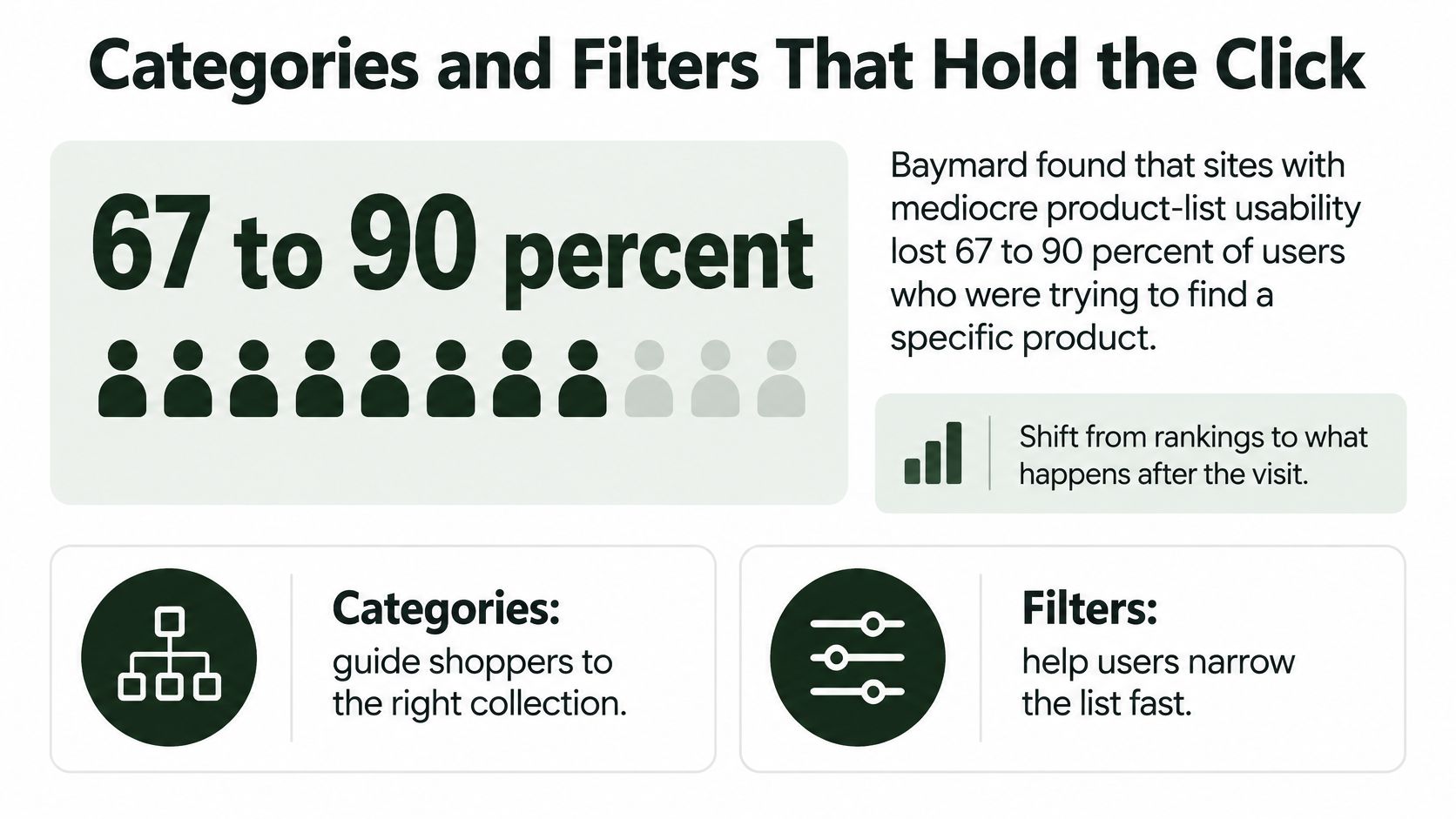
The practical difference is often in the product list, not a full redesign. Shoppers need to see useful distinctions on product cards and filter by the attributes that matter to them.
A shopper looking for a laptop sleeve by size lands on your category page. If the cards omit size, padding, and material, and the only filter is color, the visitor has to open products one by one. The page earned the click but made comparison harder than it needed to be.
Plan keyword targets, category architecture, internal links, filters, and product attributes as one discovery system. If shoppers search by size, material, compatibility, or use case, expose those attributes in the filters and show the most useful distinctions on product cards.
Keep filter controls on the clean category page, while preventing parameter URLs from becoming competing indexable pages. The shopper can narrow the grid; Google can focus on one stable category URL. Link guides and related categories to that clean URL or to a priority product, rather than to filter combinations that can change or disappear.
For a typical imported catalogue, start with:
- Size or dimensions: Help shoppers rule out products that won't fit.
- Color and material: Make visible differences easier to compare.
- Compatibility: Help shoppers avoid choosing an unsuitable product.
- Use case: Support searches from people who know the job, not the product name.
- Sort by price: Offer it as a control, not as a separate indexable page.
Check your top organic landing category on a phone. Can visitors distinguish products above the fold and filter by the attribute in their query without opening each product page? If not, improve the product cards and filters before sending more search traffic to that page.
Keep Price Stock and Shipping in Sync
Your supplier changes a price at midnight. By morning your product page, your structured data, your Merchant Center feed, and your checkout are telling four different stories. Nobody on your team broke anything. The catalogue drifted on its own.
Google's ecommerce documentation for Search emphasizes that product structured data can communicate price, availability, shipping, and review information, while Merchant Center feeds provide another route for Google to understand and display products, and Google recommends using both because they can improve eligibility and help verify product information.
Using both sources raises the stakes on accuracy. When the page and the feed agree, Google has corroboration. When they disagree, you've handed Google a reason to distrust the richer result and handed the shopper a reason to distrust the store. Structured data can't compensate for a shipping promise your supplier won't meet. It can only publish the promise more widely.
Product Data That Must Match Across Surfaces
| Field |
Surfaces that must agree |
What goes wrong when they drift |
| Price and currency |
Product page, Product schema, Merchant Center feed, checkout |
Rich result or cart shows a price the store will not honor |
| Availability |
Product page, schema, feed |
Markup says in stock after the supplier is sold out |
| Shipping cost and transit time |
Product page, schema, checkout |
Shopper discovers the real cost only after add to cart |
| Return policy |
Product page, return-policy markup, policy URL |
Eligibility and the policy page contradict each other |
| Brand, GTIN, MPN |
Schema and feed |
Google cannot tie the page to the right product |
| Review rating |
On-page reviews and review markup |
Imported supplier testimonials are treated as store reviews |
Run the audit on a cadence, not at launch. For a small catalogue, do a full pass weekly and a spot check whenever a supplier sends a feed update. Compare price and currency, availability, shipping cost and transit time, and return rules across the visible page, the markup, the feed, and checkout. Flag any mismatch before the next publish.
Identifiers deserve their own attention. Brand, GTIN, and manufacturer part number help Google interpret catalogue data and connect your page to the right product across commerce surfaces. Supplier feeds often leave these blank or inconsistent between variants, and that gap shows up as products Google can't confidently match.
Reviews need a firm line. Keep ratings that come from real orders on your store, and don't import supplier testimonials into review markup. They aren't your customers, they didn't buy from you, and marking them up as store reviews misrepresents the page. A product with no reviews and honest data is in a better position than one with borrowed stars.
Fewer indexed SKUs with honest stock beat a large catalogue of stale Offers every time.
Finish with an exception list. Description tweaks and image swaps can lag a few hours without hurting anyone. Price and in-stock claims can't. If those fields don't match across surfaces, the page shouldn't stay published as eligible for richer product appearances until they do.
Keep Pages Fast Enough to Hold the Visit
Speed won't rescue a thin page, but a slow product template taxes every SKU that uses it. One heavy theme is reused across hundreds of imported products, so a single unoptimized supplier widget becomes a sitewide problem.
Start with your priority URLs, not the whole catalogue. Check them in the Search Console Core Web Vitals report and PageSpeed Insights, targeting LCP at 2.5 seconds or less, INP at 200 milliseconds or less, and CLS at 0.1 or less. Those are the thresholds your top landing pages should clear before you spend more effort earning them traffic. The detailed fixes behind each metric are covered in the guide on how to improve Core Web Vitals, but dropshipping templates have recurring culprits worth checking first.
Supplier images are usually the biggest one. They're often oversized, uncompressed, and loaded at full resolution into a small product card. Compress them to WebP or AVIF, set explicit width and height so the layout doesn't shift while they load, and lazy-load only images below the fold. Don't lazy-load the main product photo. That's frequently your LCP element, and delaying it delays the metric you're trying to pass.
Then audit third-party scripts.
- Supplier widgets: Stock counters and shipping estimators that phone home on every page load.
- Review apps: Helpful for trust, costly when they inject heavy scripts into every product template, including products with no reviews.
- Chat tools and popups: Often loaded immediately, competing with the product image and the buy button for the shopper's first interaction.
Remove unused theme and app assets from category and product templates. If an app only serves the cart, it shouldn't load on the category grid. If a theme feature is switched off in settings, check whether its code still ships. Disabled in the customizer doesn't always mean absent from the page.
Retest after every theme or app change, and log the results beside your weekly catalogue check. Speed regressions in dropshipping stores rarely come from one big decision. They come from six small app installs nobody retested. A slow grid erodes the clicks and conversions your indexation and content work depends on, so treat the retest as part of publishing, not as a quarterly project.
Publish the Priority Pages on a Schedule
Close the loop with a one-week batch. Pick ten products that already passed the demand, margin, and stock test. Confirm their canonicals, sitemap inclusion, and internal links. Rewrite those ten with the commercial fields the priority pages need, then run the price, stock, and shipping check before they go live.
Publish, then read impressions, clicks, indexed coverage, and revenue on those URLs before adding the next ten. If the first batch isn't getting indexed or clicked, the answer isn't a bigger batch. It's finding out why while the problem is still ten pages wide.
A store that can't staff that loop can hand the same order to software. We built AutoSEO's workflow so Step 2 turns commercial intent, page value, technical blockers and ranking opportunity into a simple publishing schedule, which maps directly onto the priority batch above. Auto SEO researches real search demand, writes content to a 90+ on-page score, and publishes it to the customer's CMS automatically. AutoSEO publishes directly to WordPress including WooCommerce, Shopify, Webflow, Wix, Ghost, BigCommerce and Blogger, and to custom-code sites through its content API, so an approved page isn't pasted by hand.
This is software, not a done-for-you agency, and no tool can promise you a ranking or a revenue number. Your decision is simpler. How big is the next batch, and will a person or a connected CMS workflow ship it?
Start your SEO for dropshipping with the next ten priority products instead of the next ten blog posts. AutoSEO can research the demand, write the pages to a 90+ on-page score, and publish them directly to your Shopify or WooCommerce store on a schedule you approve. Bring your scored product list, connect your store, and ship the first batch this week.