You've published useful articles, cleaned up their titles, and checked Google Search Console. Yet organic traffic is flat, or clicks are falling while impressions hold steady. It's hard to know whether you need better content, a technical fix, or a different way to measure results.
A library isn't much use if nobody can find the books. Your website has the same problem: pages need to be discoverable, trustworthy, and useful at the moment someone needs an answer. SEO content marketing connects those requirements to a business outcome, rather than treating publication as the finish line.
Table of Contents
What SEO Content Marketing Is and Why Quality Beats Volume
SEO content marketing combines audience research, useful content, and search-engine accessibility. You identify what prospective customers search for, publish pages that answer those needs, and help search engines discover and understand them.
The library analogy captures both sides of the job: useful material and a reliable way to find it.

Treat content as a connected loop
A small-business marketer needs a repeatable process, not just an editorial calendar. Each stage should produce something the next person can use.
The six stages of the SEO content marketing loop
| Stage |
Question It Answers |
Output |
Metric |
| Research |
Which queries have demand we can realistically win? |
Prioritized keyword list |
Impressions and search demand |
| Map |
Which URL should answer each query? |
Keyword-to-URL map |
Pages mapped per cluster |
| Brief and produce |
What must the page say to satisfy intent? |
Brief and draft |
Drafts passing the quality gate |
| Publish and link |
Can search engines find, understand and index the page? |
Live page with schema and internal links |
Indexed status |
| Measure |
Did the page earn visibility, clicks or leads? |
Page-level report |
Clicks, CTR and conversions |
| Improve |
What should change next? |
Update queue |
Ranking and citation changes |
These metrics serve different purposes. Mapping coverage and approved drafts measure operational progress; conversions measure business outcomes. Neither substitutes for the other.
Why more pages aren't the answer
Google's original Panda update in February 2011 addressed low-value, duplicate, and thin content, while its 2022 Helpful Content Update targeted content created primarily to manipulate rankings rather than help people, as documented in 4GoodHosting's Google algorithm history.
The practical lesson isn't that long articles automatically win. It's that pages need a reason to exist beyond attracting a search visit. A concise compatibility guide can be more useful than an expansive article that avoids the buyer's actual question.
Practical rule: A stage without an owner or a measurable output is a likely failure point, even when the writing is strong.
List the stages for your own site and assign a metric to each. Mark any stage where nobody can produce the output or explain the result. That's the gap to fix before increasing publication volume.
Mapping Keywords to the Right Content Type
Every keyword expresses an intent, and each URL should serve one primary intent. Before choosing headings or assigning a writer, decide what the searcher needs to accomplish.
Build the keyword-to-URL map
- Export existing queries. In Google Search Console, review queries alongside their landing pages. Keep the page URL, impressions, clicks, and position so you can distinguish existing opportunities from missing coverage.
- Investigate gaps. Use a keyword tool to add estimated demand and difficulty. Treat these as planning signals, not promises of attainable traffic.
- Group by intent. Combine queries when the same page could satisfy their underlying need. Similar wording alone isn't enough.
- Assign a target URL. Give each cluster a designated page, whether that URL exists already or needs creating.
- Choose update or creation. Improve an existing page when its purpose matches. Create another when the searcher needs a genuinely different answer or experience.
A practical keyword research for content marketing workflow helps keep this work tied to publishing decisions rather than an ever-growing spreadsheet.
Match the page to the task
Search intent, content type and success metric
| Search Intent |
Example Query |
Content Type |
Primary Success Metric |
| Informational |
what is seo content marketing |
Guide or explainer |
Impressions, organic clicks and assisted conversions |
| Problem-solving |
why is my blog not getting search traffic |
Troubleshooting article or FAQ |
Clicks and query coverage |
| Commercial investigation |
best seo tools for shopify |
Comparison or buyer's guide |
Clicks and trial or demo starts |
| Transactional |
trail running shoes buy online |
Product or category page |
Add-to-cart rate and purchases |
| Navigational |
[brand] pricing |
Brand or pricing page |
Branded clicks and support deflection |
The metric should reflect the page's job. For a pricing page, support deflection is a secondary check: can visitors find billing, plan, and cancellation answers without contacting your team?
Two mapping errors cause avoidable work. Merging different intents produces pages that explain a topic at length before allowing someone to buy. Splitting the same intent produces near-duplicate articles with no clear reason for a search engine or reader to prefer one.
Consider a B2B project management software company. A query about what sprint planning means belongs to an educational guide. A search for the best project management software for agencies belongs to a comparison page, while a branded pricing query belongs to the pricing page.
Give each query group a clear owner. Then inspect the search results manually to confirm that the proposed format matches what users appear to need.
Writing Content Briefs Writers Can Reuse
A content brief is the agreement between the keyword map and the writer. It explains the reader's problem, the evidence required, and the decision the page should support.
A reusable template reduces interpretation without making every article sound alike. Keep the fields consistent; change the substance for each audience and intent.
Create the reusable template
- Define the searcher. Record the target query, intent, and reader's stage: problem-aware, comparing options, or ready to buy. Add relevant constraints, such as limited technical knowledge or a fixed delivery deadline.
- Write the opening promise. State what the reader should understand or accomplish after using the page. If the promise is vague, the assignment probably is too.
- Collect necessary questions. Use search question boxes, support tickets, sales conversations, and customer language. Prioritize questions that affect a decision, not every related question a tool can generate.
- Specify original evidence. Request a product test, approved customer quotation, current price list, or documented internal analysis. Name who will supply it. Never ask a writer to invent experience.
- Outline the answer. Include the target query naturally in the H1 and use H2s for meaningful subquestions. Let the explanation determine the order rather than copying competing articles' structures.
- Plan useful links. Identify relevant existing pages and proposed anchor wording. Explain why the reader would need each destination.
- Set production requirements. Specify an appropriate schema type, an editorial word range, and the next action. Treat length as a working boundary, not a reason to pad the draft.
For example, a software comparison brief should require supported integrations, eligibility conditions, and explicit evaluation criteria. A general instruction to write an engaging comparison leaves too much unresolved.
Scale the instructions, not just the writing team
In the Content Marketing Institute's 2025 B2B benchmark findings, only 40% of surveyed B2B marketers reported having a scalable model for content creation. Hiring more writers won't resolve missing evidence, unclear intent, or inconsistent approval standards.
A shared SEO content brief template makes those dependencies visible before drafting begins. It also lets an editor distinguish a weak assignment from weak execution.
A brief should remove uncertainty about the job without removing the writer's judgment about how to explain it.
Automation can populate query fields, suggest questions, and assemble an initial outline. A person still needs to verify audience relevance, choose defensible evidence, and reject unsupported claims.
Version the brief alongside the page. When you refresh an article, record the new objective and changed requirements in the same template rather than creating an unrelated assignment. That preserves the reasoning behind previous decisions and makes handoffs easier.
Internal Linking Across Topic Clusters
A topic cluster has a central pillar page and supporting pages. The pillar introduces the broader subject; the supporting pages handle narrower tasks and decisions.
For a payroll software business, the pillar might explain payroll management. Supporting pages could cover payroll calendars, employee onboarding records, and software migration.
Place links where readers need them
Google's Search Essentials guidance emphasizes helpful content, descriptive headings, and crawlable links. In practice, your architecture needs to make related pages accessible through ordinary links, not just a search box or an interactive filter.
- Link within the explanation. Place the link where someone needs the next answer, rather than adding an unrelated collection at the bottom.
- Connect supporting pages to the pillar. Give readers a route back to the broader topic.
- Maintain the pillar. Add relevant new supporting pages so older, established content provides discovery paths.
- Use descriptive anchors. Internal linking checklist tells readers more than click here. Adjust the wording naturally instead of forcing an identical keyword into every sentence.
A focused SEO internal linking workflow can help you find missing connections before you commission more content.
Diagnose structural problems
Orphan pages have no inbound internal links. A sitemap can expose a URL, but it doesn't provide readers with a useful route to it or explain its relationship to other content.
Pages targeting the same need require a different decision. Merge redundant material and redirect retired URLs when appropriate. Use canonical tags for duplicate or near-identical versions that must remain accessible, not as a substitute for resolving conflicting editorial purposes.
Excessive linking is usually an editorial problem, not a reason to chase a universal numerical limit. If every phrase sends the reader elsewhere, the main task becomes difficult to follow.
Before commissioning: Check whether an existing page is missing an answer, a useful internal link, or both.
List your clusters and inspect inbound links to their pages. Fix disconnected pages before adding another spoke that readers and crawlers may struggle to reach.
Publishing With Schema and an Approval Gate
A strong draft can still become a broken published page. Templates, plugins, and deployment settings can introduce problems that aren't visible in a document editor.
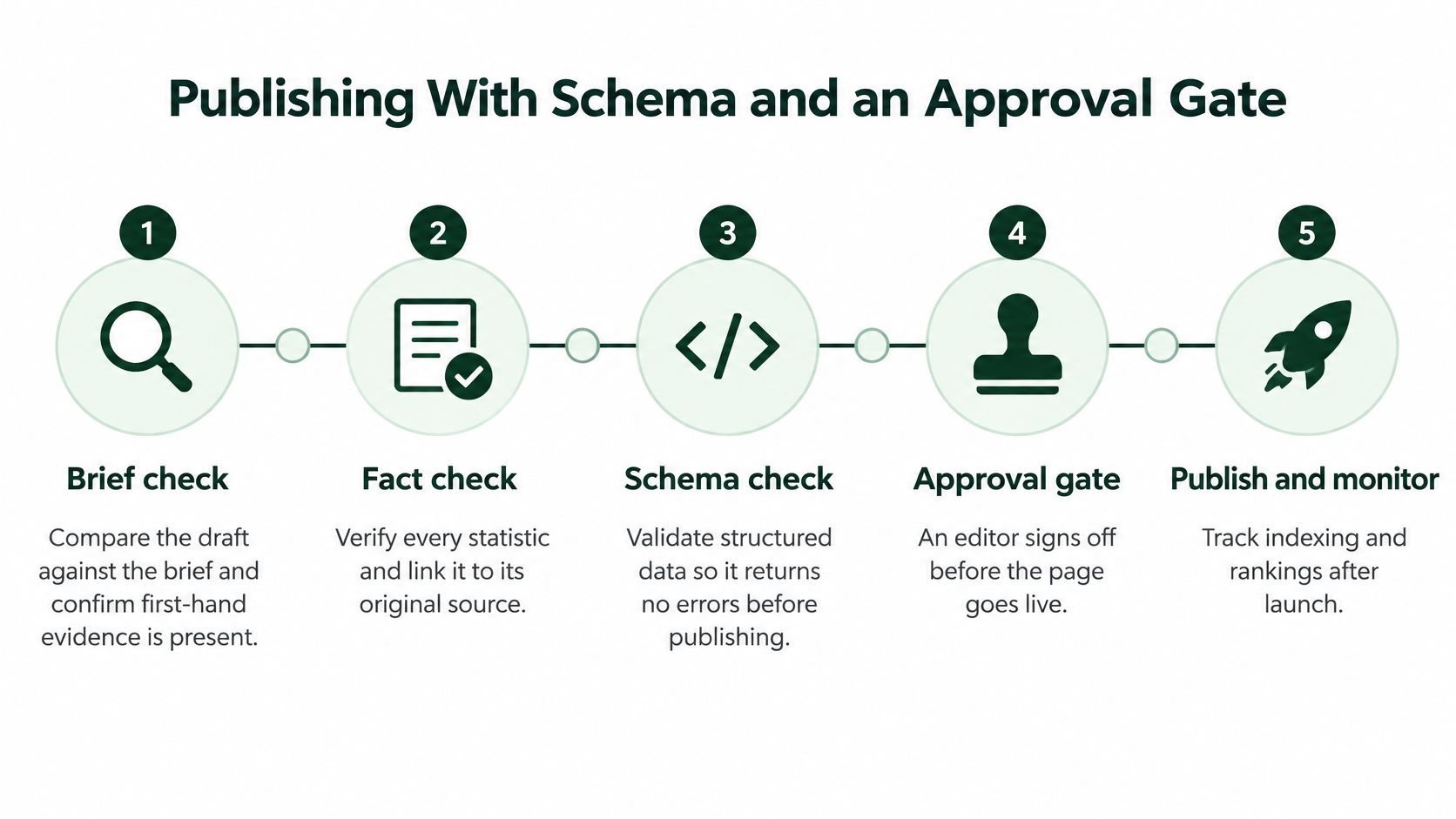
Use a publishing gate that checks both the content and its implementation.
Check the final page, not just the draft
- Compare the draft with its assignment. Confirm that required evidence is present, sources support the claims, and the page answers its intent without excessive navigation. Reject competitor paraphrases that add no useful information.
- Review titles and headings. Write a descriptive title, meta description, and H1 that accurately represent the page. Avoid promises the content can't fulfill.
- Generate appropriate structured data. Build markup from the final page content, not an outline that may have changed. Don't assume every editorial format qualifies for a search feature.
- Validate the implementation. Run Google's Rich Results Test for applicable markup. Use URL Inspection to investigate how Google can access and process the URL.
- Check indexability and canonicalization. Confirm the preferred URL is correct, the page isn't unintentionally blocked by robots.txt, and no accidental noindex directive remains. A canonical pointing to a staging address can undermine the release.
- Compare JSON-LD with visible content. Check author information, dates, prices, and product attributes. Stale Product markup is particularly easy to miss when inventory systems and editorial templates update separately.
- Release a controlled batch. Inspect the live pages before extending the workflow across the site. This limits the reach of a template mistake.
- Monitor after publication. Watch indexed status, URL-level impressions, clicks, and search appearance. Investigate unexpected changes before approving another batch.
Understand what schema can and can't do
Structured data describes page entities and attributes in a machine-readable format. Google's structured data documentation recommends JSON-LD and requires markup to reflect visible content, satisfy applicable requirements, and remain accurate.
Valid markup can support eligibility for relevant rich results. It doesn't guarantee that Google will display them, and it isn't a guaranteed ranking boost.
Treat validation errors and content mismatches differently. An error may prevent processing; technically valid markup can still be misleading if it describes information users can't see. Human review needs to catch both.
CMS integrations for Shopify, WordPress, Webflow, and Wix can carry titles, metadata, and structured fields into publishing templates. Confirm what your integration supports, especially when plugins also generate schema. Keep final approval with someone who can inspect the rendered page and stop publication.
Earning AI Citations With Verifiable Assets
AI answers can reuse only what they can check. FAQs and schema can package an answer, but the page still needs proof behind the claim: a spec, a test method, a price, a policy, or a named owner.
A study of AI and traditional search results found that displayed references varied by country, topic, and query style. Treat that as a reason to test whether your pages are being cited; formatting alone still leaves the source unsupported.
Evidence has to come from somewhere beyond polished prose.

Build assets someone can verify
Useful source material includes current product specifications, comparisons with stated criteria, documented test results, pricing, and clear policies. Identify the people and business responsible for those claims so a reader, or an AI system, can see who stands behind the page.
Separate the outcomes you're pursuing. A mention names your business; a citation attributes information to a source page. A click brings someone to your site, while purchase influence may happen without an observable visit.
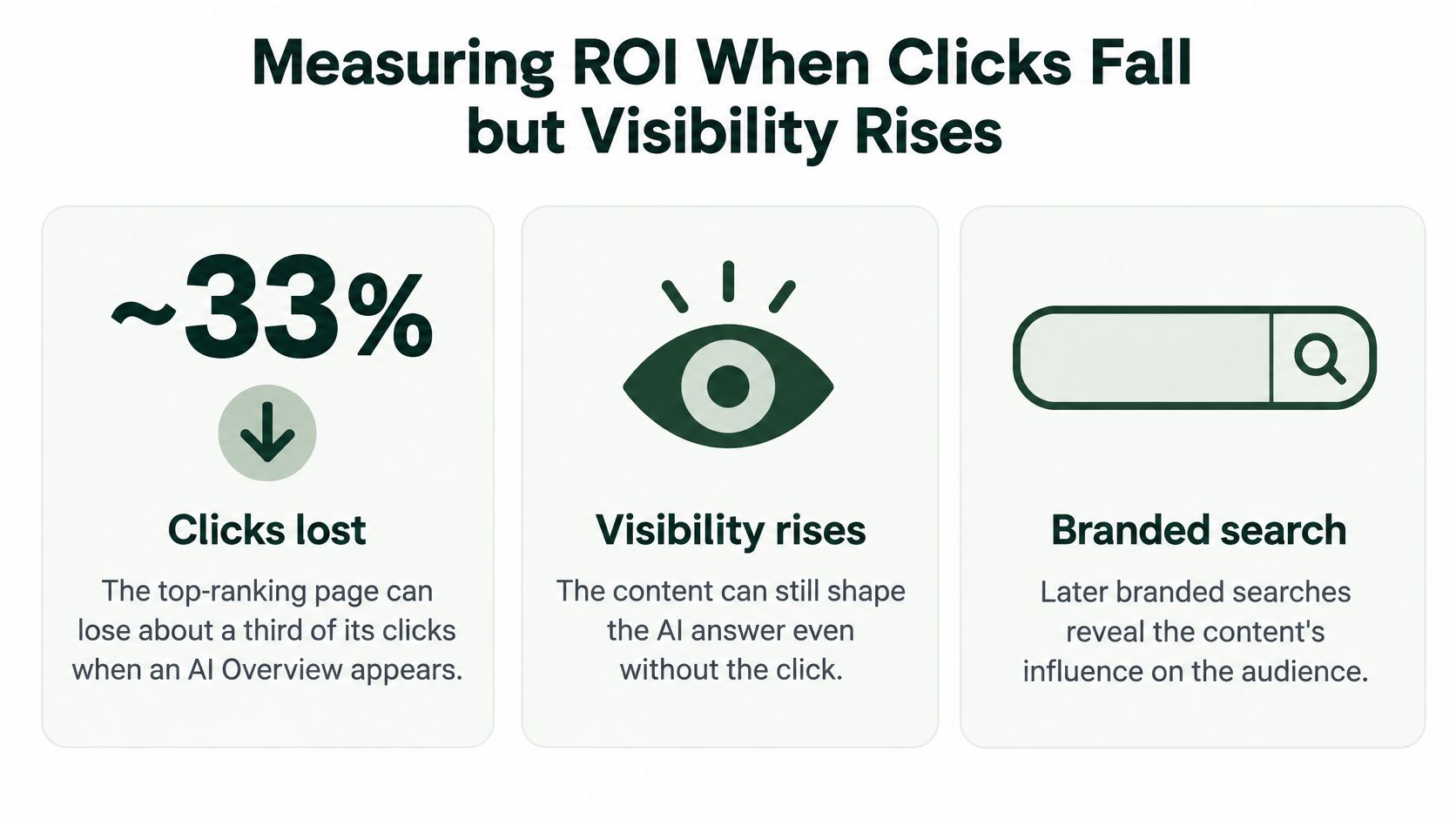
That distinction changes the diagnosis when traffic moves. Citation work needs a measurement model beyond referral traffic, because AI Overviews can reduce clicks even for pages that rank at the top. Keep visibility, AI citations, assisted conversions, and branded demand as separate signals so a click drop after an AI answer is read as a shift in where the answer was consumed, not automatically as an SEO failure.
Audit factual completeness
- Freshness: Show a last-updated date on specification pages when it reflects a substantive review.
- Attribution: Link statistics to their original sources and explain how original tests were conducted.
- Identity: Include meaningful author and company information.
- Completeness: Publish dimensions, compatibility, limitations, availability conditions, and other decision-critical attributes.
- Consistency: Reconcile product facts across your website, feeds, and marketplace listings.
Customer records need permission and privacy checks before they become public evidence. Aggregate findings when individual details aren't necessary.
An llms.txt file is a plain-text guide pointing AI tools toward selected pages. Treat it as an optional discovery aid, not an established ranking input or a prerequisite for citations. Maintain the underlying pages first.
Check robots.txt separately for the AI crawlers you intend to allow. Search retrieval and model-training access can involve different user agents, so review the relevant crawler documentation rather than broadly opening or blocking everything.
Measuring ROI When Clicks Fall but Visibility Rises
Your guide still appears in search, and an AI answer cites it, but visits have fallen. That's a different diagnosis from a page disappearing from results.
A lost click isn't automatically a lost customer. Equally, a citation isn't proof of revenue. Keep both possibilities visible rather than replacing a traffic-only dashboard with an equally incomplete visibility-only dashboard.
The graphic illustrates the distinction, not a guaranteed outcome for your site.
Separate evidence from attribution
Metrics that separate visibility, citation and revenue
| Metric |
Source |
What It Proves |
Review Cadence |
| Impressions by page and query |
Google Search Console |
Visibility in search results |
Weekly |
| Organic clicks and CTR |
Google Search Console |
Traffic earned from results |
Weekly |
| AI citations and mentions |
AI-visibility tracking across ChatGPT, Perplexity and Google AI Overviews |
Presence in sampled AI answers |
Monthly |
| Branded search volume |
Google Search Console |
Branded search activity, a proxy for demand |
Monthly |
| Assisted conversions |
Google Analytics 4 |
Observed content touchpoints before purchase |
Monthly |
| Leads or revenue per cluster |
CRM or store analytics |
Attributed business value of the cluster |
Monthly |
Search Console reports impressions for branded queries, not total market search volume. Growth can indicate stronger demand, but advertising, publicity, and customer activity may also contribute.
Likewise, GA4 can only describe journeys it observes. Consent choices, device changes, and visits that never happen create attribution gaps. Sampled AI tracking also depends on prompt wording, location, and the answer generated.
Use the pattern to choose the action
- Clicks and impressions fall: Investigate indexing, rankings, query demand, and competing pages.
- Impressions hold but CTR falls: Inspect result layouts, titles, intent alignment, and AI-answer presence. Don't assume the content has stopped helping.
- Citations persist: Check branded queries, assisted conversions, and customer-reported discovery before cutting the page.
- Traffic is healthy but orders are weak: Verify conversion tracking, then inspect product availability, page usability, and offer clarity.
Falling impressions aren't required for an SEO problem. A misleading title or poor intent match can reduce valuable clicks while visibility remains stable.
Review commercial and product pages separately from educational guides. Refresh stale facts, create comparisons for comparison-led searches, and improve eligible markup when search presentation is the issue.
For a complementary discussion of search visibility, watch the video below.
Finish each monthly cluster report with a decision and owner. Include content production, software, and review costs when assessing return, and don't count the same sale repeatedly across assisted and final-touch reports.
Running Refreshes and Client Workflows
An existing page with relevant impressions deserves inspection before you commission its replacement. It may need corrected information or a clearer answer rather than a new URL.
Refreshes still require prioritization. A page that no longer supports your audience or offer may deserve consolidation or retirement instead.
Run a manageable refresh queue
- Sort clusters by lost impressions. Compare recent performance with an appropriate previous period and check seasonality before assigning work.
- Name the owner. Reuse the original brief template with a new version and a specific reason for the update.
- Correct facts first. Replace stale prices, screenshots, specifications, and unsupported claims. Then address unanswered questions visible in query and customer feedback.
- Return to approval. Run publishing checks again, particularly when changing templates, products, or structured fields.
- Log the release. Record the change date, affected sections, and expected outcome so reviewers can interpret subsequent performance.
Choose a monthly workload your team can complete, including evidence collection and approval. Reserve capacity for urgent corrections rather than filling the entire calendar with planned updates.
Keep client work separate
For agencies, maintain the correct Search Console property, brief library, access permissions, and reporting views for each client. A shared production queue can coordinate work, but the account lead should confirm business facts and approval authority.
- Separate credentials: Use client-specific access rather than shared logins.
- Track dependencies: Mark work waiting for legal, product, or customer approval.
- Record exceptions: Document any client request that departs from the usual publishing standard.
Avoid batch rewriting merely to make pages appear fresh. Similar automated edits can remove useful distinctions, introduce repeated passages, and make the effects difficult to diagnose.
Publish changes because you can name the problem they solve. Then leave a record clear enough for someone else to evaluate the result.
Start With One Cluster in the Next 90 Days
Consider a hypothetical Shopify store selling trail running shoes. It has a substantial catalog and an uneven collection of blog posts, but organic traffic has been flat. The marketer doesn't need to rebuild the entire site to test a better process.
A focused wet-weather trail-shoe cluster would connect product expertise to a clear buying decision. The exercise below is a proposed schedule, not a forecast of ranking gains.
Begin with a bounded project
- Opening fortnight: Export Search Console queries and compare candidate topics. Choose wet-weather trail shoes if the store has relevant impressions, suitable inventory, and credible advice to offer.
- Following fortnight: Prepare a guide, comparisons, and category-page updates. Give each a distinct intent and request evidence such as documented fit checks, outsole observations, or current product information.
- Middle of the project: Publish approved pages, inspect their live implementation, and connect supporting content to the appropriate hub. Check that shoppers can move from advice to a suitable product without repeating their search.
- Closing weeks: Review cluster impressions, clicks, assisted orders, and sampled AI citations. Investigate weak points before deciding whether to expand.
A comparison page might help a runner choose between waterproof protection and faster drainage. The category page should then make matching products easy to identify. Those are related jobs, but they don't require identical content.
Decide what deserves expansion
Continue when the cluster attracts relevant attention and helps shoppers make progress. Revise when queries reveal a mismatch, and pause expansion when the store can't supply accurate evidence or maintain product details.
AutoSEO is one option for connecting keyword research, briefs, content generation, CMS publishing, and visibility tracking through an approval-first workflow; a spreadsheet, your CMS, and separate analytics tools can also support the process.
Your next step is deliberately small: choose a cluster, assign its URLs, prepare the briefs, and book a monthly review. Keep a person responsible for the claims you publish and the decisions you make from the results.
AutoSEO connects keyword research, content production, technical checks, publishing, and performance monitoring in a shared workflow. Visit AutoSEO to explore an approval-first way to manage SEO content marketing while keeping human review over evidence, usefulness, and publication.