A writer is waiting in Slack. The deadline is today. The doc they got says “Topic: SEO content brief,” plus a rough outline and a note to “make it rank.” No target query. No intent call. No clue whether this should update an existing URL or become a new page.
That's how teams burn time.
A usable SEO content brief removes guesswork before drafting starts. It tells the writer what the page needs to do, what the search results already reward, what must appear on the page, and what would make the draft fail review. The difference between a brief that helps and a brief that slows production isn't length. It's whether the brief behaves like an operational document people can execute against.
SEO platforms formalized “topic to brief” workflows by at least 2021, which helped turn the brief into a standard handoff artifact rather than an optional planning note, as described in Frase's overview of SEO research workflows. That shift matters. A brief is no longer something you create to look organized. It exists so research decisions are made once, upstream, instead of repeatedly by the writer, editor, and SEO reviewer later.
Table of Contents
What an SEO Content Brief Actually Does
A writer gets the assignment at 10 a.m. Draft due by end of day. By noon, they are still deciding what the page is supposed to be. A definition post, a product-led guide, or a refresh of an older URL that already ranks on page two. That stall usually gets blamed on the writer. In practice, it starts with a weak brief.
An SEO content brief is the production document that settles those decisions before drafting starts. It turns research into instructions a writer, editor, and reviewer can all execute against. Frase describes the upstream research part of that workflow well in its overview of SEO research workflows, but the brief only becomes useful when it carries operational decisions, not just notes from SERP review.
The teams that ship cleanly use the brief to answer three production questions up front:
- What query cluster is this page responsible for
- Should this become a new URL or improve an existing one
- What has to be present for the draft to pass review and move to publish
That second question gets skipped too often. I see briefs that tell a writer to cover a topic without stating whether the site already has a page that should absorb the demand. That creates duplicate targeting, internal competition, and messy revision cycles after the draft is already written.
A usable brief also defines the output in terms a production team can check. Required sections. Required entities. Answer targets that can be quoted or extracted cleanly by search features and AI systems. CTA type. On-page assets. Reviewer expectations. If those calls are missing, the writer fills the gap with assumptions, and the editor ends up doing strategy during copy review.
The brief is a production artifact
Treat the brief like a handoff document with acceptance criteria.
Writers do not need a long theory lesson on SEO. They need to know what they are building, what signals matter on this page, and what will send the draft back for revision. Editors need the same document to judge fit. SEO reviewers need it to confirm the page matches the search task it was assigned to handle.
That is why good briefs are specific about constraints. If the page needs a concise definition in the first screenful, say so. If the page needs comparison tables, original examples, or a short answer block that can stand alone in a citation, include that requirement. If the page must avoid overlap with an existing article, name the URL and explain the boundary.
Practical rule: If two experienced writers could read the brief and produce different page types or different intents, the brief is not ready.
What the brief should lock before writing starts
A solid brief reduces downstream decisions. It does not push them into editing.
That means the document should lock the page goal, the angle, the update-versus-create decision, the mandatory coverage, and the pass-fail criteria for review. It should also capture the production details that keep work moving, including who approves the draft, what can be published without another SEO pass, and which elements can be generated or validated automatically in the handoff to CMS.
ThatDevPro's content brief framework is useful here because it treats the brief as more than an outline. That is the right standard. A brief should reduce rework, prevent avoidable intent mistakes, and make approval faster because the review criteria were decided before anyone wrote the first paragraph.
Vague briefs create slow drafts. Precise briefs create predictable production.
Required Fields Every SEO Content Brief Needs
Most templates are padded with fields nobody uses. Writers skip vanity notes and generic SEO advice. They use the parts that affect what goes on the page.
The broader content environment is one reason briefs now need more specificity. Industry summaries of 2025 content-marketing survey data reported an average blog post length of 1,333 words, and listed guides, ebooks, webinars, and roundups among the most effective formats at 27%, 26%, and 26% respectively. The same summary reported that 88% of marketers used images, 60% used statistics, 45% used contributor quotes, and 26% embedded videos. It also cited a content analysis where articles over 2,000 words earned 77% more backlinks than shorter articles. Those patterns are why modern briefs often define depth, evidence, and media requirements instead of stopping at a keyword, according to this content and SEO statistics roundup.
The fields that actually matter
Use these every time:
- Intent call. Informational, commercial, or transactional. Pick one primary job.
- Primary keyword. The main query this page is built around.
- Secondary entities and question targets. Not a random keyword dump. Terms and questions that shape coverage.
- Title tag and meta description suggestions. Give writers a direction, not just “SEO title TBD.”
- Word count range. A range tied to the SERP, not a round vanity number.
- SERP archetype. What's currently ranking: comparisons, tutorials, category pages, listicles, product pages.
- Required H2 structure. The minimum skeleton.
- Must-cover subtopics. Specific omissions that would weaken relevance.
- Internal links. Include target URL and suggested anchor text.
- External sources. The sources the draft should cite or review.
- Schema type. Article, FAQPage, HowTo, or another applicable type.
- Media requirements. Screenshots, tables, diagrams, video embeds.
- CTA. What action the page should drive.
| Field |
Lazy Input |
Useful Input |
| Intent |
“SEO article” |
“Commercial investigation. Reader is comparing tools and wants selection criteria before trial or purchase.” |
| Primary keyword |
“content brief” |
“SEO content brief” |
| Secondary entities |
“related keywords” |
“search intent, SERP analysis, internal links, schema, content outline, topical coverage” |
| Question targets |
“add FAQs” |
“What is an SEO content brief? How detailed should an SEO brief be? When should you update an existing page instead of creating a new one?” |
| Title tag |
“Write an SEO title” |
“SEO Content Brief Template for Faster, Better Drafts” |
| Meta description |
“Make it compelling” |
“Learn how to build an SEO content brief that gives writers clear intent, structure, links, and publish-ready requirements.” |
| Word count |
“2,000 words” |
“Use a range based on current ranking pages and the coverage needed for this intent.” |
| Outline |
“Intro, tips, conclusion” |
“Define the brief, list required fields, show template, explain create vs update, add AI-search fields.” |
| Internal links |
“Link relevant pages” |
“Link to /blog/content-audit with anchor ‘content audit process' and /blog/schema-guide with anchor ‘schema markup guide'.” |
| External sources |
“Use good sources” |
“Review current documentation, official product pages, and named references that support citable claims.” |
| Schema |
“Add schema” |
“Use Article schema. Add FAQPage only if the final draft contains standalone Q&A blocks.” |
| CTA |
“Mention product” |
“Invite the reader to use the template or book a workflow review.” |
Two fields teams still skip
First, the audience definition. Not “marketers.” State the actual reader and their job to be done.
Second, the failure condition. What makes the draft unusable? Wrong intent, weak coverage, no internal links, no answer-first blocks, unsupported claims. If that isn't in the brief, reviewers invent standards later.
The fastest way to create revision churn is to brief a topic and leave the page's job undefined.
A Brief Template and a Worked Example
A practical workflow is to review the top 5 ranking pages, record their word count, heading depth, and subtopic coverage, then map 7 to 10 subtopics into a gap matrix. That same workflow warns against copying outline length without matching intent, and recommends including 3 to 5 must-cite external sources, explicit internal-link targets, and a benchmark based on the strongest ranking page, as outlined in SEO Syrup's data-driven brief process.
Here's the format I'd hand to a writer:

Copy-ready template
- Primary keyword
- Intent
- Audience
- Create, update, or consolidate
- SERP archetype
- Primary angle
- Target word count range
- Suggested title tag
- Suggested meta description
- Required H2s
- Required subtopics
- Question targets
- Internal links with anchor text
- External sources to review
- Schema
- Media requirements
- CTA
- Acceptance criteria
- Owner and reviewer
If you want more examples to compare against your own process, this collection of content brief examples is useful because it shows how the structure changes by intent.
Worked example one
For “shopify email capture app”, the brief should be transactional or late-stage commercial. The SERP usually pushes the page toward solution evaluation, app discovery, features, integrations, and setup friction. The CTA should send the reader to a product page, app listing, or demo.
That means the brief should ask for comparison blocks, pricing context if available on source pages, setup screenshots, integration notes, and stronger buyer-oriented internal links. Schema is usually Article unless the final draft becomes a tightly structured comparison or review format that warrants something more specific.
A template is only useful if the team can see how the fields change in practice. This walkthrough makes that easier:
Worked example two
For “ahrefs vs semrush”, the brief changes immediately. This is a side-by-side comparison query. The reader expects trade-offs, use cases, feature differences, and a recommendation by scenario, not a generic “what is SEO software” explainer.
So the brief needs a comparison table, category-by-category evaluation criteria, “best for” sections, and a softer CTA that respects comparison intent. Internal links should point to adjacent cluster pages such as keyword research guides, rank tracking pages, or tool alternatives. If you brief both examples the same way, one of them will miss intent.
When to Create a New Page Versus Update an Existing One
This is the most expensive call a brief makes.
A lot of teams assume every target keyword deserves a new page. That's how they end up with overlapping posts, weak internal competition, and a content library full of near-duplicates. A stronger brief decides whether the job is create, update, consolidate, or ignore.
Recent content-gap guidance has pushed this further by treating intent, freshness, and format as different gap types, and by asking briefs to record not only the audience and search task but also why the current site fails and whether the right action is create, update, consolidate, or ignore, as described in Briefiq's article on SEO content gaps.
The decision matrix
| Criteria |
Create New |
Update Existing |
Consolidate |
| Intent match |
No current page serves the search task |
Existing page matches the task but is stale or thin |
Several pages partly serve the same task |
| Ranking ceiling |
Current URL can't realistically cover the needed format |
URL has relevance but needs stronger depth or structure |
Signals are split across overlapping URLs |
| Consolidation upside |
Low, because topic is net-new |
Moderate, if one page already has traction |
High, because merging removes cannibalization |
| Link equity cost |
Worth paying for a new URL |
Lower cost than starting over |
Best option when multiple weak pages compete |
Two common scenarios
A decaying how-to post usually deserves an update if the intent still matches. Rewrite the opening, rebuild the outline around current SERP expectations, refresh examples, and fix internal links. Don't create “how to do X in 2026” if the old URL can still own the topic.
A competing comparison page often needs consolidation. If you already have “Tool A vs Tool B,” “Tool B alternative,” and a broad alternatives roundup all stepping on the same query family, a fresh page can make the problem worse. Merge where possible, redirect intentionally, and rewrite the surviving page around the clearest search task.
If two pages on your site answer the same buyer question with slightly different titles, the brief should start by asking which one deserves to live.
A simple rule
Create new pages when the audience task is different. Update pages when the task is the same but execution is weak. Consolidate when multiple URLs split relevance around one task.
Adapting Briefs for AI Search and Citation Visibility
Older templates were built for blue-link rankings. They don't fully account for AI Overviews, assistant answers, or citation-style retrieval.
Guidance for 2026 has expanded the brief with fields many teams still skip: citable claims with sources, primary entities, structured-answer pairs, target snippets for AI Overviews, internal-link anchor inventory, schema directives, and freshness signals. The same guidance recommends answer-first blocks, explicit entity mapping, and passage-level structure so content is easier for AI systems to quote or summarize, according to Seomytics' template guidance for AI search.
The add-on block I'd append to any brief
Add this under your standard brief:
- Direct-answer opening line
- Extractable answer units for each H2
- Citable claims and named sources
- Primary entities and related entities
- Structured Q&A pairs
- Snippet targets
- Freshness-sensitive statements
- Quotable paragraphs versus contextual paragraphs
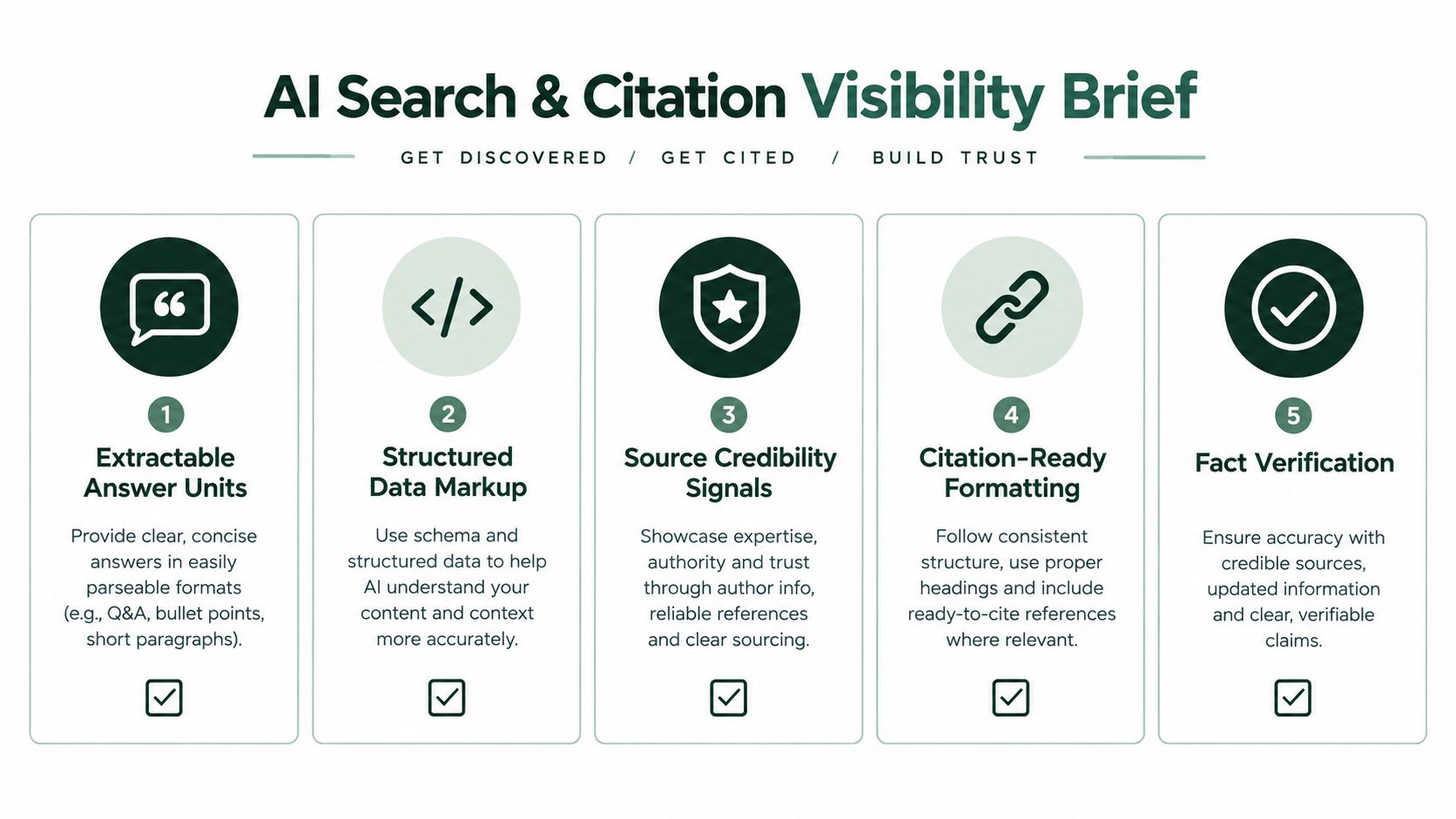
If you're tracking whether those fields translate into actual assistant mentions, these AI visibility tracking tools help frame what to monitor after publish.
For each section, write the one-sentence answer you want a machine to lift cleanly.
Example:
- H2: “When should you update an SEO page instead of creating a new one?”
- Extractable answer unit: “Update an existing page when it already matches the search task and only needs fresher information, stronger structure, or better coverage.”
That sentence gives the writer a target. It also forces clarity.
What makes a paragraph citable
A citable paragraph is compact, factual, and anchored to a named source when needed. A contextual paragraph can be looser, more interpretive, and more brand-led. Briefs should distinguish the two so writers don't bury the answer in scene-setting.
A page can rank and still be hard to quote. Those are different optimization problems.
The practical change is small. Keep the human title. Add a direct-answer line near the top. Require clean Q&A blocks where the query suggests them. Mark the claims that need sourcing before the draft starts.
Approvals, Handoff, and the Path to Publish
Most content delays don't happen during writing. They happen after the draft is “done.”
That's because the handoff is usually informal. Someone drops a brief in Slack, the writer drafts, the editor comments, SEO adds notes late, and the CMS step becomes a separate mini-project. A better workflow names owners and triggers before anyone writes.
The review chain
Use a fixed chain with clear scope:
- SEO lead approves the brief. They own intent, keyword targeting, internal-link plan, and SERP fit.
- Editor reviews the structure before or during drafting. They own clarity, flow, and whether the outline is executable.
- Subject reviewer checks factual accuracy and unsupported claims.
- Publisher or content ops owner handles CMS entry, schema application, canonical checks, and scheduling.
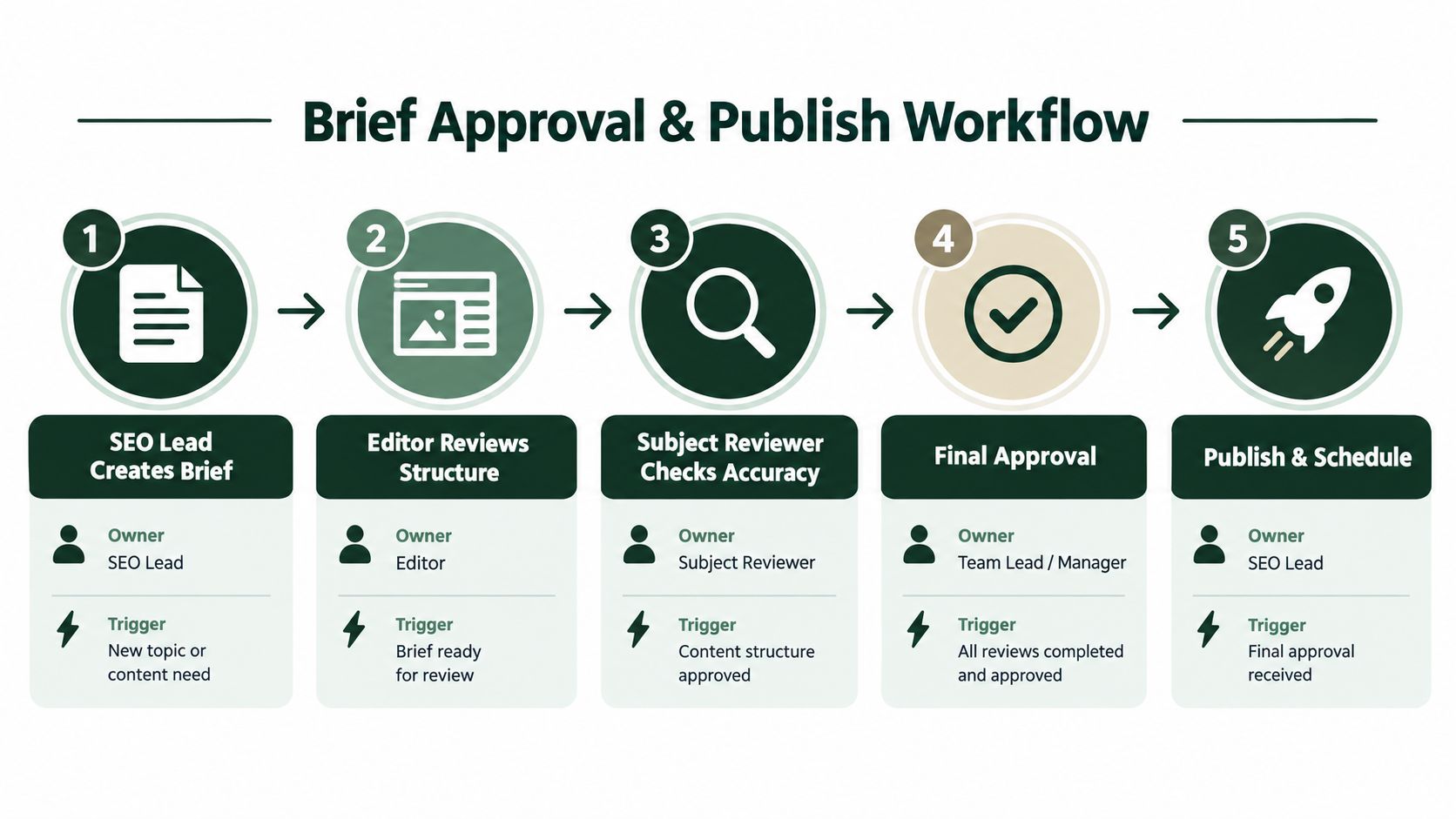
If your team publishes through WordPress, this guide on how to publish a WordPress site is a useful reference point for the final handoff side of the workflow.
What triggers a re-brief
Not every issue is an edit.
A missing internal link or weak intro is an editorial fix. A wrong intent call, a page type mismatch, or a decision that the topic should have updated an existing URL instead of launching a new one requires a re-brief. Teams waste a lot of time trying to patch strategic errors inside copy edits.
The pre-draft asset checklist
Before writing starts, the brief should already include:
- Target URL plan if known
- Competitor URLs reviewed
- Internal link targets
- Schema type
- CTA destination
- Media requirements
- Reviewer names
- Publish channel
When those are missing, writers stall or fill the gaps themselves. Neither outcome is efficient.
Publish-side discipline
Publishing needs its own checklist. Someone has to add schema, confirm the canonical, check internal links in the live environment, and log the page into whatever system tracks outcomes. Otherwise the next brief gets built on memory instead of evidence.
Automating Briefs and Publishing at Scale
Automation helps most when it removes repetitive decisions, not when it tries to replace every editorial judgment.
The cleanest setup maps each stage to three things: trigger, input, output. A keyword list triggers brief generation. SERP data, site data, and existing URLs act as inputs. The output is an approved brief, then a draft, then a publish-ready page package.
What should be automated
These steps are good candidates:
- Brief generation from keyword sets using SERP parsing, intent classification, and outline extraction
- Internal-link suggestions pulled from your existing content graph
- Draft assembly that inserts approved titles, metadata, links, schema, and outline blocks into the CMS
- Pre-publish QA for word-count range, missing links, metadata presence, schema presence, and media checks
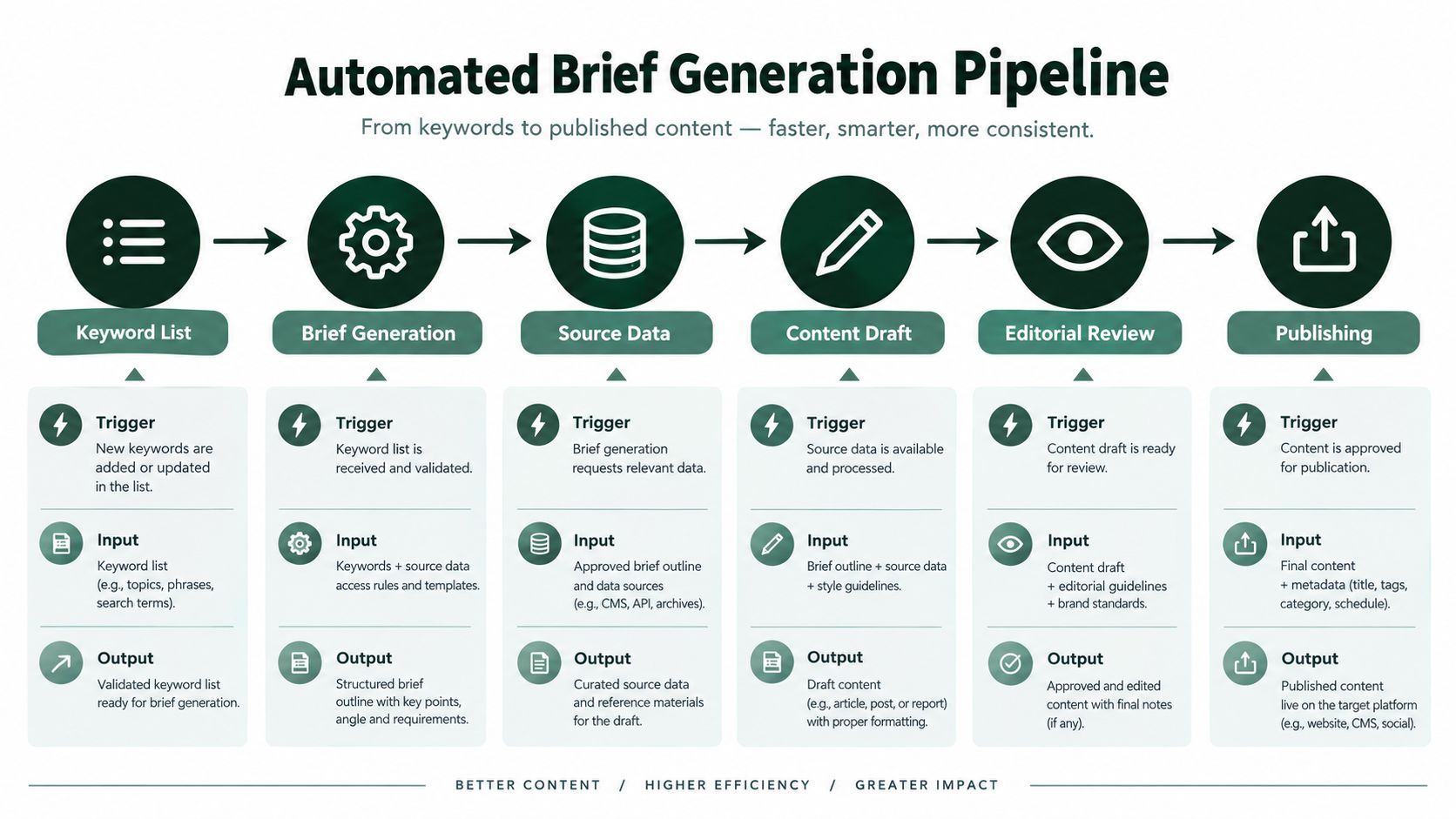
One option in this category is AutoSEO, which connects keyword research, brief generation, content production, publishing, technical fixes, and measurement in one workflow. The practical value is that the brief doesn't live in isolation from the URL, schema, internal links, or post-publish tracking.
What still needs a human
Three checkpoints should stay manual:
- Claim review. Someone needs to verify source-backed statements and remove soft hallucinations.
- Brand voice. Automation can produce structure. It usually can't protect tone without review.
- Final publish approval. A human should still decide whether a page is fit to go live.
Fully automated publishing sounds efficient until a weak draft, wrong canonical, or mismatched CTA slips through. A hybrid model works better where the system builds the brief and draft, runs QA, and stages the page for approval.
A practical sprint checklist
Use this on one topic cluster first:
- Keyword intake. Define the target set and group it by page type.
- Brief generation. Pull SERP patterns, intent, subtopics, and link targets.
- Decision layer. Mark each target create, update, or consolidate.
- Draft assembly. Push approved fields into your editor or CMS.
- QA gate. Check links, metadata, schema, headings, and required media.
- Human review. SEO, editor, and subject reviewer sign off.
- Publish and log. Schedule, publish, and record outcomes for the next iteration.
Teams usually fail automation by over-automating the wrong step. Don't start with one-click publishing. Start with repeatable briefs and clean handoffs.
AutoSEO gives teams a connected way to turn keyword research into structured briefs, drafts, technical checks, and scheduled publishing without juggling separate tools for each step. If your current SEO content brief process lives across spreadsheets, docs, and Slack threads, it's worth seeing how a single workflow can reduce handoff friction and make publishing more predictable.