You exported last quarter's queries, sorted the sheet by impressions, and stalled halfway down. The top rows are branded lookups you already know. The queries that could change this month's revenue sit under misspellings, variant names, and questions a product page almost answers. A three-person team isn't going to hand-grade thousands of rows before Monday's content meeting.
Automated keyword research is the repeatable pass that replaces that stall. It collects demand you already earn, estimates demand you don't rank for yet, and routes each cluster to a new page, a refresh, a merge, or a skip. Volume and difficulty still count. They shouldn't be the only numbers in the queue, especially when an AI summary sits above the links and the click never comes.
The practical version below is what I'd hand a small Shopify, WooCommerce, or startup team: which inputs to trust, which scores separate a useful query from an expensive one, how Search Console limits change the grade, and how far to automate before a person still has to say yes.
Table of Contents
What Automated Keyword Research Replaces and Why It Matters
Say the sheet has 5,000 terms and no column that says what to do this month. Someone sorts by volume, someone else argues about difficulty, and the file goes back into Drive. Manual research is hand-picking fruit from one tree. Automated keyword research is a sorting line. Every query hits the same checks, in the same order, every week.
The line has three stages.
- Collection pulls Search Console exports, sitemap URLs, competitor page structures, and demand estimates from an API such as DataForSEO.
- Scoring grades each keyword on intent, feasibility, traffic potential, business value, and answer visibility.
- Routing sends each cluster to a new page, a refresh, a merge, or a skip.

The gain is consistency and speed, not perfect data. The same rules hit a linen SKU, a comparison guide, and a support question. That matters most for operators on Shopify, WooCommerce, or Wix, and for startup marketers with no in-house SEO specialist. A specialist can still override a score. The pipeline stops the team from inventing a new grading system every Monday.
Practical rule: If two people can sort the same export and land on different top-ten lists, the research isn't a system yet.
What you can take from a working setup is a source comparison, the metrics that change priority, a diagnostic read of search outcomes, a copyable weekly pipeline, and a clear call on how much of it should run without you.
Data Sources to Pull From and What Each One Shows
A keyword queue built from one export will inherit that source's blind spots. Four inputs cover different jobs, but none gives a complete view of demand or likely search outcomes.
| Source |
What It Shows |
Main Limit |
Best Use |
| Google Search Console |
Queries, pages, countries, devices, impressions, clicks, CTR and average position for your own site |
Omits anonymized queries; the API limits how many rows it returns per day for each property and search type |
Ranking demand you already earn |
| XML sitemaps |
Published URLs and, when maintained, last-modified dates |
No search demand data |
Mapping keywords to existing pages and spotting coverage gaps |
| Competitor pages |
Headings, title patterns, page formats and ranking topics |
No volume or click data by itself |
Finding subtopics, formats and intent signals |
| DataForSEO |
Estimated search volume, cost-per-click, competition and related terms via API |
Estimates rather than your own traffic; each call adds cost |
Estimating demand for terms Search Console does not show |
Google Search Console is the strongest first-party signal in this set. It reports queries, pages, countries, devices, impressions, clicks, click-through rate and average position for your property, but only for searches where your site has earned impressions. Anonymized queries are omitted, so the report is a partial view, not a complete inventory of demand. Follow this Search Console keyword research walkthrough to pull and interpret the reports. The web interface limits how much data it displays; the API can return more, but its daily row cap still applies to each property and search type.
XML sitemaps show which URLs you publish and, if the file is maintained, when they were last modified. They reveal site coverage, not what people search for. Match candidate keywords to indexable URLs before creating new pages, so existing coverage gaps are visible in the research.
Competitor pages reveal headings, title patterns, formats and topics that rank. Similar wording can serve different needs: a category grid, buying guide and forum thread may indicate distinct intent. Page content has no search-volume or click data, so use the search results as a format sample, not a demand estimate.
DataForSEO adds estimated search volume, cost-per-click, competition and related terms for queries your site has not yet earned impressions for. These are modeled estimates, not your own traffic, and each API call adds cost. Spend calls on clusters Search Console cannot show rather than buying another estimate for a term that already brings clicks.
The sources answer different questions. Search Console describes the visibility your site already earns; DataForSEO estimates broader demand; sitemaps and competitor pages expose URL coverage and content patterns. Combine them before scoring. Search outcomes and answer visibility still need to shape priorities: volume estimates alone cannot show whether a query is already bringing clicks or which page formats appear in its results.
The Metrics That Separate Good Keywords from Expensive Ones
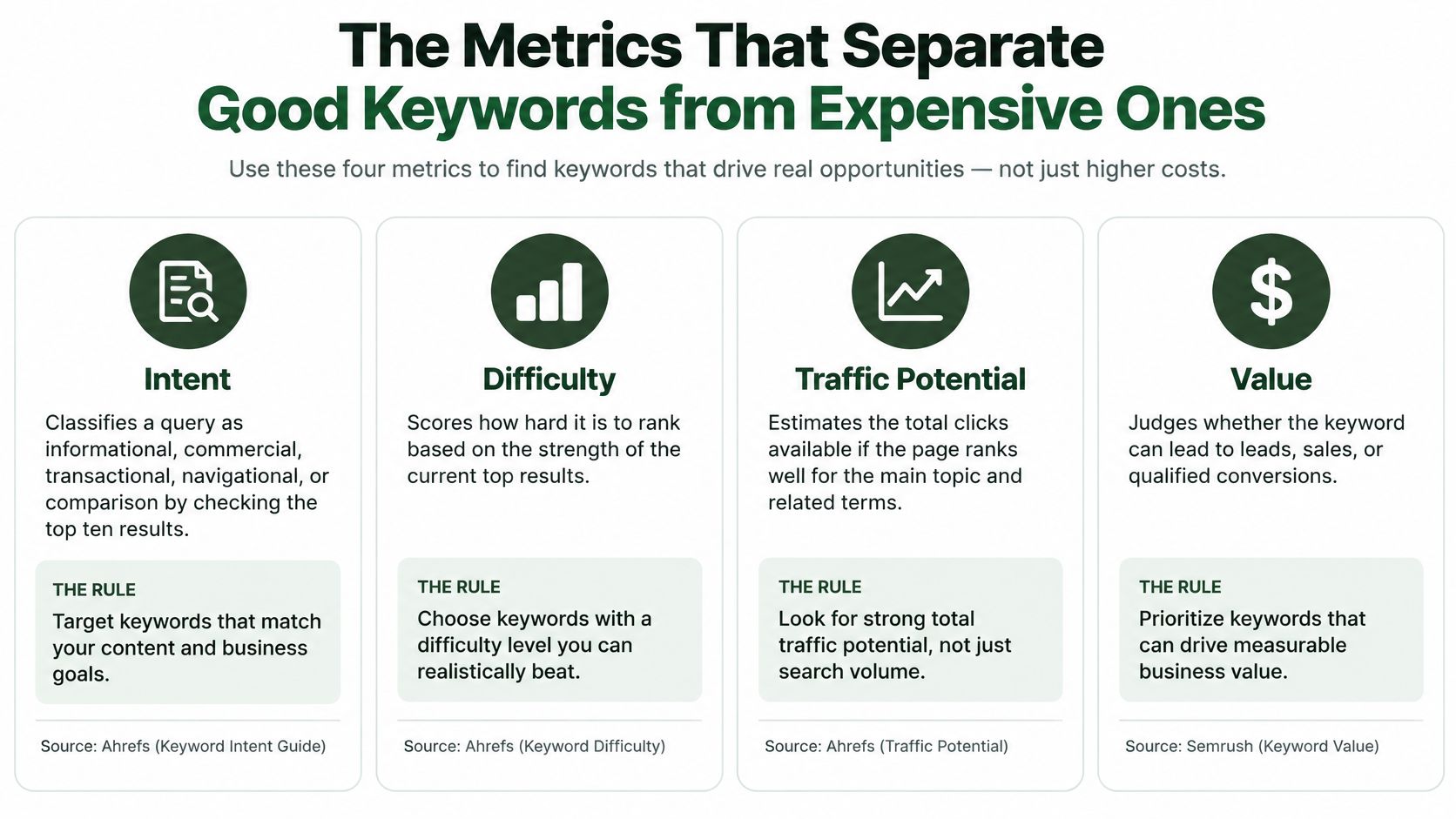
A high-volume term can be the most expensive mistake in the queue. It soaks a writer for two weeks and returns almost no qualified visit. Score five things, each from a named input, before a cluster earns a slot.
| Metric |
Data Source |
Scoring Rule |
| Intent |
Top ten SERP results |
Classify as informational, commercial, transactional, navigational, or comparison by the page types that rank |
| Feasibility |
Domain strength, SERP intent match, current position |
Score easier when your page already sits between positions 8 and 20 and the top results match your page type; score harder when stronger domains dominate and few results share your intent |
| Traffic potential |
DataForSEO volume plus expected click rate |
Discount raw volume when an AI summary sits above the results |
| Business value |
Margin or conversion value per topic |
Weight each cluster by the margin or conversion value of its product or topic |
| Answer visibility |
SERP composition and citation checks |
Rate higher when the query is likely to produce citations, branded demand, or consideration |
Intent comes from the page types in the top ten, not from the words in the query. Product listings, category pages, guides, and forums are different jobs. A query with "how to" in it can still be transactional if the results are product pages.
Feasibility is how hard this page is for you, not a generic difficulty badge. Domain strength of the current results, how many of those results match the intent, and your position if you already sit in the 8 to 20 band all move the score.
Traffic potential is volume times an expected click rate. Business value is the margin or the conversion worth of the product or topic behind the cluster.
Answer visibility is the fifth lens, and it's the one most scoring sheets skip. Pew Research Center data summarized by Elite Content Marketer found that users clicked a traditional result on only 8% of visits when an AI summary appeared, compared with 15% when no AI summary appeared, and that 26% of AI-summary searches ended the browsing session entirely. A falling organic click rate doesn't make the keyword worthless. It changes the objective from traffic alone to a mix of visits, citations, assisted conversions, and branded demand.
Take shopify return policy template. Intent is high for a policy-template page if the results are templates and docs. Feasibility is moderate if mid-strength sites hold the top ten. Click potential is low if an answer box resolves the question. Citation value is high if being the quoted source sends later branded searches for your app or your policy product.
A starting weight I would tune against your own closes is business value 40%, feasibility 30%, and traffic potential 30%, with answer visibility as a boost or a penalty on top. Once a month, run the scored set through the answer surfaces you care about, log whether the brand is cited, and watch branded queries beside clicks.
The short version of reading those outcomes in the interface is here:
Reading Search Signals to Set Priorities
A query with impressions but few clicks can call for a different fix than a query already earning clicks. Search Console provides impressions, clicks, click-through rate, and average position by query, page, country, and device. Use those observed outcomes to turn keyword rows into actions, not another ranked list.
| Observed Pattern |
What It Usually Means |
Automated Action |
| High impressions, low CTR |
Title or snippet problem, or search features taking clicks |
Queue a title and meta rewrite; check result features |
| High impressions, strong CTR, weak position |
Authority, relevance, or content-depth gap |
Queue page expansion and internal links |
| Clicks but no dedicated relevant page |
Cannibalization or landing-page mismatch |
Queue a dedicated page or merge competing URLs |
| Strong position, zero clicks on a commercial query |
Snippet or intent mismatch |
Test a new title; confirm the page type matches the query |
Google's Search Console performance documentation explains that much of this performance data is assigned to the canonical URL. Duplicate and alternate URLs can obscure which page received the credit. Canonicalize URLs before clustering, or one query may appear to have several weak pages when its signals belong to a single page.
Three guards against false priorities
Segment before you score. Country and device can change both intent and the ranking field. A mobile query in one market and a desktop query in another should not share one average position. Compare like with like before setting a threshold.
Allow for reporting lag. Performance data can arrive several days late, and daily reporting uses California local time. A rule that runs the morning after a title change may grade an incomplete day. Set a lag window in the rule and use one timezone for every run.
Score the gap, not the raw count. Base opportunity on impressions, CTR versus the rate expected for that position, position band, commercial intent, conversion value, and the effort required to fix the issue. High impressions alone do not make a term a priority. If there is no commercial path, keep it in the backlog unless another outcome, such as answer visibility, justifies the work.
For example, a Shopify store has 4,200 impressions for “linen duvet cover king,” a 0.6% CTR, and average position 7.8. That matches the first table row: queue a title and snippet rewrite, then check shopping units and other result features. A new page is not the first move. The page is already on page one; the weak signal is its click rate.
If the third pattern appears, investigate who owns the intent before deciding whether to create or merge a page. A structured competitor analysis framework can help compare those competing results. Avoid merging URLs and commissioning a new guide in the same week, since that makes it harder to judge which change affected performance.
How to Run the Pipeline from Export to Task Queue
Run the same seven steps on the same columns every week. If the output layout changes, you can't tell whether demand moved or the sheet did.
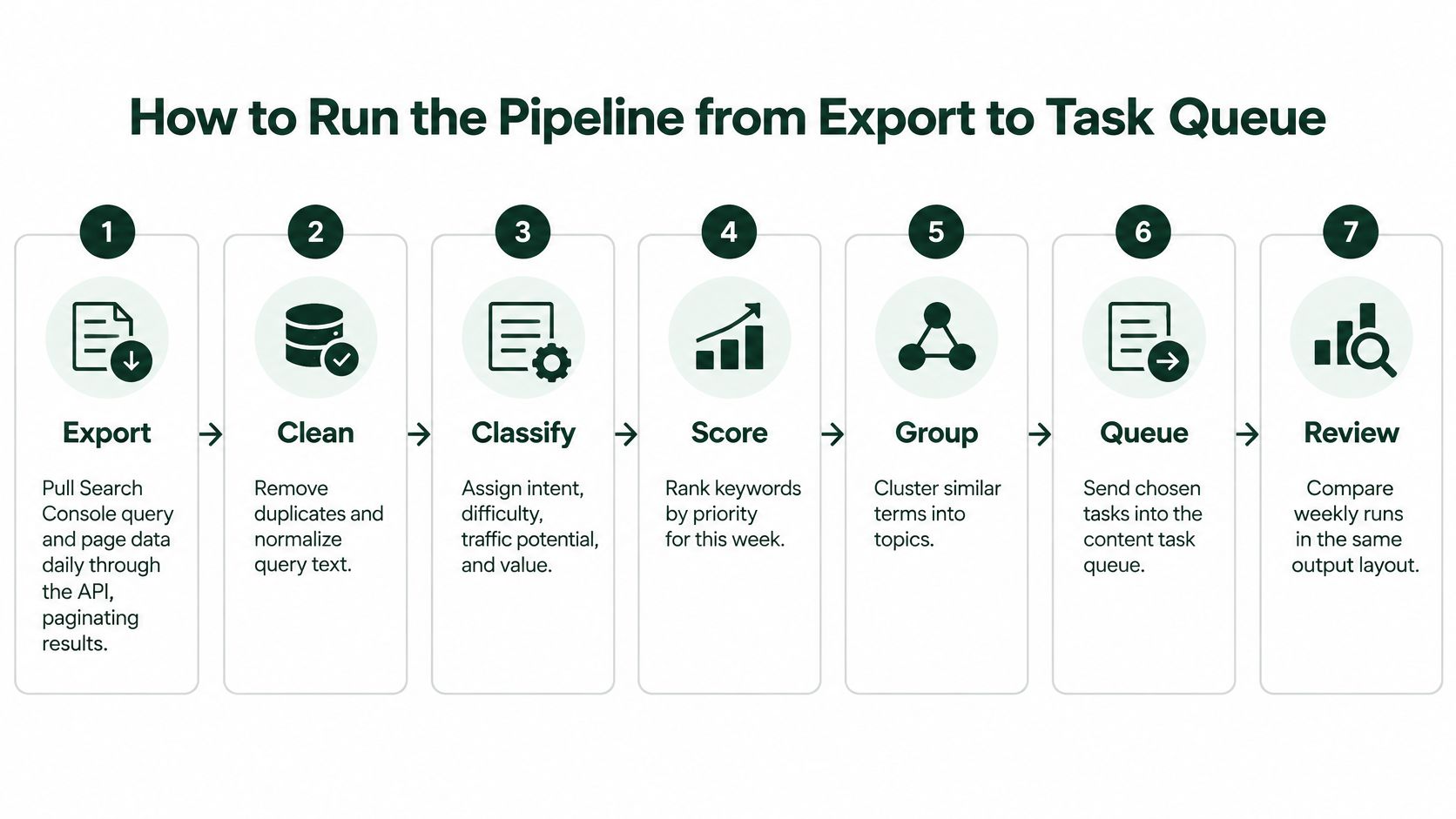
- Export. Pull Search Console query and page data on a schedule through the API, in pages rather than one giant request. Compare query-level totals with the unsegmented property total. If the segmented pull is much smaller, you truncated the file, and missing rows will look like missing demand.
- Clean the URL list. Pull sitemap URLs, canonicalize them, and drop noindex and redirect URLs. Every candidate has to map to one indexable page before it can be a task.
- Expand. Send seed terms through DataForSEO for volume, cost-per-click, and competition. Tag each keyword with its source so a modeled volume never gets treated as a click you already earned.
- Sample the results. For each cluster, record the page types, headings, and title patterns in the top ten. This is the intent check, and it is also the brief outline.
- Cluster and score. Group terms that share intent and overlapping results. Behavior signals such as clicks, CTR, and revenue can feed a simple clustering pass. A 2010 study of the Spanish music site BuenaMusica.com applied k-means to 712,643 keywords from Google, Yahoo!, and Bing and produced six user clusters tied to engagement and revenue, not just frequency. Then score intent, feasibility, traffic potential, business value, and answer visibility. Spot-check about 20 clusters by hand before you trust a new weighting.
- Route. Assign new page, refresh, merge, or skip. One cluster, one URL, one job.
- Queue. Push routed items into a list with an owner, a due date, and an approval step. Nothing publishes unreviewed.
Keep the handoff boring
Spreadsheets and scripts can reproduce this logic. A managed platform mainly cuts the upkeep of credentials, schedules, and column names. Either way, the brief that leaves the queue should name the target URL, the route, the intent, and the internal links. That handoff is what turns research into a content plan a writer can finish without reopening the export.
Full clustering doesn't need to run daily. Keyword databases move slower than your click log. Daily work is the export and the position triggers. Monthly or quarterly work is the expansion, the cluster rebuild, and the weight check.
Blind Spots, Trade-offs and When Automation Misleads
The common assumption is that a bigger export is a fuller market. It isn't.

Google's write-up of performance data states that Search Console omits anonymized queries, queries issued by only a small number of users over a two-to-three-month period, and stores only the most important rows because of privacy and processing limits. A system that ranks opportunities only by exported query volume will underweight long-tail, emerging, and product-variant searches. On an e-commerce catalog, those variants are often the terms with a SKU behind them.
Keep page-level impressions and clicks even when the query string is hidden. Label every keyword with provenance and a coverage confidence. Query country, device, page, and search type separately when the mix matters, because the dimension changes what gets aggregated.
Four trade-offs and the guard for each
Coverage versus cost. More demand-API calls widen the candidate list and raise the bill. Cap calls to clusters with no first-party impressions, and stop when the new terms repeat intents you already route.
Speed versus accuracy. Daily triggers catch a position jump. They also fire on lagging, partial days. Require two stable days before a rewrite task is created.
Scale versus judgment. A cluster of hundreds of terms can glue two intents together. Review the largest clusters first, and split any group whose top results don't share URLs.
Automation versus brand voice. A generated brief can set headings and links. It can't hear how your support team talks. Human edit before publish stays in the queue, not as a hope.
When the average lies
Seasonal products make a single monthly volume look stable when it isn't. A 2025 medical-information study used Google Ads Keyword Planner on 633 food-and-drug-allergy keywords in Germany and counted 3,649,390 searches from September 2022 through October 2024. The split was 13.4% in 2022, 45.7% in 2023, and 40.9% in 2024, and Planner can look back up to 48 months. Compare a seasonal SKU with the same months last year, not with a twelve-month mean.
Multi-market sites need country-level runs, because the same string can be a product search in one language and a definition in another. Low-traffic sites have thin query tables, so lean on sitemap structure and competitor formats until impressions are dense enough to score.
Label a keyword high confidence when Search Console and the demand API agree, and low confidence when only one source supports it. Low-confidence items never jump the queue alone.
Decide How Much to Automate and Start This Week
Start with the smallest pipeline that changes the Monday meeting. A weekly Search Console export, a sitemap check, and a scored list of about 50 clusters will beat a daily agent that nobody reviews. Add demand-API volumes after the team trusts the routes. Add daily triggers after the lag rule is in the script.
Match the build to the constraint you really have.
- No SEO specialist on staff: Use a tool or a script with an approval queue and scores written in plain language, not a 0 to 100 black box.
- Three or more markets: Automate country segmentation before you automate briefs. Mixed countries poison every other score.
- Content output is the bottleneck: Automate briefs and internal-link targets. Leave scoring on the weekly sheet until the writers are caught up.
- Measurement is the gap: Automate the report and the answer-visibility check. Don't add more keywords until you can see citations and branded demand beside clicks.
- A small site with sparse traffic: Rely on sitemaps and competitor structure. Fold Search Console in once impressions are steady enough to pattern-match.
Spreadsheets, scheduled scripts, and platforms such as AutoSEO can all run that checklist. AutoSEO ties Search Console, sitemaps, competitor pages, and DataForSEO into one research flow, then clusters gaps into a calendar. Pick by which constraint above is binding, not by which demo has the longest keyword count.
This week, export the last 90 days of Search Console data for your top 20 pages. Score the first 50 clusters with the metric rules above. Review them with the team before you route a single task. If the routes still look wrong after that review, fix the weights. Don't add another data source yet.
AutoSEO connects keyword research, briefs, publishing, and AI-visibility checks so a small team can run this pipeline without stitching five exports by hand. It pulls Search Console together with demand estimates, groups terms into clusters, and keeps an approval step before anything goes live. See how that workflow fits your site at AutoSEO.