You've owned the domain for months. GA4 traffic looks acceptable, yet every keyword tool keeps returning the same competitor terms and the same broad content ideas. Your editorial calendar is full, but you still can't answer the practical question: which query should the team improve this week?
Google Search Console can answer that question, provided you use it as a prioritization layer, not as a complete replacement for keyword research. It shows where your verified property already appeared in Google Search, which pages appeared, and what users searched before clicking, giving you observed visibility instead of modeled demand.
That distinction matters even more in answer-heavy search results. A query can generate impressions without producing many visits, so clicks alone no longer tell you where your site has the strongest opportunity. The useful workflow combines Search Console's real visibility signals with external demand and intent analysis.
Table of Contents
Why Search Console Beats Guesswork for Keyword Research
Most keyword platforms begin with an estimate of the market. They suggest terms that may have search demand, then add modeled volume, difficulty, and competitive signals. Those estimates are useful for expanding a topic set, but they don't prove that your site can appear for the term or that the query fits your existing content.
Search Console starts from the opposite direction. Its Performance report exposes clicks, impressions, CTR, and average position for real queries tied to a verified property. Google explains that the report shows which queries surfaced a site and can be grouped by page, country, or device in its Search performance documentation. Each impression represents a visibility event in which your result appeared on a viewed results page, not an estimate of total market searches.
That makes GSC especially valuable for deciding what deserves attention first. A page already receiving impressions has crossed a relevance threshold in Google's systems. It may rank below the first page, appear for an unexpected variation, or attract visibility without clicks. Those are actionable conditions, unlike a high-volume suggestion for which your site has no current evidence.
Practical rule: Use external tools to expand the universe of possible topics. Use Search Console to decide which existing opportunities deserve resources now.
Observed visibility is not search volume
Search Console doesn't reveal the total number of searches for a query. Its impressions reflect when your result appeared, and the report is limited to your property's observed visibility. A query with modest impressions may have broad market demand that your site hasn't reached, while a query with many impressions may reflect a narrow set of searches where your page appears repeatedly.
That limitation doesn't weaken GSC. It defines its job. Search Console is strongest when you ask, “Where is Google already testing or showing this site?” It is weaker when you ask, “How large is the entire market for this topic?”
For regional campaigns, the ability to filter by country, device, date range, and search type adds useful context. A term may perform differently across markets or devices, and page-level analysis can show whether one URL owns the query or whether several pages are competing. Teams that need a broader regional starting point can pair this workflow with a practical resource such as NZ keyword data for founders, then validate the resulting themes against their own Search Console visibility.
The four patterns worth mining
The most useful GSC opportunities usually fall into four groups:
- Proven winners, queries already producing clicks and visibility that deserve protection.
- Low-CTR opportunities, queries where your result appears but the snippet fails to earn enough attention.
- Near-page-one terms, queries with meaningful impressions and rankings close enough to improve through content, internal links, or clearer intent alignment.
- Declining queries, terms whose visibility or position has weakened and may signal outdated content, stronger competitors, or intent changes.
The AI Overview era adds a necessary reality check. Impressions can remain healthy while clicks soften because the search result answers more of the query before the user visits a page. That's why the rest of the analysis should treat GSC as evidence of visibility and opportunity, not as a simple list of traffic-generating keywords.
Open the relevant property in Google Search Console and choose Performance → Search results. Start with a recent working window rather than the default view, then use the date controls to isolate a consistent period. For trend work, GSC's date comparison and filters are more important than any single snapshot because Google documents the report as a place to review changes in clicks and impressions over time.

If the property receives Discover or Google News traffic, keep those surfaces separate from standard web search. Select Web in the search type control, then confirm that the report is measuring the search behavior relevant to your keyword work. Mixing surfaces can make a query set harder to interpret because each surface reflects a different user context.
Set up the query view
Select the Queries tab below the chart. Turn on the four core metric cards, Total clicks, Total impressions, Average CTR, and Average position, so every row has enough context for a decision. Leave the default Average position sort visible briefly to understand the distribution, then sort by Impressions in descending order.
The impression sort is the useful starting point for mining. It surfaces terms for which Google is already showing your pages, including queries that have poor CTR or sit just outside the strongest results. Sorting by clicks first is useful when protecting existing winners, but it can hide pages with substantial visibility and weak engagement.
Use Compare when you need to test a change over time. Compare a recent period with the preceding period or a corresponding earlier window, then inspect changes in impressions, clicks, CTR, and position together. A position improvement with a click decline deserves a different response from a position decline with stable impressions.
The Filter by Query containing control is useful for focused reviews. Search for a product name, a topic stem, or a question word. For advanced segmentation, use the filter's regex option to group patterns such as question queries, brand terms, locations, or modifiers. Regex is particularly useful when a site has many wording variations that a simple text match misses.
Move between queries and pages
Choose the Pages tab when you need to decide which URL should be updated. Select a page, then return to Queries to see the terms associated with that URL. Reverse the process when you start with a query and need to identify every page receiving visibility for it. This is how you detect intent overlap, duplicate targeting, and pages that deserve consolidation or clearer internal linking.
You can also use the dimension controls to combine page and query context where available in the report. The purpose isn't to collect every row. It's to connect a search phrase to a specific URL and a specific action.
Use this five-click setup before analyzing rows:
- Search results, then choose the Web search type.
- Set the date range to a consistent recent window.
- Turn on Clicks, Impressions, CTR, and Position.
- Open Queries and sort by Impressions.
- Apply Filter by Query containing or regex, then move to Pages when assigning an action.
The report is now a working dataset rather than a dashboard screenshot. You can inspect visibility, engagement, ranking context, and URL ownership without letting the default sort dictate your priorities.
Use the visual walkthrough below after you've configured the filters and before exporting a larger set of rows.
Spotting the Four Query Patterns That Move Rankings
Search Console becomes useful when you turn rows into decisions. Don't treat every query as an isolated target. Group terms by their position, impression behavior, CTR, and change over time, then assign an action that matches the problem.
The following framework uses practical thresholds for triage. These aren't Google ranking rules. They're working filters for deciding what to review first.
| Pattern |
Position Range |
Signal Threshold |
Recommended Action |
| Winners |
1-3 |
Impressions rising in the comparison period |
Protect the page, strengthen related internal links, and monitor changes |
| Low-CTR opportunities |
4-10 |
CTR below 3% on informational queries |
Review intent, title, description, and SERP features |
| Near-page-one terms |
11-20 |
Steady impressions across the comparison period |
Expand the page, improve internal links, and clarify topical coverage |
| Declining queries |
Any position |
Position down by more than 3 positions across two comparison windows |
Diagnose content freshness, intent, technical issues, and competition |
Winners need protection, not automatic rewrites
A query such as “B2B content brief template” ranking in position 2 with impressions rising is already validating the page's relevance. Rewriting the entire article because another tool suggests a different keyword can introduce risk. Start by checking whether the page still matches the query, whether important internal links remain intact, and whether related pages are creating overlap.
The right action is usually controlled maintenance. Track the URL, preserve the successful intent, and use adjacent queries to guide additions rather than replacing what already works.
Low CTR often points to a message problem
Suppose “how to audit Shopify SEO” ranks in position 6, generates visible impressions, and has a CTR below the working 3% threshold for informational queries. Don't assume the page needs more backlinks immediately. First inspect the search results and compare the wording, format, and promise of competing snippets.
A title that says “Shopify SEO Guide” may undersell a page that contains a practical audit process. A more precise title and description can align the snippet with the question, but remember that Google may rewrite those elements. If the SERP contains an answer feature or other rich result, low CTR may reflect the page layout rather than weak copy.
Near-page-one terms are content and linking candidates
A query such as “technical SEO checklist for SaaS” sitting in position 15 with steady impressions has evidence behind it. The page is visible, but Google may not yet see enough depth, authority, or intent alignment to place it on the first page.
Review the page's main promise, missing subtopics, internal links, and competing URLs. Add only material that serves the query. A focused section answering a missing question can be more useful than broad keyword repetition, especially when the query set includes several related intents.
Declines require diagnosis before editing
A query that falls more than 3 positions across two comparison windows is a warning, not a guaranteed content refresh. Check whether impressions also fell, whether another URL replaced the original page, whether the query changed intent, and whether indexing or technical issues affect the page.
If impressions remain stable while clicks decline, investigate SERP features and snippet changes. If both impressions and position decline, compare the page with current results and look for outdated coverage, weaker internal prominence, or a competitor that better satisfies the searcher.
Exporting Search Console Data and Combining External Signals
The interface is enough for a small site, but larger properties need exports. Search Console's UI has a 1,000-row display cap, so an apparently complete table can omit long-tail queries and pages. Google's report is also property-specific, doesn't provide exact market search volume, and doesn't automatically group similar queries by intent, which means the export needs cleaning before it becomes a planning dataset.
Open Performance → Search results, choose the longest suitable date window available for query data, and select the query dimension. Apply a page, country, device, or search-type filter before downloading when the property is large. Segmenting first is more reliable than exporting one broad table and assuming every opportunity is present.
Clean the sheet before scoring it
In Google Sheets or Looker Studio, normalize capitalization and whitespace, remove duplicate query strings, and add columns for brand status, intent, topic, landing page, and recommended action. Keep the original GSC metrics intact so your team can distinguish observed visibility from any external estimate added later.
The next step is enrichment. You can join the query string to search-volume data from DataForSEO, Semrush, or another demand source using a lookup such as VLOOKUP in a spreadsheet. For a practical explanation of the limitations and uses of external volume, see this guide to keyword search volume.
The lookup should inform scale, not overrule Search Console evidence. A high-volume term with no impressions may be a long-term content opportunity. A lower-volume term already producing impressions and clicks may deserve attention first because your site has demonstrated relevance.
Use a combined signal without hiding the raw data
If your team uses the proposed CTR-weighted priority formula, add a calculated field such as:
Volume × Position × 0.01 × CTR
Treat that formula as an internal sorting aid, not as a universal SEO score. Position is an ordinal ranking measure, CTR varies by intent and SERP layout, and external volume is modeled. Keep separate columns for clicks and impressions so a blended score never disguises the signals that created it.
| GSC Field |
External Source |
Calculation |
Purpose |
| Impressions |
DataForSEO or Semrush volume |
Compare visibility with modeled demand |
Find terms where market potential exceeds current exposure |
| Clicks |
Conversion or analytics data |
Review visits and downstream outcomes |
Protect queries that produce useful traffic |
| CTR |
SERP and intent review |
Use in the weighted priority field |
Identify message or layout problems |
| Average position |
Ranking and competitor context |
Combine with volume cautiously |
Separate existing opportunities from distant targets |
| Query string |
Topic and intent classification |
Normalize, deduplicate, and tag |
Build content groups and avoid duplicate targeting |
Search Console's own data should anchor thresholds on impressions and clicks, not raw volume alone. Also, don't discard a query because an external tool reports no volume. A zero-volume estimate can still represent real observed demand when GSC records impressions, and that evidence can justify a focused content test.
Adapting Your Keyword Plan for AI Overviews and Answer-Heavy SERPs
Click-based prioritization is losing some of its clarity. AI Overviews, featured snippets, knowledge panels, and other answer formats can satisfy an informational need before the searcher visits a traditional result. A page can improve from position 8 to position 3 and still receive fewer clicks if the result page answers more of the query above the organic listings.
That changes the order of operations. Treat impressions as the primary visibility signal and clicks as a secondary conversion signal. Impressions tell you that Google continues to place your page in the result experience. Clicks tell you whether that visibility still leads users to the site.
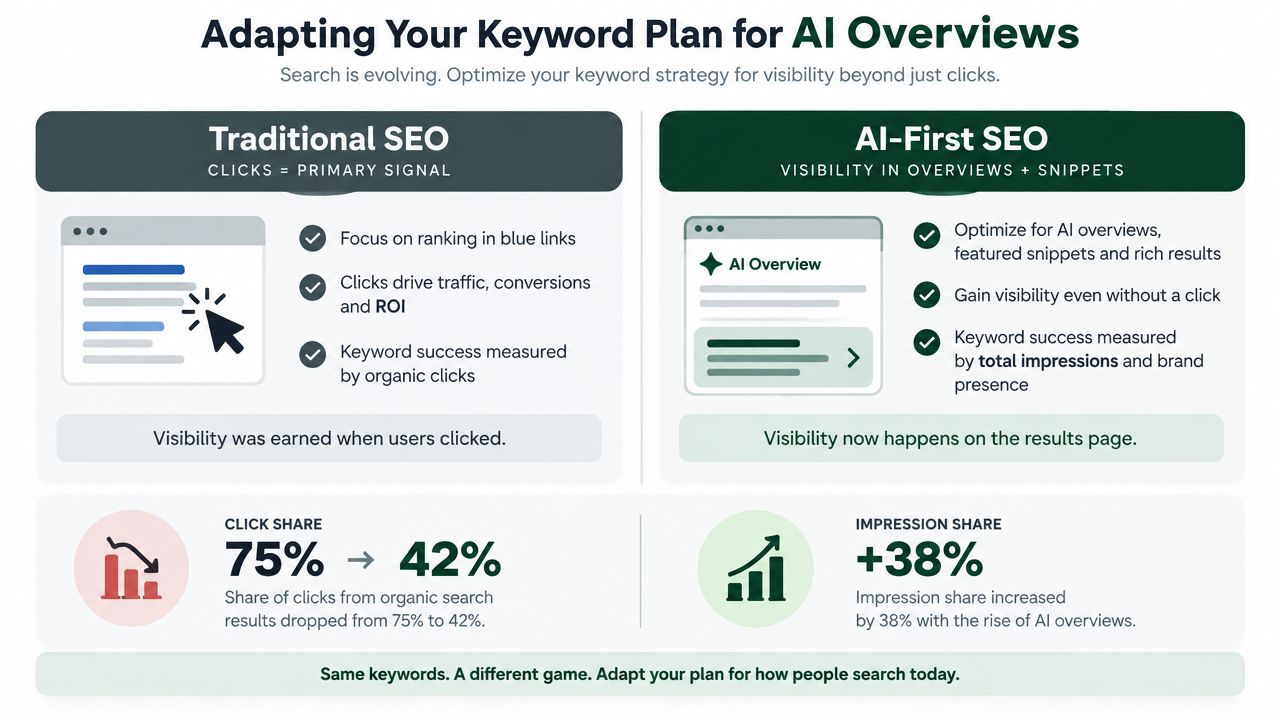
For a visibility-led review, calculate an internal impression-share priority using:
Position × Impressions ÷ 100
The formula isn't a measurement of actual share. It's a sorting device that helps surface queries with meaningful exposure and a position worth investigating, even when clicks are subdued. Review the highest values alongside the query, page, country, device, and SERP context.
Flag question-led patterns such as how, what is, best, and vs. for intent review rather than automatic CTR optimization. Those modifiers often signal an answer-seeking task, so the page may need a direct definition, comparison table, concise process, or structured explanation before you change its snippet.
Technical clarity also matters. Review technical SEO and schema guidance when pages need clearer machine-readable context, but don't treat schema as a guarantee of visibility in an AI answer. Content quality, crawlability, intent alignment, and evidence still determine whether a page deserves attention.
Rankings and CTR remain useful. They just aren't sufficient as standalone success metrics when the result page increasingly answers the question before the click.
Turning Insights Into a Repeatable Keyword Workflow
A weekly review should produce assignments, not another unused export. On Monday, open the Performance report, choose the latest 28-day window, sort by impressions, and apply the four query buckets. Move winners and low-CTR terms into the content brief backlog, assign near-page-one queries to existing-page updates, and schedule a follow-up review for declining queries after another comparison window.
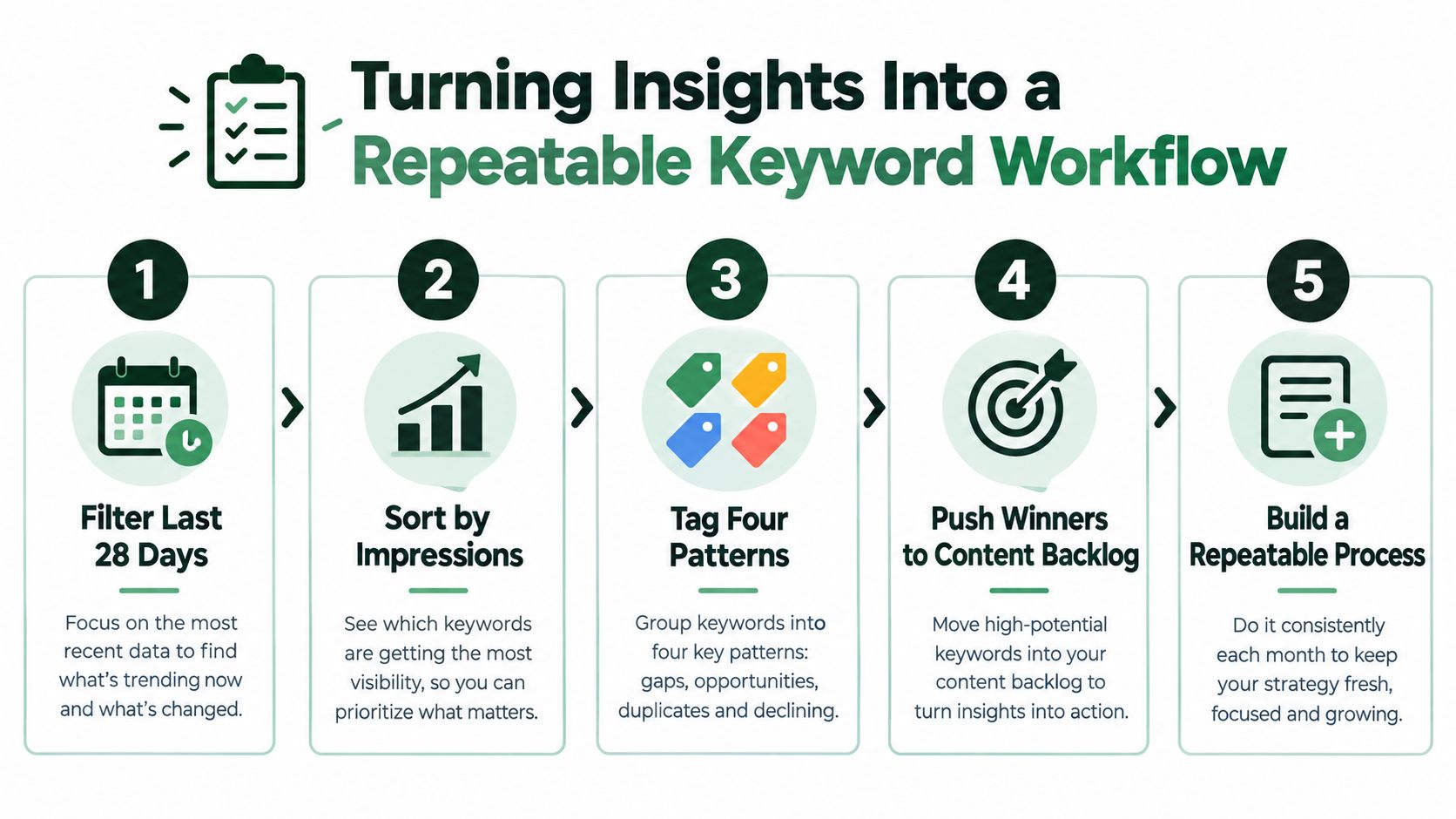
Keep one living sheet with the query, URL, position, impressions, clicks, CTR, pattern, intent, owner, next action, and review date. A reporting workflow such as automated SEO reports can reduce manual collection, but someone still needs to interpret whether a change reflects content, competition, or SERP layout.
For thin-data sites, troubleshoot before drawing conclusions:
- Property coverage: Verify that the correct domain or URL-prefix property is selected.
- Indexing status: Use URL Inspection to confirm that priority pages can appear in search.
- Segmentation: Expand regex filters and review country, device, and page combinations.
- Fragmentation: Check whether subdomains or separate properties split the evidence.
- Noise control: Separate brand and non-brand queries before assigning editorial work.
Don't optimize around rows with fewer than 10 impressions, ignore brand versus non-brand differences, or chase CTR without checking position movement. The objective is a weekly decision system that directs every brief and update, not a one-off keyword audit.
AutoSEO connects Google Search Console data with sitemap, competitor, and DataForSEO signals, then turns prioritized opportunities into content, technical, publishing, and measurement tasks. Visit AutoSEO to see how its connected workflow can help your team move from query evidence to scheduled SEO execution.