Shopify's own Q2 2026 referral data says organic search still sent more sessions to merchants than all tracked AI platforms combined, even as AI-referred sessions grew sharply year over year. For a Shopify store owner, that's the important signal, search optimization is still the biggest durable discovery channel, and AI-assisted discovery is additive, not a replacement.
The practical takeaway is simple. SEO for Shopify store growth starts with content architecture, then technical quality, then schema and linking. If the store's collections, product pages, and informational content are thin or duplicated, no app install or theme tweak will save it. If those pages are built well, the traffic compounds across the whole catalog.
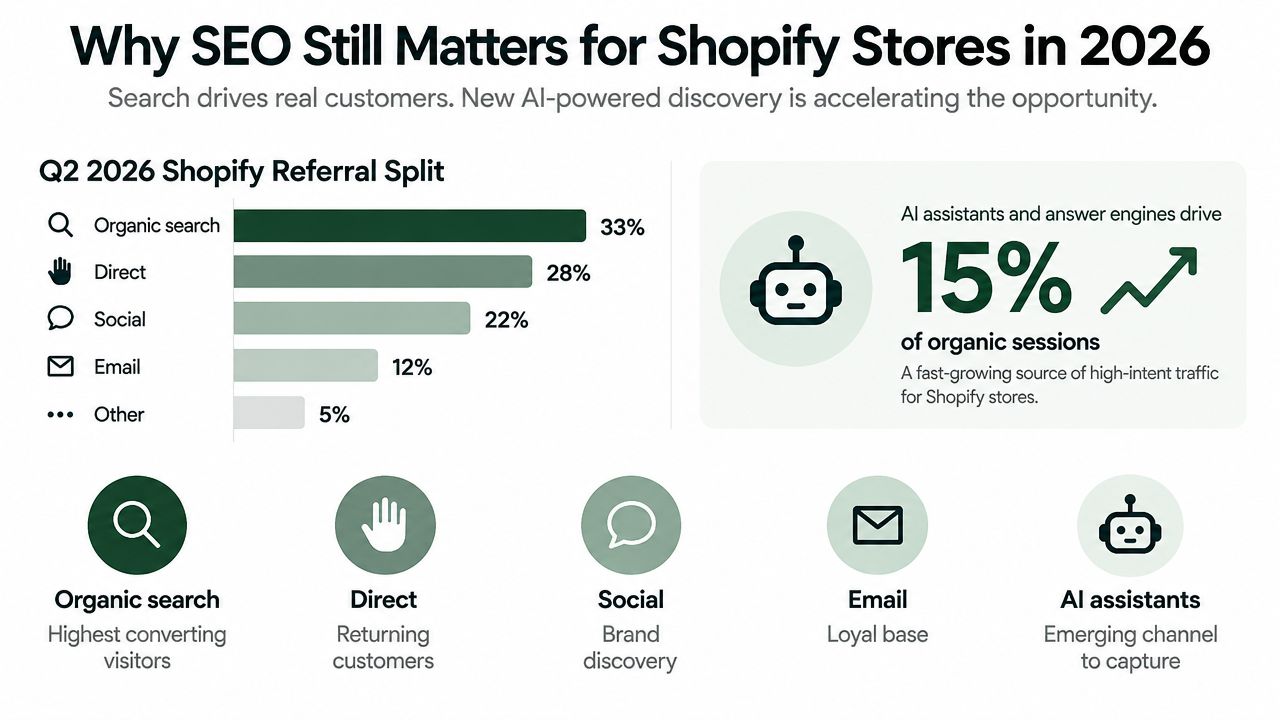
Table of Contents
Why SEO Still Matters for Shopify Stores in 2026
Shopify merchants need channel economics, not another list of app recommendations. Shopify's Q2 2026 data shows that organic search remains a larger referral source than tracked AI platforms, while AI-referred sessions continue to grow. The practical implication is clear: search still supplies broad ecommerce demand, and AI discovery is an additional route to shoppers. Shopify's 2026 referral behavior analysis gives store owners a useful basis for planning acquisition budgets.
Paid media remains useful for testing offers, creative, and new product angles. Its weakness is repeated click cost. A campaign can validate demand quickly, but it does not build an owned discovery asset when spending stops. Organic pages can continue attracting shoppers, support email capture, and contribute to repeat purchases after the initial optimization work.
What that means for a Shopify store
The primary SEO decision is architectural. Give each meaningful search intent a page that can satisfy it, then connect related collections, products, and buying guides. Shopify handles much of the storefront infrastructure, but it does not decide which topics deserve dedicated pages or prevent merchants from publishing thin, overlapping content.
A store that earns visibility for high-intent queries can attract visits without bidding for every click. Ecommerce benchmark reporting from Similarweb's 2025 ecommerce traffic benchmark indicates that top organic positions capture substantially more clicks than lower rankings. The goal is not to rank everywhere. It is to rank where purchase intent is already present.
Practical rule: if a query can lead directly to a product, collection, or buying guide, build a useful page for it instead of relying on a hidden filter or thin template.
That sequence matters. Start with content architecture, improve technical access and page quality, then use internal links and schema to clarify relationships. AI systems can draw from the same signals, especially clear product entities and useful supporting content, but they do not remove the need to build a store that search engines can understand and shoppers can use.
How the Shopify Storefront Works for SEO
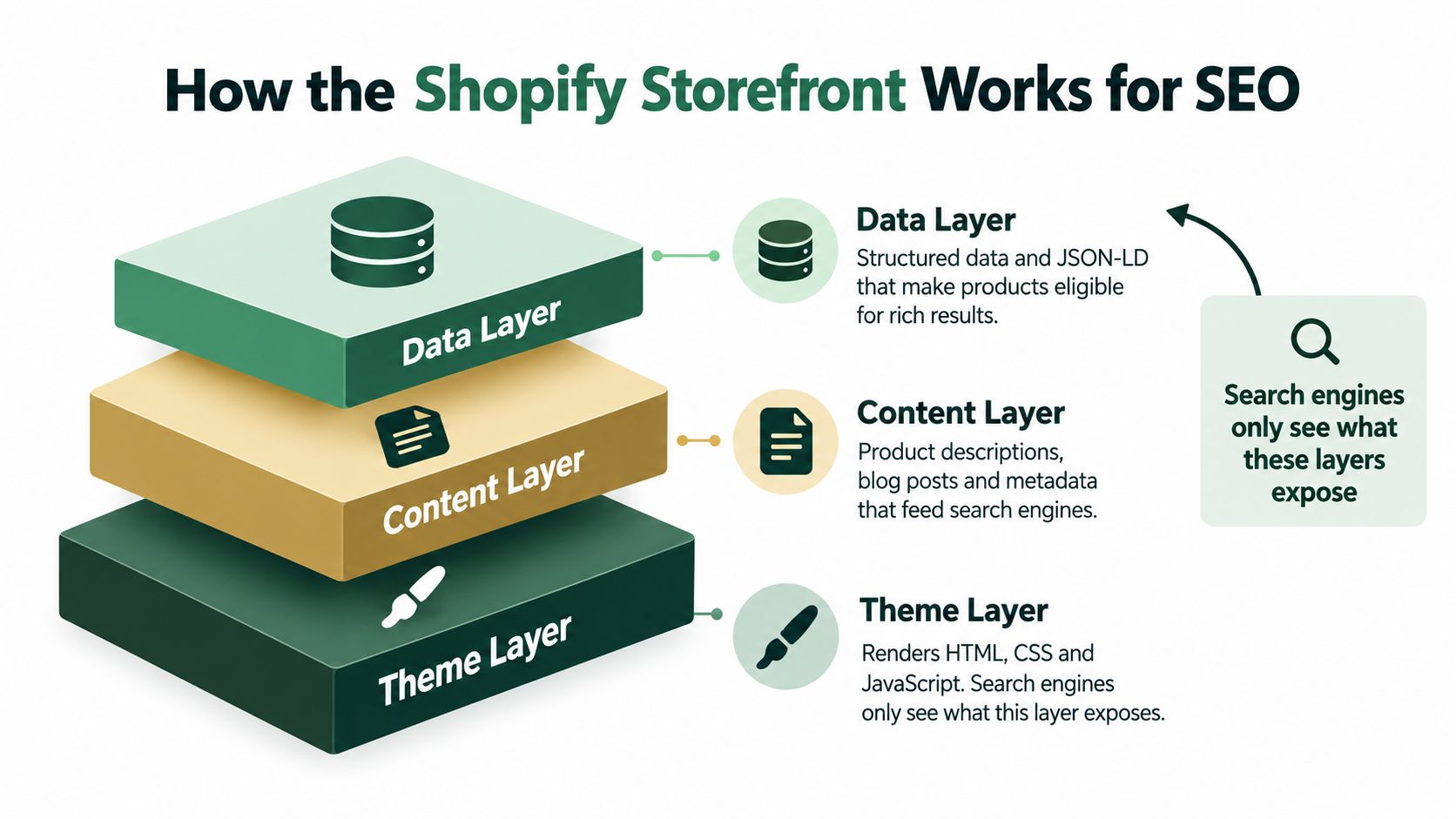
A Shopify storefront acts like a building with three visible layers. The theme controls what gets rendered, the content layer supplies the words and page structure, and the data layer tells search engines what the page means. Search engines only understand what those layers expose, so the platform itself is rarely the whole problem.
Theme layer, content layer, data layer
The theme layer is where Liquid, CSS, JavaScript, and app embeds either help or hurt. A theme with too many moving parts can waste crawl budget, slow rendering, and bury important text below heavy scripts. That's where SEO problems often start, not with the platform itself.
The content layer is where most of the ranking opportunity lives. Collections, products, blog posts, and standalone pages are what search engines evaluate for relevance. If the collection copy is thin and the product descriptions are copied across variants, the storefront gives search engines very little to work with.
The data layer is the structured information that helps pages become eligible for richer presentation. Product details, breadcrumbs, and clear entity markup help both search engines and AI systems understand the page. For Shopify teams, that layer should be treated as support, not strategy.
Search engines don't rank the promise of the store. They rank the pages they can crawl, interpret, and trust.
Shopify handles some baseline SEO mechanics for you, including canonical handling, sitemaps, and common storefront hygiene. That's useful, but it's baseline plumbing, not differentiation. A store usually outranks a similar store because its content architecture is stronger, its page templates are cleaner, and its internal paths make more sense.
For a practical example of what to check first, the Search Console workflow in this Shopify-specific Search Console guide is the right place to start before changing copy or adding apps. It helps you see which templates are getting indexed, which queries are already working, and where the storefront is leaking visibility.
Technical Foundations and Core Web Vitals
Core Web Vitals are not three separate chores, they're one system. Google judges a page as good only when at least 75% of real user visits meet all three targets together, with LCP under 2.5 seconds, INP under 200 milliseconds, and CLS under 0.1 Shopify's web performance overview. Miss one metric and the page fails the overall standard.
| Metric |
Good |
Moderate |
Poor |
Shopify Target |
| LCP |
≤ 2.5s |
> 2.5s and < 4.0s |
≥ 4.0s |
Stay in Good on real user data |
| INP |
< 200ms |
Slower than Good, but not Poor |
Poor when interaction feels laggy |
Keep app scripts light |
| CLS |
< 0.1 |
Higher layout movement |
Unstable layout |
Reserve space for all media |
Where Shopify product pages usually slip
LCP often breaks on product pages because the hero image is too heavy, variant media loads late, or a theme ships with too much rendering overhead. Shopify's own web performance guidance classifies LCP as Good at 2500 ms or below, Moderate above 2500 ms and below 4000 ms, and Poor above 4000 ms Shopify web performance reports. That makes image strategy and theme structure more important than most merchants think.
INP has become the interaction metric that exposes bloated app stacks. Slide-out carts, review widgets, upsell scripts, and chat boxes can all create lag if they're not carefully managed. If a customer taps the page and nothing responds quickly, the page is already doing worse than the theme owner thinks it is.
CLS is usually the easiest win. Explicit width and height on product images, reserved space for review modules, and careful placement of promo banners can keep the page visually stable. That matters for users, and it matters for search systems that associate good UX with usable pages.
| Common cause |
What to change |
Why it matters |
| Heavy hero media |
Compress, lazy-load lower images, and preload the main asset |
Improves LCP |
| App script overload |
Remove nonessential apps and defer where possible |
Improves INP |
| Late-loading widgets |
Reserve layout space before widgets render |
Improves CLS |
A Shopify team should not chase content expansion before the main product template lands in the Good band on real CrUX data. Use this Core Web Vitals improvement resource as a check against the usual theme and app mistakes, then fix the template before scaling the content program.
Optimizing Collection and Product Pages
Collection pages often carry the broadest commercial intent in a Shopify store. Build them as landing pages, not filter bins. Each collection needs one clear H1, a defined keyword theme, and concise introductory copy that explains the category before the product grid begins.
Collection pages should answer the query
A useful collection introduction should describe the category in buyer language and match the query the page targets. For example, a collection targeting “organic cotton tote bags” should use that theme in its H1 and explain the products before listing them. A dedicated category page with focused copy can satisfy broader intent more effectively than a single product page targeting the same phrase.
Keep the copy unique and specific. Shopify gives merchants the collection template, handles much of the catalog structure, and makes product organization straightforward. It does not decide which category deserves a page, what the page should answer, or how much context shoppers need.
Product pages require a different standard. Write a specific title tag, add selling copy that contributes more than the meta description, and use plain, descriptive alt text for the main image. Expand on materials, dimensions, use cases, compatibility, care, delivery, or buying objections where those details help a customer choose. Manufacturer copy copied word for word gives the page little original value.
The common Shopify mistake is treating product pages like inventory records. Search engines need pages that help a buyer decide.
Collection URLs also help a store organize demand across the catalog. A strong collection can target category intent while related product pages handle item-specific searches. That division reduces the temptation to force every keyword onto one product template.
| Element |
Collection Page |
Product Page |
| Main purpose |
Capture category intent |
Capture item-specific intent |
| Headline |
Category phrase |
Product name plus benefit |
| Copy |
Introductory, buyer-focused |
Unique sales copy and details |
| Links |
Point to hero products and guides |
Point back to the category and related items |
| Media |
Category imagery if helpful |
Primary product image and supporting shots |
Use expert ecommerce SEO advice from Amax Marketing as a practical reference for category targeting, clear page intent, and deliberate page-level structure. The useful principle is simple: every indexable page should have a clear job beyond displaying products. That content architecture matters more than another theme tweak or SEO app setting.
Content Depth Over Platform Tweaks
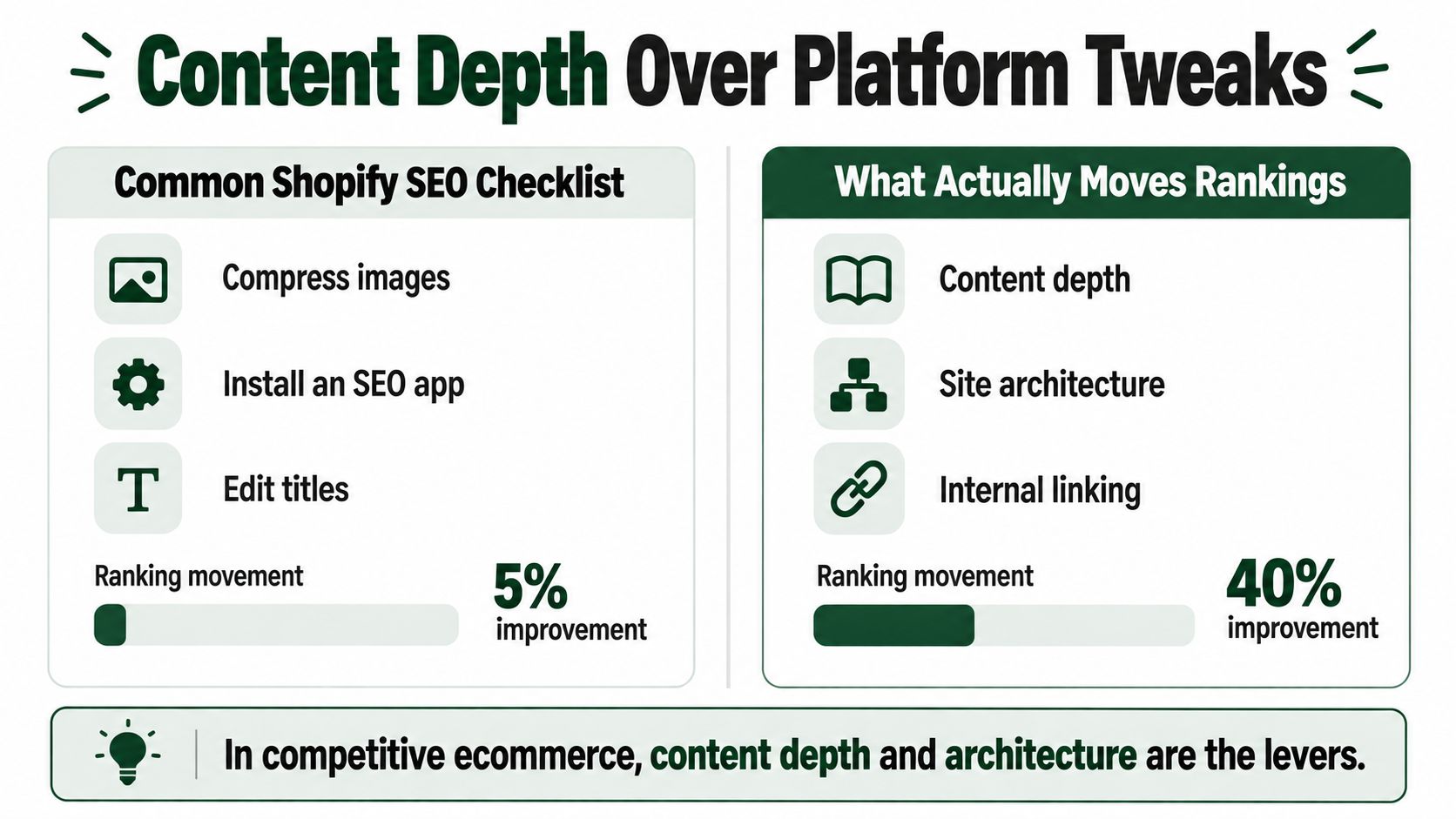
Shopify makes many technical settings accessible, but those settings rarely determine whether a store wins competitive searches. Compressing images, installing an app, and editing title tags can remove friction. The larger gains usually come from content depth, site architecture, and backlinks. Two stores can use the same theme and still perform very differently because their pages serve different search intents and earn different levels of trust.
Where the biggest gains come from
Thin collection descriptions are often a practical starting point. Useful category copy gives the page context, helps search engines interpret its subject, and creates a natural destination for internal links. Comparison guides can support the same architecture by answering research questions and directing qualified visitors toward commercial pages.
Variant sprawl creates a different problem. Publishing near-duplicate URLs for colors, sizes, or minor feature differences can divide relevance across pages with almost identical intent. Consolidating those pages, where the shopping experience allows it, usually produces a clearer site structure than multiplying URLs.
A useful trade-off looks like this:
- Do less with templates: Do not add another plugin while the page remains thin.
- Do more with structure: Build pages that address commercial and informational intent in a connected path.
- Do more with links: Earn editorial mentions and point relevant internal links toward priority pages.
SEO app changes mainly affect presentation and workflow. They cannot create authority or replace missing information. A store can automate meta tags and still lose to a competitor with stronger category content, clearer relationships between pages, and a more credible link profile.
AI-driven discovery makes page usefulness even more important. Systems that summarize or recommend products need clear attributes, supporting explanations, and consistent relationships across the catalog. AI can speed up research, drafting, technical tasks, and publishing through an automated workflow, but it does not decide the right content architecture for the store. Strategy still determines which pages deserve depth, consolidation, and links.
Structured Data and JSON-LD for Shopify
Structured data helps search engines read a Shopify store more accurately. It doesn't guarantee rich results, and it won't rescue a weak page, but it does improve clarity for product, category, and informational templates. On Shopify, the most useful schema types are Product, Offer, BreadcrumbList, FAQ, and Organization.
What to mark up first
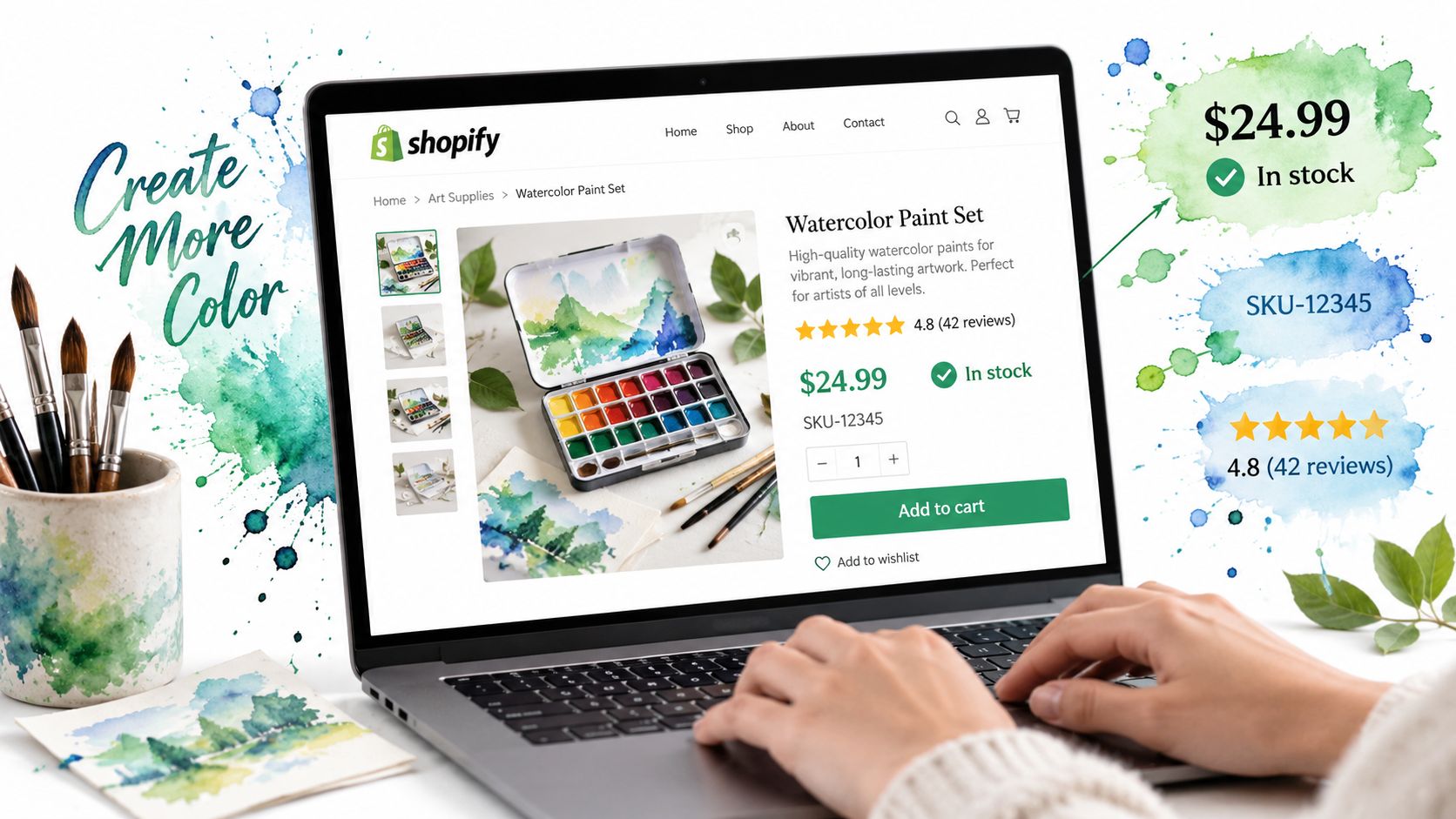
Product schema should describe the actual item, including price, availability, SKU, and aggregate review data when it exists. Offer schema supports commercial details like pricing and availability. BreadcrumbList helps search engines understand where the page sits in the store hierarchy.
FAQ schema works well on buying guides and product-support pages, especially when the questions reflect real objections. Organization schema belongs on the homepage and helps establish the brand entity. Together, those markups make the site more legible to both search engines and AI systems.
Shopify themes usually expose Product and BreadcrumbList natively, but FAQ and Organization often require theme edits or a vetted schema app. That's where teams need to be careful. Schema should reflect real page content, not bolt on fake answers or empty markup.
The broader shift matters too. Shopify's own recent SEO guidance puts more emphasis on topical authority, structured information, and page quality, while the platform community has also been discussing how AI and zero-click behaviors change product discovery. The practical point is that schema helps the page be understood in more places, but it's still secondary to the page's actual usefulness.
If you need a deeper implementation reference, this JSON-LD schema markup guide is a useful companion for Shopify templates. It's especially relevant when product, breadcrumb, and FAQ logic need to stay consistent across theme updates.
Internal Linking, Canonicals, and Site Architecture
Internal linking on Shopify works best as a hub-and-spoke system. Collections act as hubs, products and blog posts act as spokes, and important pages should be reachable in a few clicks. If a page never gets internal links, search engines tend to treat it as less important than the rest of the catalog.
Build the link graph on purpose
Blog posts should point into collections when the topic supports commercial intent. Collection descriptions should point down to hero products, size guides, comparison posts, or complementary categories. Related products can also cross-link across categories when the user journey makes sense.
Canonical handling on Shopify is solid at the baseline, especially for duplicate variants and standard product URLs. The danger usually starts with filtered, sorted, or paginated views that look distinct but don't deserve separate indexing. If every color, size, or sort order becomes crawlable without control, duplicate content creeps in fast.
Use this rule set:
- Keep canonical paths clean: One indexable version per primary page.
- Control faceted navigation: Let useful facets stay crawlable only when they deserve traffic.
- Audit orphan pages: If a page has no internal links, fix that before you publish more content.
Search Console and a crawl tool should be part of every Shopify audit. That combination surfaces orphan pages, redirect chains, and link graphs that have grown too wide. It also shows where the store is sending authority to pages that don't deserve it.
The biggest architecture problem on Shopify is not usually missing pages, it's too many near-duplicates. Once that happens, the store can look large while being harder for search engines to understand. Cleaning that up usually creates more lift than adding another assortment of blog posts.
Treat the first 90 days as three focused sprints, not a full rebuild. During the first 30 days, audit Core Web Vitals in PageSpeed Insights and Search Console, remove index bloat from tags and filters, and submit an updated sitemap. This establishes a cleaner technical base before you publish more pages.
From days 31 to 60, rewrite priority collection pages with category-level copy, add Product, Offer, and BreadcrumbList schema, and publish a small group of pillar posts that link to those collections. The goal is a coherent content architecture, not a larger product list.
Days 61 to 90 should turn that structure into measurable growth. Build relevant backlinks, strengthen internal links between priority pages, and track organic sessions, indexable pages, and revenue in GA4 and Search Console. Use the same queue to schedule internal-link fixes and schema updates instead of managing them in separate sheets. Visit AutoSEO to review a workflow that combines content planning, schema, publishing, and measurement for Shopify SEO.