In a 2021 Content Marketing Institute study, 80% of the highest-performing B2B content marketing organizations reported using an editorial calendar, compared with about 50% of the least successful organizations. That doesn't prove a spreadsheet causes success. It does suggest that managing what gets made matters more than collecting ideas.
Table of Contents
Why a Living Calendar Beats a Date List
Say a small Shopify team publishes whenever the founder finishes product photos. The marketing generalist writes between email campaigns, the founder reviews when available, and everyone assumes the spring-sale buying guide is underway. Sale week arrives with product listings ready but no guide to help shoppers choose.
The problem wasn't a shortage of topics. Nobody connected the buying guide to the sale deadline, booked the review, or checked whether photography would arrive in time. A publication date without those commitments was just a hopeful entry.
A living editorial calendar is the management system for those commitments. It connects the reader's need to a business outcome, assigns responsibility, and makes unfinished work visible while there's still time to act. The date is an output of that system, not its starting point.
The distinction is easier to see side by side.
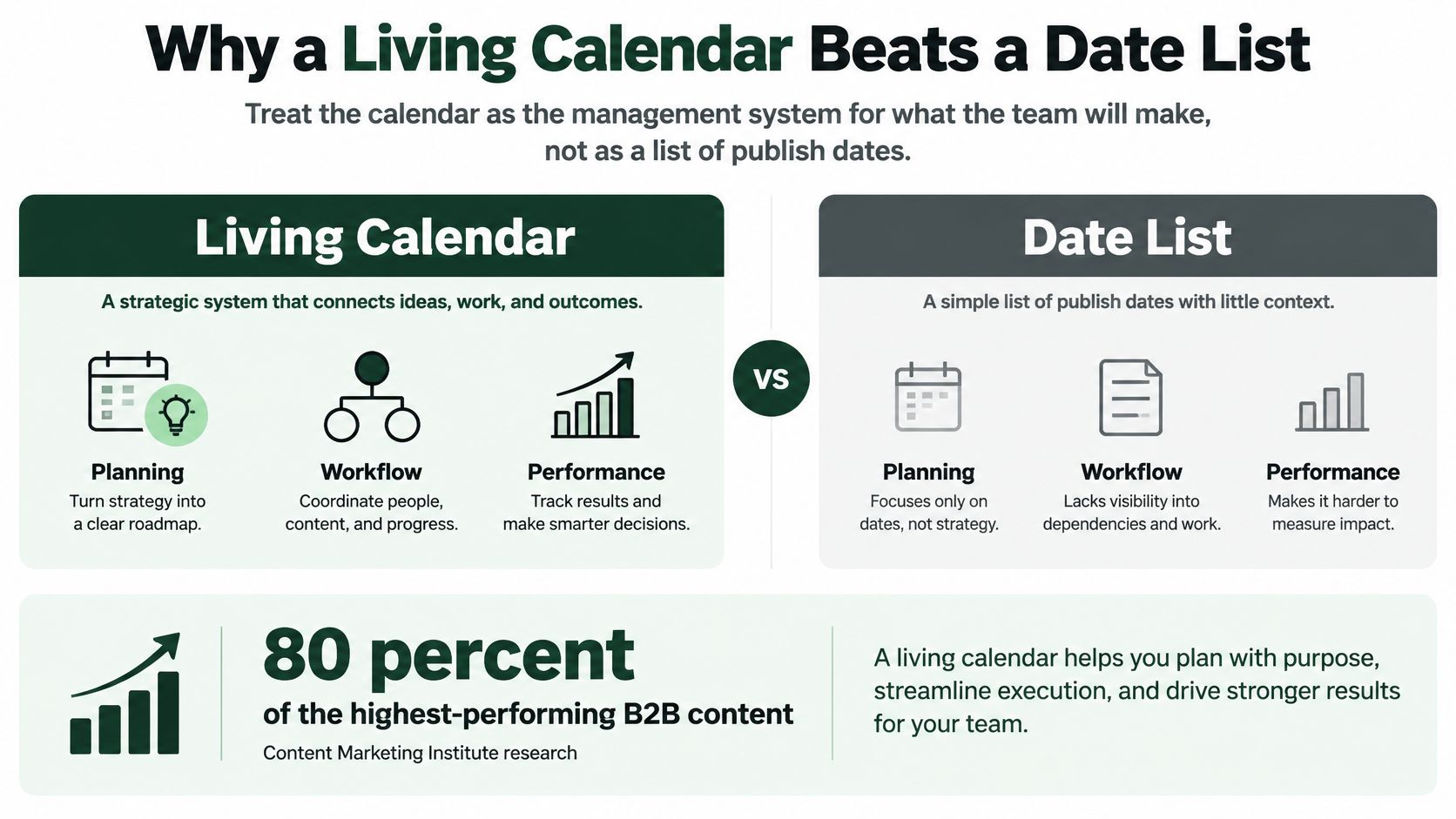
Commit near term and adjust later
For the Shopify team, a useful plan begins with the spring campaign and the customer questions that could stop a purchase. The team then books production work around actual availability rather than treating every empty calendar cell as unused capacity.
Keep near-term commitments firm and later themes adjustable. A delayed product shipment should change the content plan before someone spends a week recommending unavailable stock.
A short calendar the team finishes is more useful than a full calendar everyone quietly ignores.
Learning how to create an editorial calendar means learning what not to schedule. Updates, product launches, and urgent corrections need room alongside new articles. If every available hour already belongs to a draft, the generalist will have to sacrifice either quality or the promised date when something changes.
Fields on a Ready-to-Use Calendar Template
Open Google Sheets, Airtable, or Notion and create a blank asset row using these headers:
Working headline | Target query or cluster | Audience and intent | Format | Business objective | Owner | Author | Assets needed | Approver | Status | Publication date | Production deadlines | Channels | CMS destination | Primary URL | Internal-link targets | Schema note | Language | Market | Review KPI
Start by completing that row for an actual assignment. Don't import the entire ideas backlog yet. A usable row should let another person understand what's being made, what they owe, and what would prevent publication.
Editorial calendar fields and a sample row
The example below is a hypothetical home-goods Shopify store preparing a spring bedding sale. Its dates and asset counts are planning choices, not benchmarks.
| Field |
What to record |
Spring-sale example |
| Working headline |
Reader-facing title, editable until approval |
Best linen sheet sets for hot sleepers |
| Target query or cluster |
Primary query plus supporting queries |
best linen sheets; linen vs percale; sheet thread count |
| Audience and intent |
Who the reader is and whether they're learning, comparing, or buying |
Comparison shoppers, commercial intent |
| Format |
Asset type, not only blog |
Long comparison guide |
| Business objective |
Quarter goal this asset serves |
Lift spring-sale revenue on bedding |
| Owner and author |
Who drives it and who writes it |
Marketing generalist owns and writes; founder reviews claims |
| Assets needed |
Photos, evidence, expert input, or legal review |
Three product photos and a care-label check |
| Approver |
Single person who can authorize publication |
Founder |
| Status |
Current production stage |
Briefed |
| Publication date |
Live date, not draft-due date |
Fourteen days before the spring sale |
| Production deadlines |
Topic lock, outline, draft, edit, approval, upload, promotion |
Lock topic before photography; finish outline before drafting; approve before upload; queue promotion after scheduling |
| Channels |
Where it's reused after the page is live |
Email and one social cut |
| CMS, URL, links, schema |
Destination, primary URL, internal links, schema note |
Shopify blog; save approved URL handle; link to linen collection; validate applicable Article schema |
| Language and market |
Separate fields when localization matters |
English, US |
| KPI at review |
Outcome and diagnostic metric |
Organic sessions and assisted revenue on the URL |
Keep the owner separate from the approver. The owner chases inputs and moves the assignment forward; the approver accepts responsibility for the final claims. When those jobs are blurred, everyone can assume someone else has cleared the page.
The query field should identify the main search need, not become a dumping ground for loosely related keywords. Put the detailed angle, exclusions, evidence requirements, and product positioning in an SEO content brief, then attach that document to the row.
Build backward from the live date
A publication date tells the team when the page must be available. Production deadlines tell each contributor when their work must be finished.
Create separate deadline columns for topic lock, outline or expert input, draft, edit, approval, upload, and promotion. Ask the actual reviewer when they can turn work around before you promise the live date. If the founder only reviews content during a regular planning meeting, that meeting determines the approval deadline.
Standardize the status field:
- Idea: Not accepted into production.
- Briefed: Scope and inputs are ready.
- Drafting: The author is producing the asset.
- In review: A named reviewer has the draft.
- Scheduled: Approved and queued in the CMS.
- Live: Published and checked.
- Refresh due: Requires reassessment or updating.
Hide language, market, and schema fields from the main working view when they aren't relevant. Keep them available without making a generalist scroll past unused detail to find the draft deadline.
A completed assignment should expose a constraint. If filling the sample row reveals that nobody can supply product evidence or approve comparisons, resolve that before adding more ideas.
How to Build the Calendar in One Quarter
The Content Marketing Institute's strategic editorial calendar guide starts with objectives and turns them into accountable production work. That's the useful sequence: decide what the business needs, then decide what deserves a production slot.
Use the quarterly objective as the starting point.
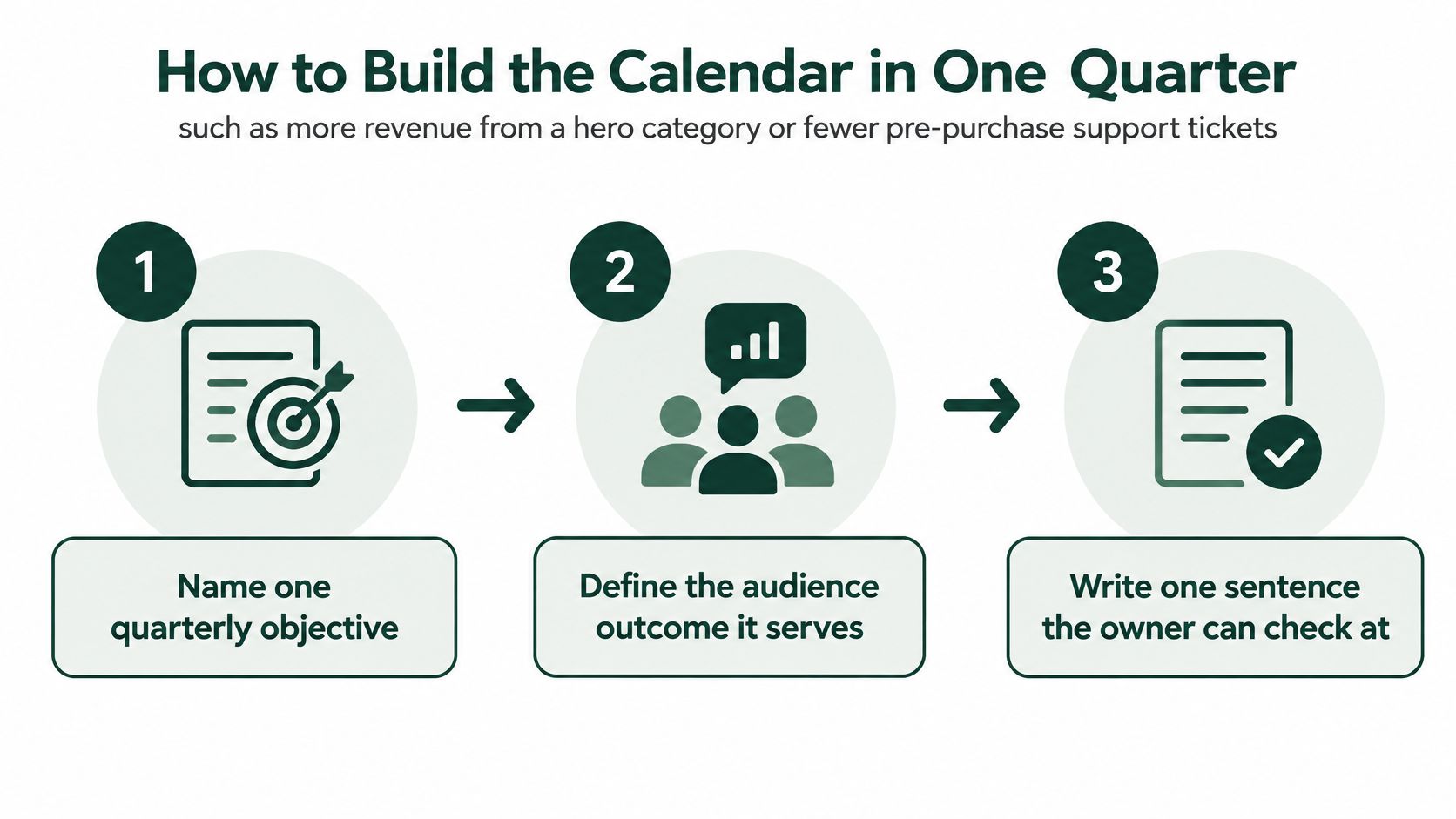
- Name the objective and audience outcome. For a bedding store, the objective might be increasing category revenue by helping shoppers choose between fabrics. That gives the owner something concrete to evaluate.
- Choose categories and formats that support the decision. Comparisons, buying guides, product updates, and care instructions have different jobs; don't default to articles for all of them.
- Check available production capacity. Include the people who edit, approve, and upload. An available writer doesn't solve an unavailable reviewer.
- Gather candidates from customer questions, search queries, launches, seasonal demand, and aging pages. Use an SEO content plan to connect those candidates to topics rather than collecting isolated headlines.
- Score candidates and accept only what fits. Preserve room for maintenance, experiments, and operational work. Keep rejected ideas in a backlog without promising dates.
- Complete the accepted assignments and back-schedule their handoffs. A missing expert interview should become visible before the drafting deadline.
- Maintain status weekly and assess performance periodically. Change later commitments when availability, inventory, or customer demand changes, rather than forcing obsolete work through production.
The practical test is whether each accepted assignment has a path to completion, not whether the quarter looks busy.
For a complementary walkthrough of editorial-calendar planning, use the video below.
A Scoring Model When Capacity Runs Out
The difficult decision isn't choosing between a good idea and a bad one. It's dropping a reasonable article because refreshing a category guide would help the business more.
Airtable's editorial calendar guidance provides a useful foundation for organizing assignments and workflow. Organization alone, though, doesn't tell a generalist which assignment should lose its slot when product-page work arrives.
Treat the calendar as a constrained content portfolio. Each accepted asset consumes writing, reviewing, design, and publishing capacity that can't simultaneously go elsewhere.
Use the same tests for every candidate
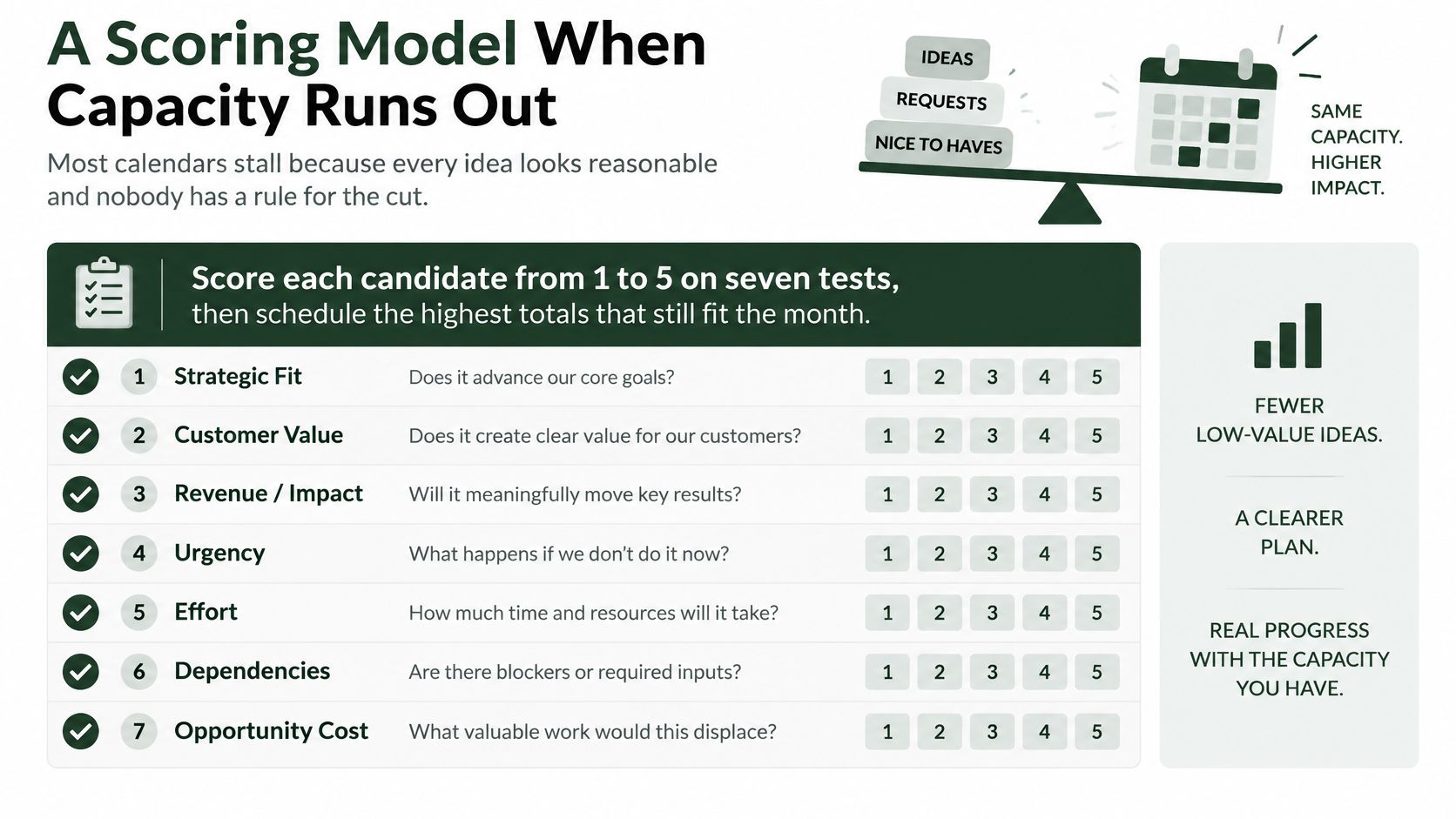
For a hypothetical scoring sheet, assign each criterion a score from one to five, with higher always meaning more attractive. That direction matters: a high production-effort score should mean manageable work, not a bigger assignment.
Use the checklist to make the trade-offs visible.
| Criterion |
Question to ask |
High score looks like |
| Search demand |
Is there evidence people look for this? |
Steady queries or a known seasonal spike |
| Commercial intent |
Does this influence a purchase or pipeline step? |
Comparison, category, or product-adjacent topic |
| Ranking feasibility |
Can this site realistically compete? |
An owned URL with relevant visibility or competing pages the team can meaningfully improve on |
| Freshness |
Is an existing URL slipping? |
Declining visibility on a useful page with identifiable outdated material |
| Business impact |
Does it serve this quarter's objective? |
Tied to a launch, margin category, or campaign |
| Production effort |
Can it ship inside the cadence? |
Research, draft, and design fit the owner's available time |
| Dependencies |
What else must be true first? |
Photos, legal review, inventory, or a technical fix already booked |
Use Search Console query patterns, customer questions, and a keyword research checklist to support the scores. Write a brief reason beside each rating so colleagues can challenge the evidence rather than debate an unexplained total.
Don't manufacture freshness urgency for a new article. Give it a neutral rating on that criterion, then judge its opportunity through demand, feasibility, and impact.
Apply a dependency gate before accepting the total
A strong total doesn't override a blocker. If a comparison requires unavailable test results, leave it unscheduled until the owner can obtain them.
Decision rule: A candidate can be attractive and still be unready. Keep its priority; withhold its date.
Say the store is choosing between a broad bedroom-inspiration article and a refresh of its linen comparison page. The inspiration piece may attract more potential readers, but the comparison refresh could better support the sale, reuse approved photography, and require less review. Those advantages can justify scheduling the refresh first.
Reserve capacity across different kinds of work rather than letting new articles consume everything:
- Proven performers: Maintain useful pages that already attract relevant visitors.
- Strategic experiments: Test a new topic, format, or audience need with a clear hypothesis.
- Operational necessities: Protect product, support, and policy work with business deadlines.
Allocate by effort, not merely by asset count. Updating a care instruction and producing an original comparison guide aren't equivalent commitments.
Search Console exports and a spreadsheet can support this process. AutoSEO is another option for bringing query, sitemap, competitor, and demand signals into a connected briefing and publishing workflow; a person should still decide what earns a date.
Re-score when meaningful facts change, such as a delayed launch or a deteriorating page. A new headline from a stakeholder isn't, by itself, a reason to reshuffle production.
A 2025 Orbit Media survey of 808 content marketers, summarized by DeepSmith's publishing-frequency guide, found that approximately half published between 2 and 4 blog posts per month. That's a useful reference point for a modest blog operation, not a requirement for a generalist who also owns product pages and email.
Start with the hours available after the rest of the job is accounted for. Then include research, briefing, fact-checking, editing, approval, formatting, distribution, and review in the assignment estimate. Counting drafting time alone produces a schedule the team can write but can't finish.
Compare complete workflows, not post counts
A high-volume publishing operation needs reliable handoffs and enough editorial capacity to clear them. Adding drafts to an existing review queue doesn't create that operation; it creates unfinished inventory.
A solo generalist may get more value from alternating a substantial new piece with a focused refresh. A store approaching a launch may need to reduce blog production while it finishes category copy, product specifications, and buying-help content.
Sustainable monthly cadence by team
These are starting approaches, not productivity promises. Increase output only when the full workflow fits.
| Team situation |
Monthly output to plan |
What the slots cover |
| Solo generalist |
A small alternating queue |
A new or campaign piece alongside a refresh |
| Typical SMB |
A modest recurring blog schedule |
Complete assignments with editing and distribution included |
| Lean e-commerce |
Articles alongside protected product and help slots |
Seasonal and launch pages before extra blogs |
| Larger team with a real production line |
More frequent publication only when every stage fits |
Refreshes, product content, email, and social adaptations |
| Volume benchmark, not a quota |
A separate high-output operating model |
Dedicated production and review capacity, not extra drafts for the same approver |
The trade-off is usually specificity versus breadth. A thorough comparison may require product checks and custom visuals; a straightforward help update may not. Give each the time its evidence and risk justify instead of setting an identical turnaround for everything.
Don't increase the cadence while approved work is waiting for upload or drafts are waiting for review. Fix the queue first.
Reuse the evidence, not just the wording
Format choice should follow the customer's task. A shopper comparing fabric texture may need close-up images or video; someone checking washing instructions may prefer concise text.
The Content Marketing Institute's 2025 B2B benchmark findings reported that 92% of B2B marketers used short articles or posts, while 76% used video. Those figures describe B2B marketers' format use, not an ideal allocation for an online store.
For the linen guide, reuse approved product evidence in an email comparison and a short social explanation. Keep those adaptations attached to the main assignment so they don't become disconnected research projects.
Reuse still takes time. A clip needs framing and captions; an email needs a subject line and destination check. If those tasks won't fit, drop the extra format rather than stealing time from fact-checking the main page.
Schedule and Automate Publishing in Your CMS
- Start with the destination on the row. Open the intended Shopify blog, WordPress post, Webflow CMS collection, or Wix blog. Confirm you're editing the correct site and content type before uploading.
- Load the approved content and metadata. Include the headline, meta title, description, intended URL handle, collection or product links, and relevant structured data. Avoid substantive changes after approval without returning them to the reviewer.
- Set the publication time. Use the platform's native scheduling controls where available, matching the calendar's live date rather than its draft deadline. Check the site's time zone against the intended market; use a documented handoff if the integration doesn't support scheduling.
- Preview the page on mobile and desktop. Test internal links, image crops, alt text, headings, and purchase-related claims. Validate applicable schema and make sure an integration hasn't added duplicate markup.
- Queue distribution after approval. A scheduled status can trigger an email or social task, but it shouldn't bypass human authorization. Keep promotional sends contingent on the page being available, especially when a launch could move.
- Check the published page. Confirm it loads publicly, uses the intended canonical URL, and isn't accidentally marked noindex. Record the final URL and review date on the row, then check that measurement is collecting the signals you chose.
Scheduling removes repetitive handoffs; it doesn't confirm that a page is correct. Someone still needs to inspect the live result, particularly when templates, app blocks, or product availability can change between approval and publication.
Run Weekly Maintenance and Lock the Next 30 Days
Block a short status meeting on the same day each week. Use it to resolve unfinished work, not brainstorm replacements for assignments already underway. Keep the next month dated and owned, while later months remain organized around themes and campaigns.
Protect some unassigned capacity for corrections and launches. If urgent work has nowhere to go, the team will either miss commitments or rush the least visible quality checks.
Fix the failure instead of expanding the sheet
- The calendar is ignored: Hide unused fields and give each contributor a filtered view of their own work.
- Publishing arrives in bursts: Reduce the accepted queue until the team can complete it repeatedly.
- Everything becomes a blog post: Match the customer's task to a product update, help page, email adaptation, or visual explanation.
- Approval is ambiguous: Name the authorized reviewer and require an explicit decision before scheduling.
- A draft slips: Revise the date and its dependent promotion. Don't publish a thin version to preserve an entry on the sheet.
Budget planning won't reliably remove those constraints. In 2025, 41% of enterprise marketers expected content marketing budgets to remain unchanged compared with 2024, according to Content Marketing Institute and MarketingProfs. For a small team, the actionable decision is still which work fits the people available now.
Review outcomes without rushing the verdict
Use the initial post-publication check to catch broken tracking, missing indexability, and unexpected visitor behavior. Search-led content may need longer before you can judge its contribution, so don't label an otherwise sound page a failure because the first review is quiet.
Mark a page for refresh when you can identify a useful intervention: outdated specifications, changed intent, missing comparison detail, or declining performance that warrants investigation. A refresh assignment needs a reason, not just an anniversary.
This week, choose the quarterly theme and complete a small set of scored assignments. Put real dates and an approver on the work you can finish, schedule only approved assets, and record how you'll evaluate them. If those commitments slip, lower the cadence before adding fields or tools.
AutoSEO connects keyword research, content briefs, internal links, schema, CMS publishing, and measurement in an approval-first workflow. Visit AutoSEO to turn your selected content opportunities into a calendar your team can review, approve, and ship.