automated seo monitoring ~14 min 2,620 words

Automated SEO Monitoring: What to Track in 2026

Automated SEO Monitoring: What to Track in 2026

You update your store's theme, check that checkout still works, and move on to orders. The product pages look fine, but the new image gallery makes them slower on mobile. Weeks later, you discover that those pages have lost their good Core Web Vitals status. Your ranking dashboard never warned you because it wasn't checking performance.

That's the practical reason to use automated SEO monitoring. You need a reliable way to notice what changed, decide whether it matters, and get the right person to act without turning every fluctuation into another website rewrite.

Table of Contents

What Automated SEO Monitoring Means for Your Site

Automated SEO monitoring uses software to check your website on a schedule, compare results with a stored baseline, and flag meaningful changes. It can cover rankings, indexation, page speed, structured data, redirects, and visibility inside AI-generated answers.

In the theme-update scenario, a useful alert wouldn't just say that your website became slower. It would identify the affected product template, distinguish mobile from desktop, and show when the regression began. That gives your developer something specific to investigate.

Think of monitoring as a smoke alarm, while a manual audit is an inspection. The inspection helps you understand existing problems; the alarm helps you notice new ones between inspections. Neither replaces the other.

The basic monitoring system

Every useful setup has connected responsibilities:

  • Collect signals. Pull search, crawl, performance, and analytics information on schedule.
  • Compare results. Check changes against a baseline that represents normal conditions.
  • Route exceptions. Send a meaningful alert to an owner or an approved repair workflow.

Your website isn't the only thing that changes. In March 2025, 18% of Google searches in a Pew Research Center study produced an AI-generated summary, illustrating why search visibility can change even when you haven't edited a page.

A manageable setup brings these checks into your regular working routine.

A modern workspace with a laptop showing a performance meter, a tablet with automated monitoring, and a calendar.

This is particularly useful for Shopify, WooCommerce, and Wix operators who don't have an SEO specialist reviewing raw reports. Marketing generalists benefit for the same reason: they need a short list of actionable exceptions, not another dashboard to interpret.

Core Signals to Track and How Often

Use this working reference to decide what belongs in your monitoring setup. The cadences and alert triggers are suggested operating rules, not universal standards or measured benchmarks; adjust them to your publishing frequency, traffic, and tolerance for risk.

Core SEO signals, sources, cadence and example alerts

Signal What It Shows Data Source Check Cadence Example Alert
Keyword rankings Position for a short list of priority terms Google Search Console, DataForSEO fallback Daily Priority term leaves the top ten for three consecutive checks
Indexation Whether key pages are in Google's index Search Console index reports, sitemap inventory, URL Inspection Weekly; daily for new products Sitemap URLs marked not indexed rise sharply in a week
Core Web Vitals LCP, INP, and CLS by page template Field data and lab speed tests Weekly per template Product template shifts from good to poor after a theme update
Schema JSON-LD presence and validity Site crawl and structured-data validation After every publish and weekly Product schema missing on newly added SKUs
Redirects and canonicals Redirect chains and canonical targets Site crawl Weekly and after relevant publishes Redirect chain exceeds two hops or canonical points to a missing page
AI citations Whether AI engines mention or link the brand for tracked prompts Repeated prompt-panel runs across engines Weekly with repeats Brand absent in three of five repeated runs on an engine
Traffic and conversions Clicks, qualified sessions, and revenue per landing page Search Console and analytics Weekly Non-branded clicks fall while impressions hold steady

Read each signal in context

Rankings need a defined query set. Track commercially important terms and their intended landing pages rather than every possible catalogue phrase. Search Console's average position isn't identical to a fixed-location rank check, so keep those measurements separate; a rank tracker tool should make its device and location settings clear.

Indexation isn't sitemap inclusion. A sitemap tells Google which URLs you want discovered. It doesn't prove that Google indexed them. Investigate unexpected exclusions on important pages, but don't treat deliberately excluded filter URLs as failures.

For performance, use field data to understand real visitor experience and lab tests to diagnose a reproducible problem. Low-traffic pages may lack enough field information for page-level reporting. Grouping similar URLs by template helps, but don't present a lab result as a field assessment.

Run schema and redirect checks after publishing because a release can introduce a deterministic fault immediately. Rankings and AI answers need repeated sampling because a single observation can mislead.

For AI visibility, keep a consistent prompt panel across ChatGPT, Claude, Gemini, Perplexity, and Google AI Overviews. Record mentions separately from clickable citations, and don't compare results collected under different market or account conditions as though they were equivalent.

Practical rule: Track fewer signals well, then add more once you trust the alerts.

How the Closed Monitoring Loop Works

A report isn't a completed SEO task. A closed monitoring loop connects detection to a controlled fix and then checks whether the intended outcome happened.

The process diagram shows how collection, diagnosis, ownership, and verification connect.
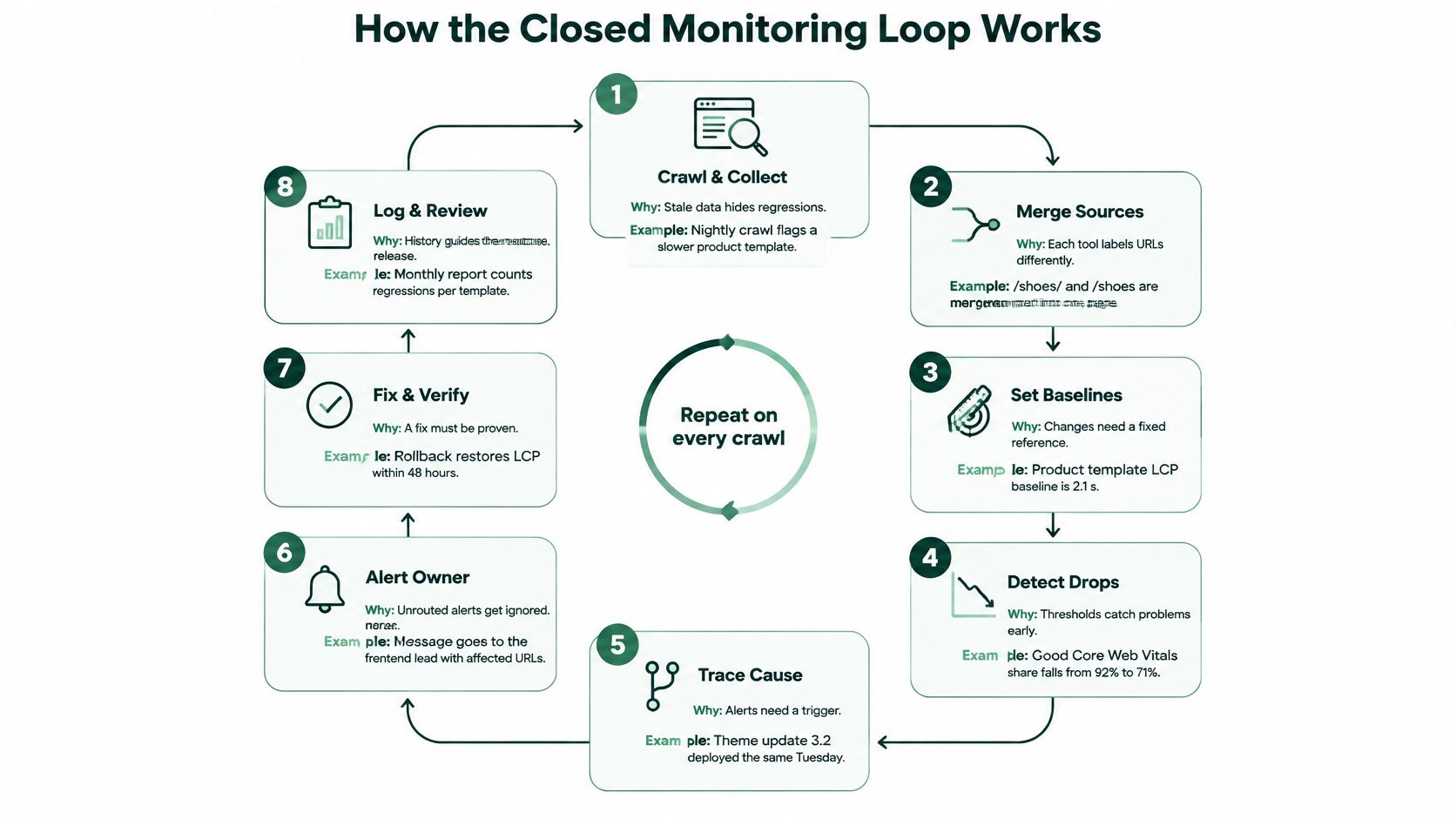
A diagram illustrating an eight-step closed monitoring loop process for automated technical SEO and performance tracking.

From observation to verified action

  1. Collect fresh information on schedule. Crawl the site and retrieve Search Console, sitemap, and speed information because stale exports can hide recent regressions. For example, a scheduled crawl might find that newly published products are missing their expected markup.

  2. Compare with a stored baseline. Keep the previous healthy state, including affected URLs, device, template, and collection settings. A mobile product-page slowdown means more when you can compare it with the same template under comparable testing conditions.

  3. Filter measurement noise. Repeat uncertain checks before creating work, and distinguish unavailable data from a genuine failure. If a rank-checking service times out, record a collection error rather than declaring that the page disappeared from search.

  4. Prioritize the surviving exceptions. Order the task queue by business impact, confidence, and repair effort. A broken buying guide that sends qualified visitors to products may deserve attention before missing metadata on an archived announcement.

  5. Draft the smallest suitable fix. Prepare a title edit, schema correction, internal link, or redirect adjustment that addresses the diagnosed problem. If the error is a canonical pointing to the wrong collection, don't bundle an unrelated content rewrite into the same task.

  6. Request the right approval. Give the reviewer the evidence, proposed change, affected URLs, and expected result. Redirects, indexation controls, and substantial content edits need someone who understands the commercial consequences.

  7. Publish with a recoverable previous version. Use the CMS integration to apply the approved change and record exactly what was published. Keep the earlier version and a rollback method so a failed release doesn't require reconstructing the page manually.

  8. Verify against a predefined outcome. Choose the review window before publishing and match it to the signal: technical validity can be checked promptly, while search and conversion effects need more observation. Close the task when the intended condition is restored, not simply when the publishing job succeeds.

Keep the handoffs visible

An integrated workflow can combine Search Console and DataForSEO inputs with an approval-first task queue, CMS publishing, and an email digest. Shopify, WordPress, Webflow, Wix, and webhook connections reduce manual transfers, but the task record still needs an owner and acceptance criteria.

Don't attribute every subsequent improvement to your edit. Annotate promotions, stock changes, tracking repairs, and other releases that might explain the outcome.

For an accompanying walkthrough, use the video below.
SEO content setup

Plan and publish SEO content with AutoSEO

Enter your site to scan it and build a keyword plan. Review your articles and connect your site for publishing. $39/mo per website.

Review before publishing Cancel anytime 30-day money-back

Performance and Indexation Drift Across Templates

Only 43% of websites achieved a good overall Core Web Vitals assessment using Interaction to Next Paint in HTTP Archive's 2024 Web Almanac, compared with 31% in 2022. That left a majority failing at least part of the assessment, despite the improvement.

For a store owner, the important question isn't whether websites generally got faster. It's whether your product, collection, and home-page templates remain healthy after changes. A site-wide summary can make a localized regression difficult to spot.

Separate templates, devices, and metrics

Largest Contentful Paint, or LCP, describes loading performance. Interaction to Next Paint, or INP, describes responsiveness, while Cumulative Layout Shift, or CLS, describes visual stability. A page can behave well on one measure and still frustrate customers on another.

In the cited measurement period, HTTP Archive's 2025 Web Almanac reported that 56% of measured pages achieved good overall Core Web Vitals, although 97% achieved good INP. Passing a strong individual metric isn't the same as passing the combined assessment.

Use template groups to isolate likely causes:

  • Product pages. Check image galleries, review widgets, variant selectors, and app scripts.
  • Collection pages. Inspect filter interfaces, product grids, pagination, and image loading.
  • Editorial pages. Watch embedded video, advertising slots, and dynamically inserted forms.
  • Home pages. Test promotional banners and large visual assets separately from catalogue components.

A healthy home page doesn't prove that your mobile product pages are healthy.

Keep a release log beside these measurements. A theme deployment or app installation is an investigation lead, not proof of causation. Reproduce the issue, isolate the component, and compare the same template after the repair.

Diagnose indexation separately

Speed monitoring won't tell you whether Google is receiving the right canonical or indexation instructions. Your technical SEO tools also need to inspect response codes, robots directives, canonical targets, and internal links.

Say a collection filter creates parameterized URLs, and a template change makes those URLs point to an unrelated canonical page. The pages might load quickly and look correct to shoppers while sending confusing consolidation signals.

Group the affected URLs by template and parameter pattern. Check the intended canonical destination, confirm it loads successfully, and inspect whether important internal links point to the preferred version. Then verify Google's selected canonical where URL Inspection information is available.

Don't infer a canonical problem merely because an HTTP canonical header is absent. Many HTML pages express their canonical through an HTML link element instead. The meaningful test is whether the intended signal is present, consistent, and appropriate.

After publishing the correction, re-crawl the affected pattern. Confirm the implementation first, then monitor subsequent indexation reporting without expecting an immediate search-engine response.

Separating AI Mentions From Real Clicks

A brand can appear in an AI answer and still lose traffic. The citation may give someone enough information to stop searching rather than visit your store.

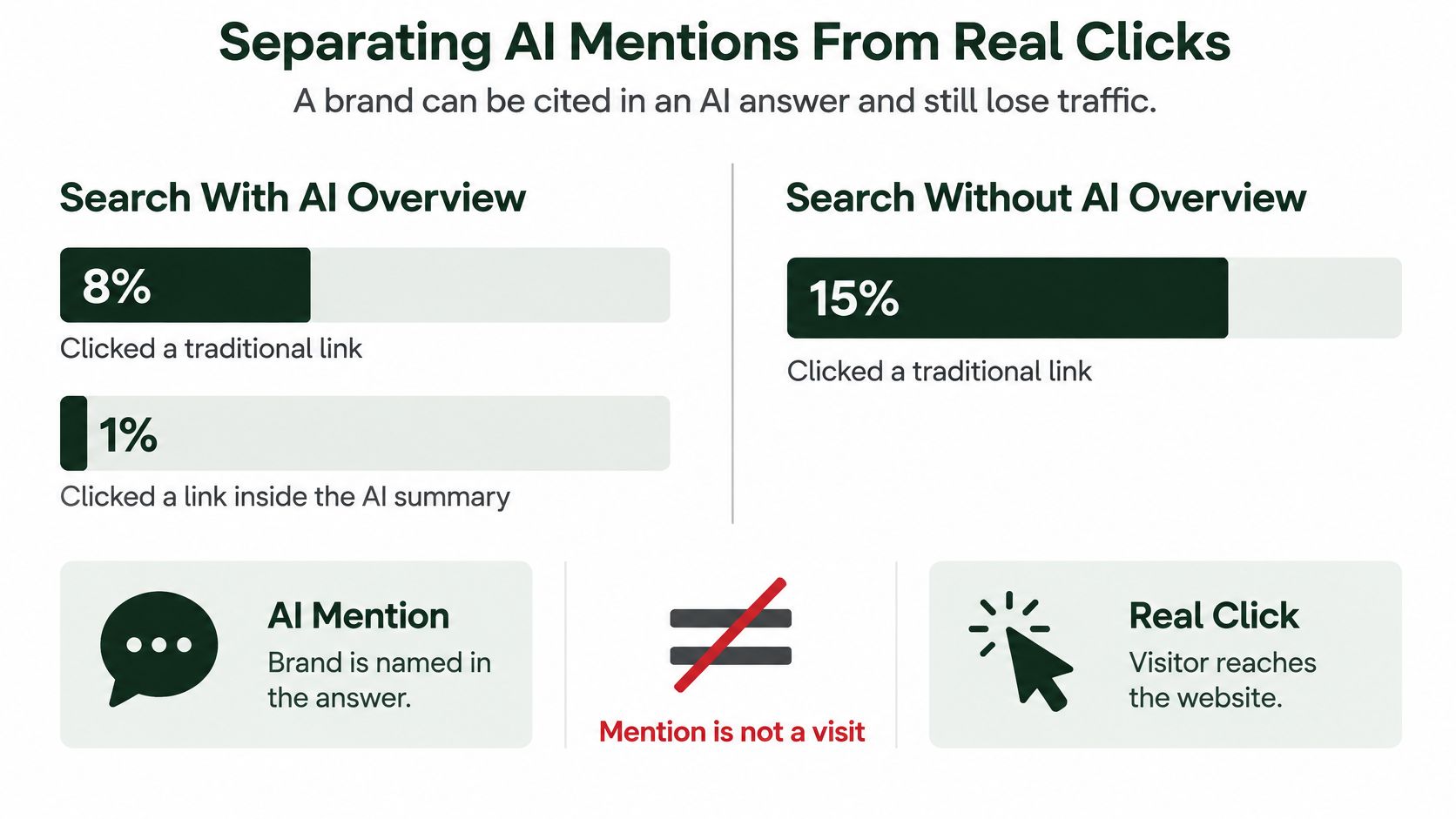
Google users clicked traditional links on 8% of searches containing an AI Overview, compared with 15% without one, according to Mashable's coverage of Pew Research Center's findings. That comparison challenges the assumption that more visible mentions necessarily produce more website visits.

The visual distinction matters when you decide what your reporting should count.

A chart comparing click-through rates for traditional search results versus AI-generated search summaries and brand mentions.

Keep business outcomes separate

Your reporting should distinguish:

  • Being mentioned. The answer names your business or cites your content. This is a brand-visibility observation.
  • Receiving a click. Someone reaches your website. This is an acquisition outcome, not something you can infer from a citation.
  • Producing value. The visitor purchases, requests a demonstration, signs up, or completes another meaningful action.

Use Search Console query filters to compare branded and non-branded demand. Then examine landing-page clicks alongside qualified sessions and conversions in analytics. Don't assume that every AI-influenced visit will have a clean, identifiable referral.

Search Console doesn't provide a universal AI Overview presence filter. Where you have query-level search-result observations, align them with query, device, market, and collection time. Treat that as contextual evidence rather than a perfect attribution system.

Report frequency, not certainty

AI answers can change with wording, location, device, and time. Your AI visibility tracking tools should report repeated observations with those conditions attached, rather than just labeling your brand present or absent.

A small prompt panel doesn't support a precise claim about your entire audience's exposure. State the sample's limits, and keep brand mentions separate from linked citations.

Consider a store selling specialist cookware. Its buying guide still receives impressions, and an AI answer names the store, but fewer searchers visit. Automatically expanding the guide could waste effort if searchers already receive the answer before clicking.

Check whether rankings, click opportunity, stock availability, and conversion tracking changed before commissioning more content. A useful brand signal and a weaker traffic signal can coexist, but neither alone establishes the cause of lost sales.

Set Alert Rules Before Automation Acts

An alert is a request to investigate, not permission to publish. Before enabling automatic changes, define what evidence qualifies, who owns the decision, and how to reverse the action.

Conflicting search narratives make that discipline important. Whole Whale's analysis of Google's statements and independent AI Overview findings highlights the difference between aggregate click-volume claims and narrower observations about click-through behavior. Your store needs evidence from its own relevant segments, not an automatic response to an industry headline.

Evidence needed before each change type runs

These are suggested minimum operating rules, not proven causal thresholds. The evidence earns a review or controlled action; it doesn't prove that the proposed edit will solve the problem.

Change Type Minimum Evidence Action Mode
Title or meta rewrite on a page Two or more weeks of falling clicks with stable impressions Draft for approval
Missing schema added across a template Same validation error on every page of the template Auto-apply with rollback copy
Internal link added to a page Page flagged as orphaned in two consecutive crawls Batch draft for approval
Redirect change Confirmed 404 on three consecutive crawls Human approval required
Content rewrite Sustained conversion drop over four or more weeks in one market Human sign-off only
Response to AI citation loss Loss across repeated prompt runs in one engine Monitor only, no rewrite

Schema auto-application should be restricted to a pre-approved template repair using verified page information. Don't invent reviews, prices, availability, or other properties to make validation pass. Validate the generated markup before publishing and check it again afterward.

Similarly, a missing URL doesn't automatically need a redirect. The owner must decide whether there's a genuinely equivalent destination or whether the missing-page response is appropriate.

Give every alert a confidence label

Use low confidence for isolated or incomplete observations, medium confidence for repeatable changes with an uncertain cause, and high confidence for reproducible faults with clear implementation evidence. Attach business impact separately: certainty and urgency aren't the same thing.

Approval boundary: Automate collection freely. Automate publishing only within an explicitly approved scope.

For international sites, compare language and market segments separately. A decline in a localized collection shouldn't trigger a rewrite across unrelated markets.

Start this week with priority keyword rankings, indexation of newly published pages, and Core Web Vitals for your product and collection templates. Save the first readings, assign an alert owner, and leave publishing approval switched on while you learn which warnings deserve action.


AutoSEO offers free Core Web Vitals and SEO Score Checker tools for an initial reading, alongside connected audits, rank tracking, AI-visibility monitoring, and approval-first publishing. Visit AutoSEO to establish your starting measurements, then connect the monitoring workflow around the pages that matter most to your business.

Related Articles

Stop doing SEO by hand

Build your SEO content plan with AutoSEO

Scan your site, build a keyword plan, and AutoSEO writes your plan's articles. Review the drafts and connect your site for publishing. $39/mo per website, cancel anytime, 30-day money-back guarantee.

$39/mo per website · Cancel anytime · 30-day money-back guarantee