You publish a new article, wait a few days, and open Google to check whether it's working. The page isn't where you expected, but you can't tell why. Maybe Google hasn't indexed it. Maybe another page on your site is ranking instead. Maybe the result looks different on mobile or in another city.
A rank checker tool gives you a controlled way to answer those questions. It also creates the measurement layer between SEO decisions and the next action. Research identifies an opportunity, content targets it, publishing puts the page into the market, and rank data tells you what happened. Without that feedback loop, SEO becomes a sequence of guesses followed by occasional reporting.
Table of Contents
Why Rank Checking Has Become a Daily Habit for SEO Teams
A marketer who has just shipped an article usually needs more than a position number. They need to know whether the intended page is appearing, whether it ranks for the target query, and whether its visibility changes after indexing. A scheduled rank check turns those questions into observable signals instead of a manual search performed from one browser.
The difference matters because search results move. A competitor can improve an existing page, Google can adjust the result layout, or a site release can alter internal links and relevance signals. A single lookup captures only one moment and may hide the movement that explains a traffic change.
Practical rule: Treat a ranking as an observation with context, not as a permanent property of a page.
From keyword target to feedback loop
Use rank data at each point in the publishing cycle:
- Before writing, review historical movement and competing pages to judge whether the keyword fits the site's current position.
- In the content brief, assign a primary term, supporting terms, questions, and a target URL.
- After publishing, check whether the intended URL appears for the tracked query.
- During optimization, compare movement with changes to headings, internal links, structured data, and content depth.
- In reporting, connect position trends with clicks, impressions, conversions, and the page that earned them.
Moz's Rank Checker keeps historical rankings in its rank history graph for up to one year, while Ahrefs' SERP Checker includes position history for the current top five pages. SpyFu describes a ranking-history database reaching back 18 years. These products illustrate the wider shift from point-in-time checking to longitudinal measurement through Moz's Rank Checker documentation.
Why recurring checks beat occasional audits
A recurring schedule helps teams distinguish a temporary fluctuation from a meaningful pattern. It can expose ranking decay before a page disappears from an important query, show that a refresh improved the intended URL, or reveal that two pages are alternating for the same term.
That becomes especially valuable when a team manages dozens or hundreds of pages. Manual searches don't scale, and they rarely preserve the exact location, device, language, or SERP layout used during the check. A rank checker tool stores those settings, repeats the measurement, and makes the change visible to the person responsible for the next task.
Independent usage data reinforces this operational pattern. In a June 2026 sample of more than 2,600 SERP monitoring jobs, 32% ran daily, 27% weekly, and 36% monthly. Google accounted for 97% of tracked results, with smaller shares for Bing, DuckDuckGo, and Yahoo, according to Visualping's SERP monitoring analysis. The lesson isn't that every keyword needs a daily check. It's that professional teams use repeatable monitoring because rank data is most useful when it drives a response.
Rank Checker Versus SERP Checker, and Why the Distinction Matters
A SERP checker answers a one-time question: what does this search results page look like right now for this query, location, language, and device? It's useful when you're inspecting competitors, validating a result layout, or checking whether a feature such as a snippet or local pack appears.
A rank checker tool adds memory and repetition. It tracks a defined keyword set, records the ranking URL, stores historical positions, detects result features, and highlights movement. The distinction sounds small, but the workflows are different.
| Capability |
Rank Checker Tool |
SERP Checker |
| Primary job |
Monitor rankings over time |
Inspect a current results page |
| Historical data |
Stores repeated observations and trends |
Usually focused on the present check |
| Alerts |
Can flag gains, drops, and anomalies |
Usually requires a manual revisit |
| Competitor comparison |
Supports ongoing comparison |
Shows competitors in the inspected SERP |
| Best use |
Measurement, reporting, and optimization |
Research, validation, and spot checks |
| Workflow output |
A trend that can trigger a task |
A snapshot that informs a decision |
An agency preparing a client report needs historical deltas, not just today's result. An in-house marketer investigating a traffic decline needs to know whether the target URL slipped gradually or vanished after a release. A content team evaluating a new topic needs repeated observations to understand whether the page is moving toward visibility.
A SERP checker remains valuable for the close inspection that a tracker can't replace. You might use it to examine the wording of competing titles, inspect the pages inside a featured snippet, or verify how a query behaves in a particular city. But the result doesn't become a monitoring system merely because you save a screenshot.
A SERP checker shows the market. A rank checker shows your position in that market over time.
This is why buying decisions should start with the workflow, not the interface. If the team only needs occasional validation, a one-off checker may be enough. If the team needs alerts, trend lines, competitor movement, page attribution, and recurring reports, persistence is the essential feature.
The Core Features That Separate a Strong Rank Checker
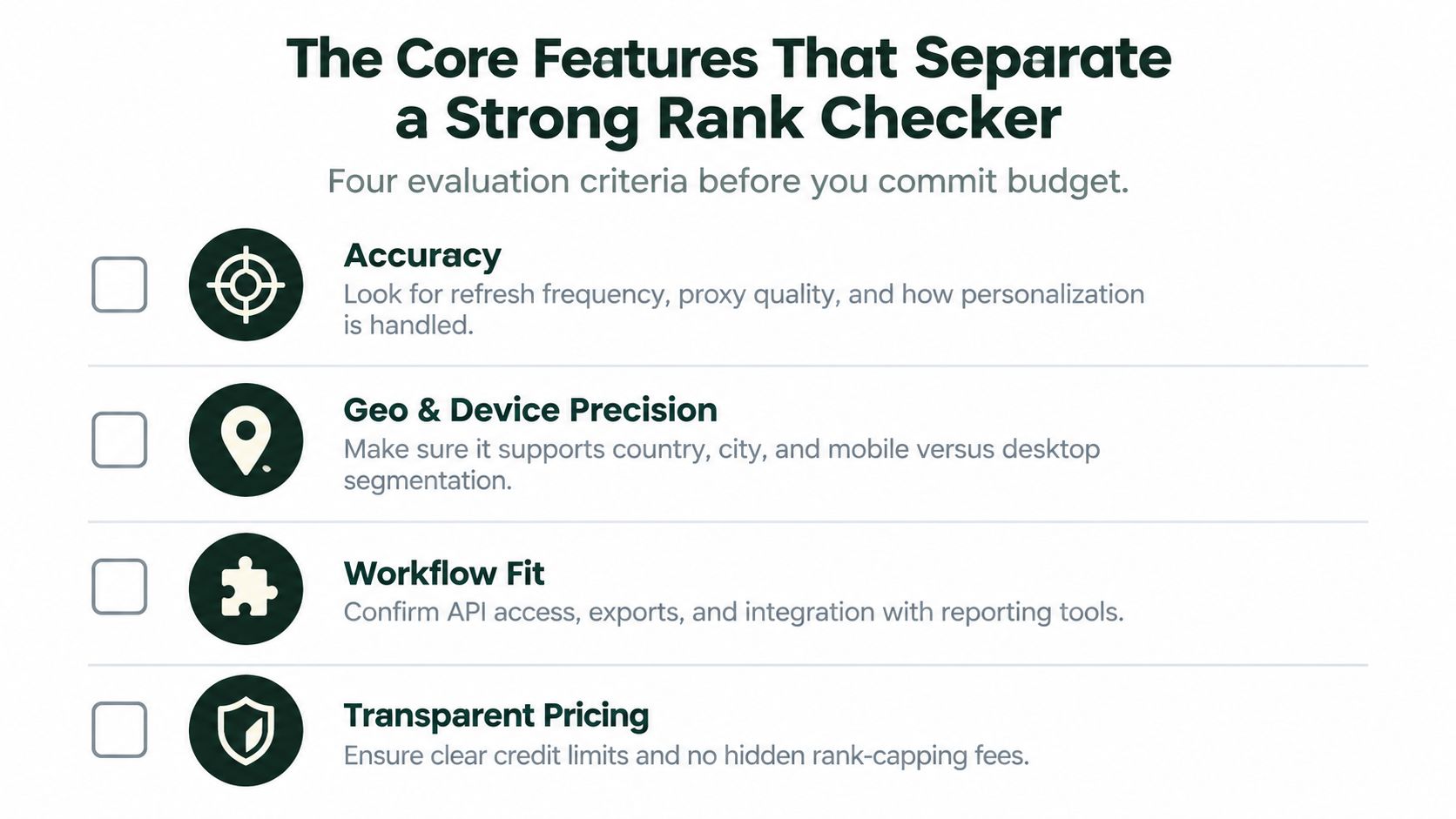
A rank checker can produce a neat table and still give you weak evidence. Before committing budget, evaluate four areas: accuracy, SERP feature coverage, geo and device precision, and workflow fit.
Accuracy begins with controlled conditions
Ask how often the tool refreshes data, how it obtains results, and how it handles personalization. A check performed without consistent settings can make a position change look meaningful when the query was measured in a different environment.
Useful controls include:
- Search location, from country to city or a more precise local area.
- Device type, such as desktop and mobile.
- Language and search engine, especially for multilingual programs.
- Result layout, including ads and special SERP features.
- Refresh behavior, so urgent keywords can be rechecked when needed.
Expert guidance treats geo simulation and SERP feature detection as core accuracy requirements because rankings vary by these variables. The rank-tracking accuracy guide from Rank Tracker explains why an uncontrolled snapshot can misrepresent visibility.
Position alone no longer describes the result
A page at organic position one may appear below an AI Overview, a featured snippet, or another prominent block. The tool should record whether your URL owns or appears in those features, not only whether it occupies a blue-link position.
Look for detection of featured snippets, People Also Ask, image packs, video results, local packs, and AI-generated result areas where available. The important question is, how much visible search real estate does the page occupy?
Granularity protects your interpretation
A national brand may need country-level comparisons across markets. A restaurant, clinic, or retailer may need city-level checks because a local query can produce a different result only a short distance away. Desktop and mobile views should remain separate, too, rather than being merged into a single average.
Integration turns data into work
API access, scheduled exports, and webhooks determine whether ranking data reaches your reporting or automation stack. Without them, the team may spend time copying values into spreadsheets while the content queue remains disconnected from the evidence.
The best setup doesn't merely display a drop. It can associate the drop with a URL, send an alert, and create a clear next step in the workflow.
How Geography, Device, and SERP Layout Shape the Numbers
Two people can enter the same keyword and receive different results because Google uses contextual signals to assemble the page. Location, device, language, personalization, and the available result features all affect what the searcher sees.
Consider a local query for a coffee shop. A check in Brooklyn might place a business near the top, while a check from Jersey City could show a different local set and a lower position. The business hasn't necessarily changed its SEO. The search context has changed.
| Check Condition |
Example Setup |
Reported Position |
Why It Moved |
| Local desktop |
Coffee shop query in Brooklyn |
2 |
Nearby local intent and local listings influence the page |
| Local mobile |
Same query on a mobile device |
5 |
Mobile layout and local result ordering differ |
| Cross-market search |
Same query in Jersey City |
9 |
Distance and local relevance change the competitive set |
| National desktop |
How-to query without video results |
3 |
Traditional organic results occupy more visible space |
| National mobile |
Same how-to query with a video carousel |
3 |
The blue link keeps its rank, but appears lower on the page |
The reported position in these examples is meaningful only when the tool records the check condition. A dashboard that combines all locations and devices can create a tidy average that matches no real searcher.
Mobile and desktop answer different questions
Mobile results often have a different layout, different feature prominence, and different user behavior. Since Google uses mobile-first indexing, mobile visibility deserves direct attention rather than being treated as a secondary variant.
For each important keyword, define the audience first. A local service business may care about a city and mobile device. A B2B company may prioritize country-level desktop research, while still checking mobile because prospects can discover the brand there.
SERP layout changes visible prominence
A featured snippet, People Also Ask block, video carousel, local pack, or AI Overview can push the traditional organic result lower on the screen without changing its underlying position. That creates two separate measurements:
- Algorithmic position, where the URL sits among organic results.
- Visible prominence, how much attention the result receives before the searcher scrolls.
A capable rank checker records both the organic position and the surrounding layout. Otherwise, it returns numbers without explaining what the searcher actually encounters.
Plugging Rank Tracking Into a Connected SEO Workflow
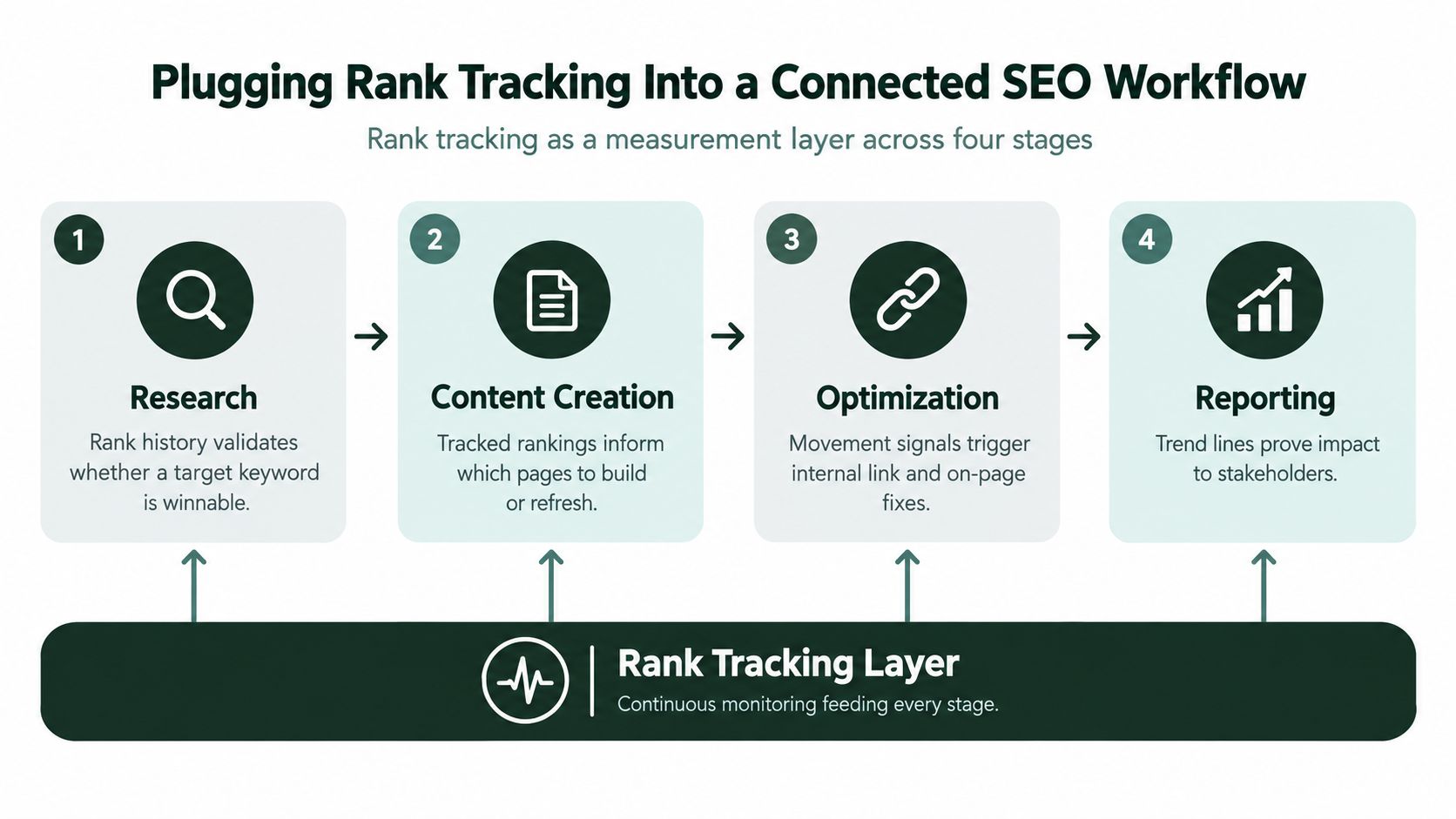
Rank tracking works best as a continuous measurement layer across four stages: research, content creation, optimization, and reporting. The tool isn't the destination. It supplies evidence to the next decision.
Research starts with a measurable opportunity
Before a writer opens a brief, the SEO lead can inspect ranking history, competing URLs, and the pages already associated with the query. That helps answer practical questions: does the site have a relevant page to improve, is a new page required, and which intent does Google currently favor?
Competitor movement adds another signal. If several competing pages gain visibility for a topic while your site remains absent, the gap may justify a new asset. If your own page is already appearing but slipping, a refresh may be more efficient than starting from zero.
Content creation gives the measurement a target
A content brief should identify the page that owns the topic. Tag the primary keyword, supporting terms, question queries, and related markets before publication. That prevents a later report from showing movement without clarifying which URL was supposed to rank.
The team can then compare the intended target with the actual ranking URL. If another page appears instead, the finding may point to cannibalization, weak internal linking, or unclear topical focus.
Publishing creates a baseline
At publication, the rank checker can record the starting state and confirm whether the page appears for its tracked terms. If it doesn't appear within the team's expected indexing window, the next action may belong to technical SEO rather than content editing.
A connected platform such as AutoSEO combines keyword research, content production, publishing integrations, technical SEO tasks, and rank tracking in one workspace. That structure lets the measurement sit beside the asset and its outstanding tasks, rather than arriving later as an isolated spreadsheet.
Optimization turns movement into a queue
Suppose a page improves after stronger internal links are added. The team should record that change and apply the learning to similar pages. If a page loses visibility after a template release, the alert should create a technical investigation, not an automatic rewrite.
Weekly snapshots can feed decisions about internal links, schema, titles, content updates, and page consolidation. The useful output isn't “rankings changed.” It's “this page moved, this intervention happened, and this is the next action.”
Watch the workflow in action:
Reporting closes the loop when trend lines reach the people who approve resources. A stakeholder doesn't need a long keyword export. They need to see which pages gained or lost visibility, what work caused the change, and what the team will do next.
Rank Checker Data Versus Google Search Console Data
Google Search Console and a third-party rank checker both contain ranking information, but they measure different realities.
Search Console uses your site's actual impressions and clicks. Its position is an average across the impressions included in the report, influenced by different queries, locations, devices, and dates. It's excellent for discovering unexpected queries, finding pages that receive impressions without clicks, and identifying changes in real search performance.
A rank checker starts with a defined keyword list and probes the results under specified conditions. It returns a discrete position for that keyword and context, often with the ranking URL, competitor results, and SERP feature information.
| Dimension |
Rank Checker Tool |
Google Search Console |
| Data origin |
Controlled checks of selected queries |
First-party impressions and clicks |
| Main question |
Where does this tracked keyword appear? |
Which searches produced visibility and visits? |
| Position format |
Specific observation for a query and context |
Aggregated average position |
| Competitor view |
Commonly available |
Focused on your own property |
| Best use |
Monitoring targets and market movement |
Discovery, validation, and anomaly analysis |
| Reporting timing |
Depends on the tool's schedule |
Includes reporting delay |
Search Console is not a true live rank checker. It typically has a reporting lag of roughly 24 to 72 hours and about 16 months of history, while its position reflects aggregated impressions rather than a fixed daily snapshot, as explained in this Google Search Console ranking guide.
For a practical research workflow, use Google Search Console for keyword research to discover the language people already use. Then place the strategically important terms into a rank checker so the team can monitor defined targets, competitors, locations, devices, and SERP features.
The common mistake is asking one source to perform the other's job. Search Console reveals real demand and site performance. A rank checker provides controlled, repeatable observation. Used together, they connect discovery with deliberate tracking.
Rethinking What to Measure in an AI-Shaped Search Results Page
A single blue-link position no longer captures the whole search experience. A result page may include an AI Overview, featured snippet, People Also Ask questions, images, videos, or a local pack before the traditional organic listings receive attention.
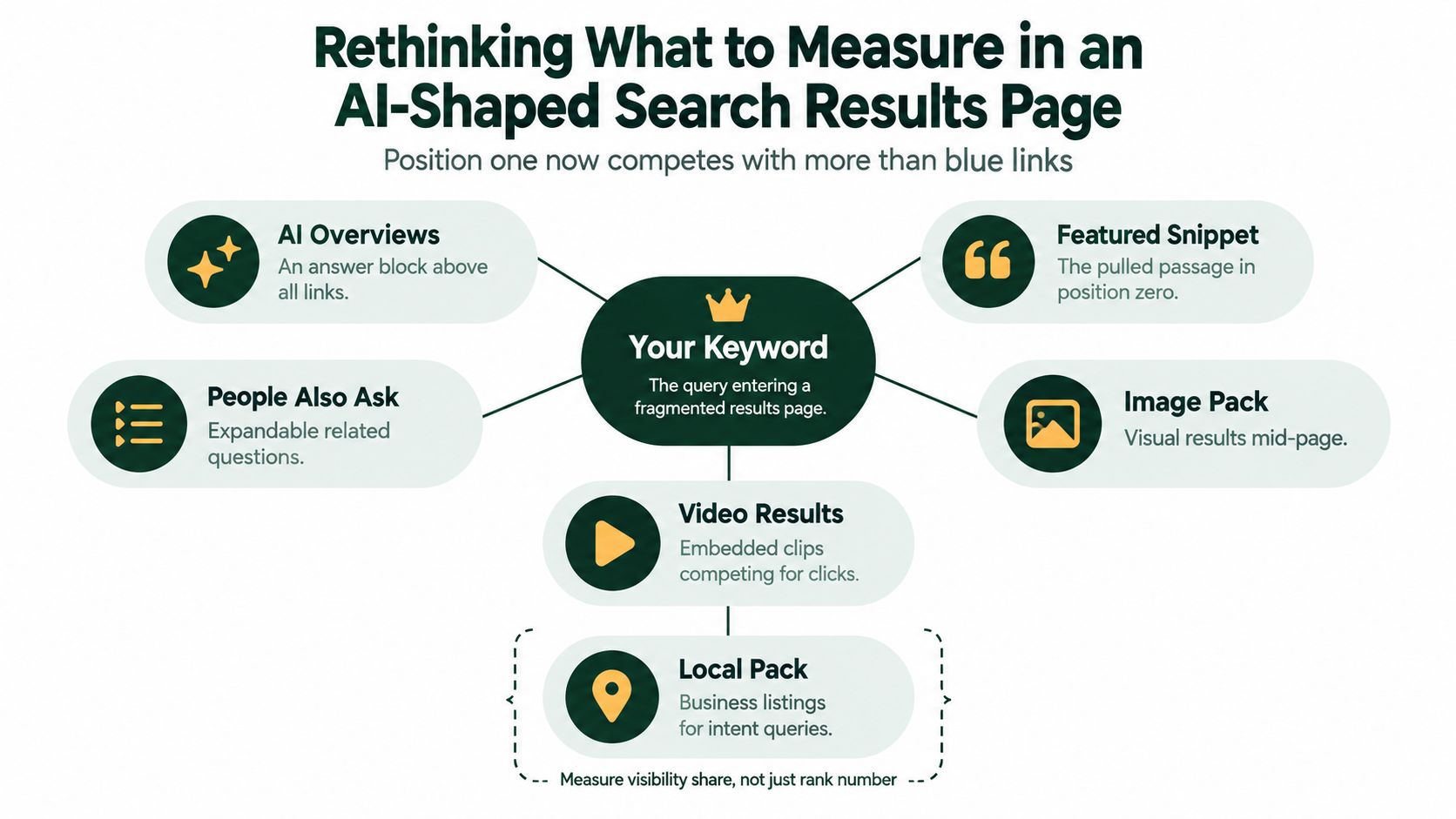
A page in organic position three could be less visible than a lower-ranked page that owns a prominent featured snippet. Conversely, a page can keep the same organic position while an AI Overview absorbs the direct answer and changes the reason for clicking.
That means the useful question isn't only “What position are we in?” It's “How much of the visible result do we occupy, and in what form?”
Measure presence across result types
A modern rank checker should help you distinguish:
- Organic position, where the URL appears in the standard results.
- Feature ownership, such as a featured snippet or local result.
- Brand or URL presence, including appearances within AI-generated summaries where tracking is available.
- Competitive visibility, which shows whether another page owns the prominent feature.
- Layout context, so a position change can be interpreted alongside the page structure.
Recent coverage of rank tracking emphasizes desktop, mobile, local searches, historical trends, competitor movement, and AI visibility rather than blue-link positions alone. The overview of rank-tracking capabilities from SEO.com reflects this broader measurement direction.
Turn visibility into an optimization decision
Suppose a how-to page ranks well but never appears in the featured snippet, while a competitor's concise answer occupies the most prominent block. The next task might be to restructure the explanation, improve the definition, or clarify the sequence of steps.
For an AI Overview query, the action may differ. The team may inspect whether the page answers the query directly, uses clear entities and supporting evidence, and remains crawlable and understandable. Tracking AI visibility requires a separate view of mentions and cited links, not an assumption based on organic position.
A useful model treats the SERP as a collection of surfaces. Rank remains one signal, but the decision should consider feature presence, visibility share, landing-page attribution, and downstream clicks. The guide to AI visibility tracking tools provides a focused framework for that additional layer.
A Practical Checklist for Choosing Your Rank Checker Setup
Evaluate a rank checker in one focused session. Don't start with the prettiest dashboard. Start with the evidence your team needs to make decisions.
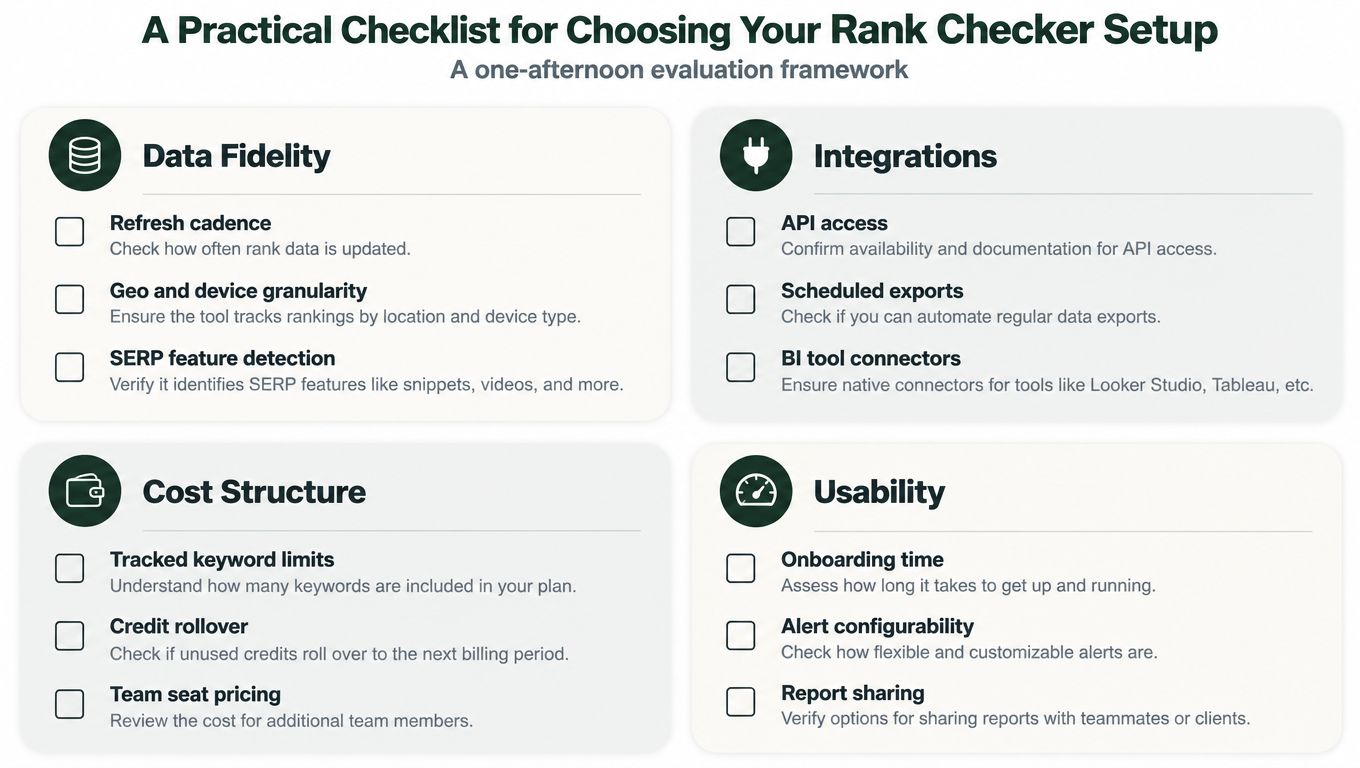
Data fidelity
Confirm that the tool can measure the audience you serve:
- Refresh cadence: Can you schedule checks at the rhythm your workflow requires?
- Geo and device granularity: Can you separate country, city, language, mobile, and desktop?
- SERP feature detection: Does it record snippets, local packs, videos, images, People Also Ask, and AI result areas?
- Historical depth: Can you compare current movement with a useful prior period?
Workflow fit
The data should travel to the people and systems that use it. Check for API access, webhooks, scheduled exports, role-based access, and integrations with reporting or BI tools.
Also test whether the platform can associate a keyword with a target URL. That small detail helps teams detect cannibalization and landing-page changes without inspecting every result manually.
Reporting depth
A report should support action, not merely display a list of positions. Look for competitor deltas, visibility trends, landing-page attribution, anomaly alerts, and filters by topic, market, device, and content type.
Decision test: For every alert, ask what task it would create. If the answer is unclear, the metric probably isn't useful enough.
Total cost
Read the limits carefully. Compare tracked keyword capacity, project limits, update frequency, API usage, exports, team seats, and historical access. A low entry price can become restrictive if the plan caps the data needed for your actual workflow.
Pull the keywords that already influence business outcomes from analytics and Search Console. Confirm that your shortlist can be tracked at the locations and devices your audience uses, then test the API or export against an internal dashboard before signing a long-term contract. For a broader comparison of setup criteria, see this SEO rank-tracking software guide.
AutoSEO connects keyword research, content creation, publishing, technical SEO tasks, rank tracking, and AI-visibility monitoring in one approval-first workflow. Visit AutoSEO to see how your team can turn ranking signals into specific optimization and publishing tasks instead of another isolated report.