You've checked traffic for the third Tuesday in a row. It's flat. The service page that should be bringing calls is buried, a competitor with a thinner site is above you, and the audit PDF from last winter is still sitting unopened in Drive. That isn't a knowledge problem. It's a priority problem, and a useful SEO audit for small business owners has to solve that first.
Table of Contents
Why Most Small Business Audits End Up in a Google Drive Folder
You've checked traffic for the third Tuesday in a row. The line hasn't moved.
Your best service page is buried somewhere past the first page, enquiries are coming from referrals rather than search, and you can't tell whether the problem is the site, the content, or Google not finding the pages at all. So you pay a freelancer, get a long PDF back, skim the red errors, and promise to deal with it next month. Six months later, nothing has changed.
That pattern repeats because most audits are built as deliverables, not decision tools. A crawl tool can flag hundreds of issues in minutes. It can't tell you whether a broken canonical on your highest value product page matters more than slow images on old blog posts. Without that ranking, everything looks urgent, so nothing gets done.
The Two Failure Modes That Waste the Most Time
I've watched small teams fall into the same two traps.
- Chasing perfect scores: Owners spend weeks trying to turn every performance score green while a money page sits accidentally set to noindex. The site looks healthier in a dashboard and earns exactly the same amount.
- Treating local as separate: For a plumber, clinic, or retailer with locations, local signals aren't a second project for later. Incorrect hours, a missing phone link, or an unindexed location page will cost you a customer at the moment they're ready to call.
The constraints behind this are real. In a survey of UK SMEs, 67% cited budget constraints as their primary SEO barrier, 54% reported lacking in-house expertise, 48% struggled to measure ROI, and 41% were unsure which tactics to prioritize, according to the UK SME SEO report examining budget, expertise, and prioritization barriers. A long undifferentiated checklist doesn't solve any of those problems. It makes the prioritization problem worse.
A useful audit doesn't end with a list of everything that's technically wrong. It ends with a short queue a named person can work through this week.
That's the mental model to hold onto. Every finding that survives into your final report should name the affected page, the search intent it serves, the business impact, the effort involved, and the owner. If a finding can't be described that way, it's background information, not an action. The report itself has no value. The action queue it produces is the value.
Starting with a crawl feels productive. It's usually a mistake.
Without a baseline, every finding floats in isolation. You won't know whether a page matters, whether a fix worked, or whether you're about to spend a developer day improving a template nobody visits. Spend an hour on setup first and every check that follows becomes easier to judge.
Confirm Access and Record the Baseline
Gather these before you run anything.
- Google Search Console: Confirm you can open the Pages, Core Web Vitals, and Sitemaps reports for the correct property. Google tells you what's indexed, what's excluded, and why.
- Analytics: Open Google Analytics or whatever you're using and note organic sessions, top landing pages, and conversions if they're tracked. If calls or form submissions aren't tracked, write that down as an audit finding in itself.
- CMS and sitemap: Confirm who can publish changes in Shopify, WordPress, Wix, Webflow, or your custom setup, and check that a sitemap exists and has been submitted.
Then record a one line baseline. Current indexed pages, organic clicks, top queries, and the pages tied to revenue. Keep that simple. Without those numbers saved somewhere, you'll have no honest way to judge the fixes in two months, and the audit turns into opinion.
Define Scope Around Money, Not Page Count
Most small sites don't need every URL audited at the same depth. Flag your business critical templates first. That usually means product pages, service and location pages, category pages, and any page with a booking form, checkout, or click to call button.
Weight findings on those templates heavily. A layout shift on a checkout page deserves more attention than the same shift on a five year old blog archive. Thin, low traffic pages still get a light pass for indexation and broken links, but they shouldn't consume the same time as the pages that pay the rent.
Write this up as a one page audit brief. Scope, access, baseline, priority templates, and who can ship fixes. Any freelancer, agency, or internal hire should be able to pick that page up and run against it without guessing what success looks like.
Running the Technical Core Checks That Actually Matter
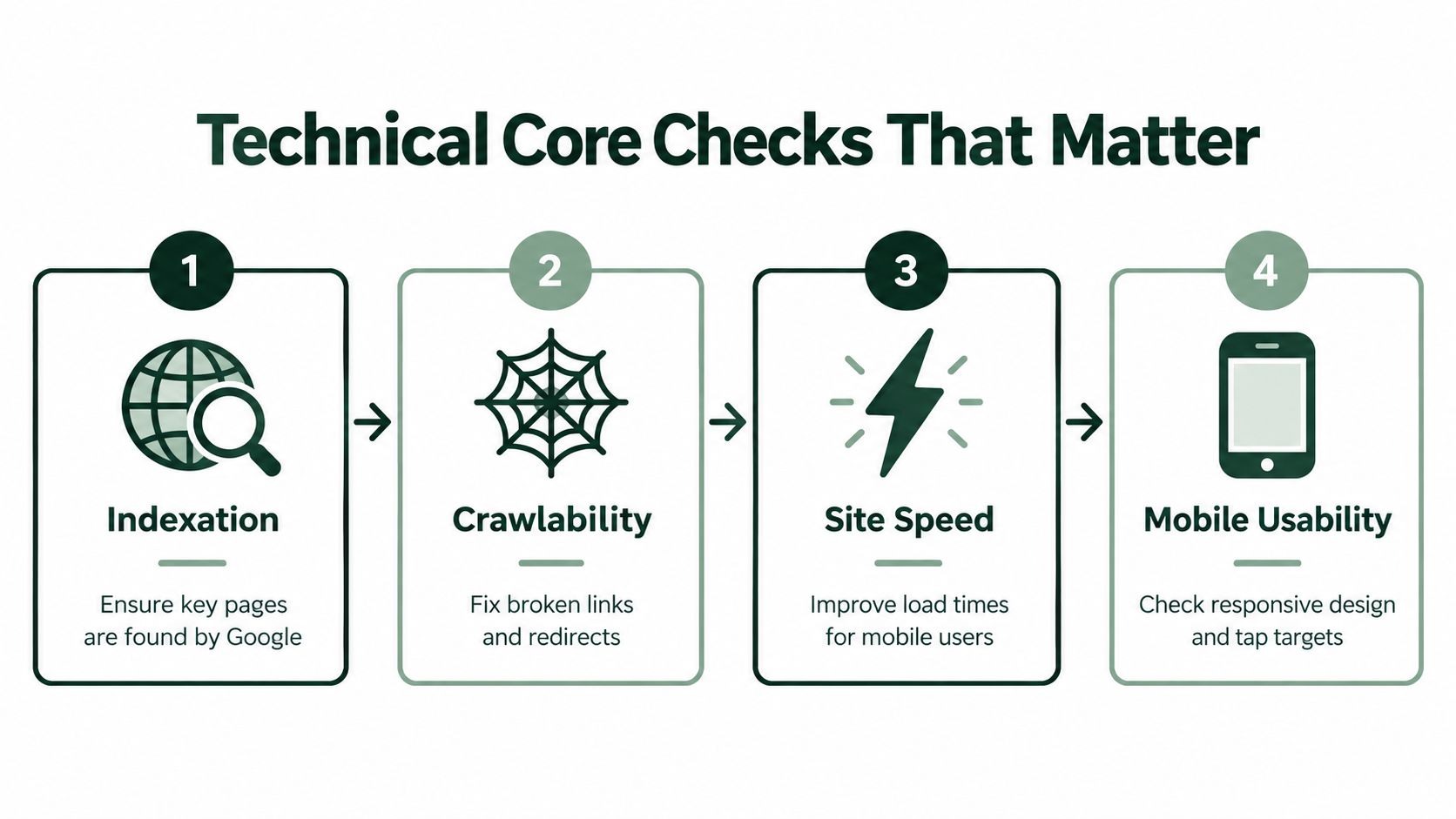
Run these in order. Indexation first, because a page Google can't store can't rank no matter how fast it loads.
Indexation and Crawl
Open the Pages report in Google Search Console and work through the exclusions on your priority templates. Check for accidental noindex tags, pages blocked in robots.txt, sitemaps listing URLs you don't want indexed, and canonical chains where page A points to B and B points somewhere else again. Clean up redirect loops and multi hop chains so each old URL lands in one jump.
The common small business failure mode is quiet. A staging setting, a plugin default, or a CMS checkbox blocks a service page and nobody notices for months because the page still looks fine to a human visitor.
Core Web Vitals
Treat page experience as a measurable issue, not a design opinion. Google recommends Largest Contentful Paint of 2.5 seconds or less, Interaction to Next Paint below 200 milliseconds, and Cumulative Layout Shift below 0.1, measured with real user data in the Core Web Vitals report guidance for Search Console. Core Web Vitals joined Google's page experience systems in June 2021, and a 2022 analysis found only about 39% of roughly 3 million pages passed all requirements on both mobile and desktop. Your competitors likely have unresolved gaps too.
Translate each metric into a cause. Slow LCP usually means oversized hero images, render blocking resources, or a sluggish server. Poor INP points to heavy JavaScript. High CLS usually means images or ads without reserved dimensions. Segment by device and template, and don't confuse a one off lab test with field data from real visitors.
Schema and Internal Linking
Validate Organization, LocalBusiness, Product, and FAQ schema where it's relevant, then check for errors in Search Console. Then look for orphan pages, especially orphaned money pages with no internal links pointing to them. A page nobody links to is hard for crawlers to find and easy for visitors to miss.
Technical Check Ownership Matrix
| Finding Type |
Example Issue |
Likely Owner |
| Indexation |
Service page set to noindex |
Marketer or CMS admin |
| Canonicals and sitemap |
Wrong canonical URL on products |
Marketer |
| Performance |
JavaScript blocking interaction |
Developer |
| Schema |
Missing LocalBusiness fields |
Marketer, developer to validate |
| Layout shift |
Hero image without dimensions |
Developer or theme editor |
Practical rule: If you can't name the owner while you're logging the finding, you haven't finished logging it.
Reading On-Page and Content Findings as Opportunities
Correcting hundreds of title tags one by one is where small business audits go to die. You'll burn a week, feel busy, and change almost nothing that matters.
Read content findings as a portfolio review instead. Group your queries from Search Console by intent. Transactional queries want a product or service page. Commercial investigation queries want comparisons, pricing context, or proof. Informational queries want a clear answer. Then ask one question for each cluster. Which single page should own this intent?

That question exposes the expensive patterns quickly.
- Thin service pages competing with each other: Three pages targeting slight variations of the same service in the same town, none with enough depth or internal links to win.
- Blog posts cannibalizing money pages: An informational post ranking weakly for a query your product page should own, splitting clicks and links between two URLs.
- Titles that don't match intent: A title tag written for a keyword the page doesn't really serve, or truncated so the useful part disappears in results.
- Metadata describing a different page: Descriptions copied across locations or products that promise something the page never delivers.
Decide Merge, Rewrite, or Remove
For each cluster, make a call. Merge overlapping pages into the strongest URL and redirect the rest. Rewrite the page that owns the intent but says too little to convert anyone. Remove or noindex pages that serve no intent, earn no traffic, and clutter your sitemap. It's a harder conversation than fixing titles, and it's the one that moves revenue.
Apply the same lens to internal links. Links aren't just navigation. They're how you tell Google and visitors which pages matter most. If your top service page receives fewer internal links than a seasonal blog post, that's a content finding with technical consequences, and it's usually fixable in an afternoon.
Work through your clusters once with this framework and hundreds of on-page findings collapse into roughly ten decisions. Those decisions are what belong in the action queue, not a spreadsheet of every imperfect meta description on the site.
Two Audit Layers Most Small Business Guides Skip
Local visibility is often the whole business for an SMB, yet generic audit templates treat it as an afterthought. The demand is there in plain sight. BrightLocal's consumer research found 84% of consumers had searched for a local business during the previous three months, 80% of U.S. consumers searched online for local businesses weekly, and 32% did so daily, with 73% of local searches beginning on mobile devices and 52% of consumers beginning their most recent local search on Google, as summarized in BrightLocal's collection of local search behavior statistics. Earlier Google reporting put 46% of searches in the local intent category back in 2018.
Audit Local as a Layer, Not a Separate Project
Record each location separately. Check name, address, and phone consistency across your site and search profiles, verify opening hours and click to call links work on mobile, and confirm every location page is indexable with a correct canonical. Validate LocalBusiness schema where it applies. Then connect Search Console and analytics data to calls, direction requests, form submissions, and purchases, so local findings are judged on money, not impressions alone.
Treat Accessibility as Revenue Protection
Most audits mention alt text and move on. That's too thin. Reporting found more than 2,000 ADA website accessibility lawsuits in the United States during the first half of 2025, a 37% increase over the same period in 2024, with nearly 70% targeting e-commerce retailers, many with annual revenue below $25 million, according to reporting on the rise in ADA website accessibility lawsuits. Independent testing also found 94.8% of the top one million home pages had detectable WCAG failures, averaging 51 errors per page.
Don't oversell this as a ranking shortcut. WCAG compliance isn't a declared direct ranking factor. The honest case is stronger anyway. Unlabeled form fields, keyboard traps, poor contrast, missing focus states, and meaningless link text stop real customers from finishing a booking or a checkout. Test keyboard navigation, form labels, image alternatives, contrast, and the full checkout flow on Shopify, WooCommerce, Wix, or whatever you run. Log barriers on revenue templates first, with a reproducible test, a severity level, and an owner.
Both layers share one trait. They decide whether a found customer becomes a paying one.
Scoring Findings So the Team Knows What to Fix First
A list of eighty findings isn't a strategy. Sorting them is.
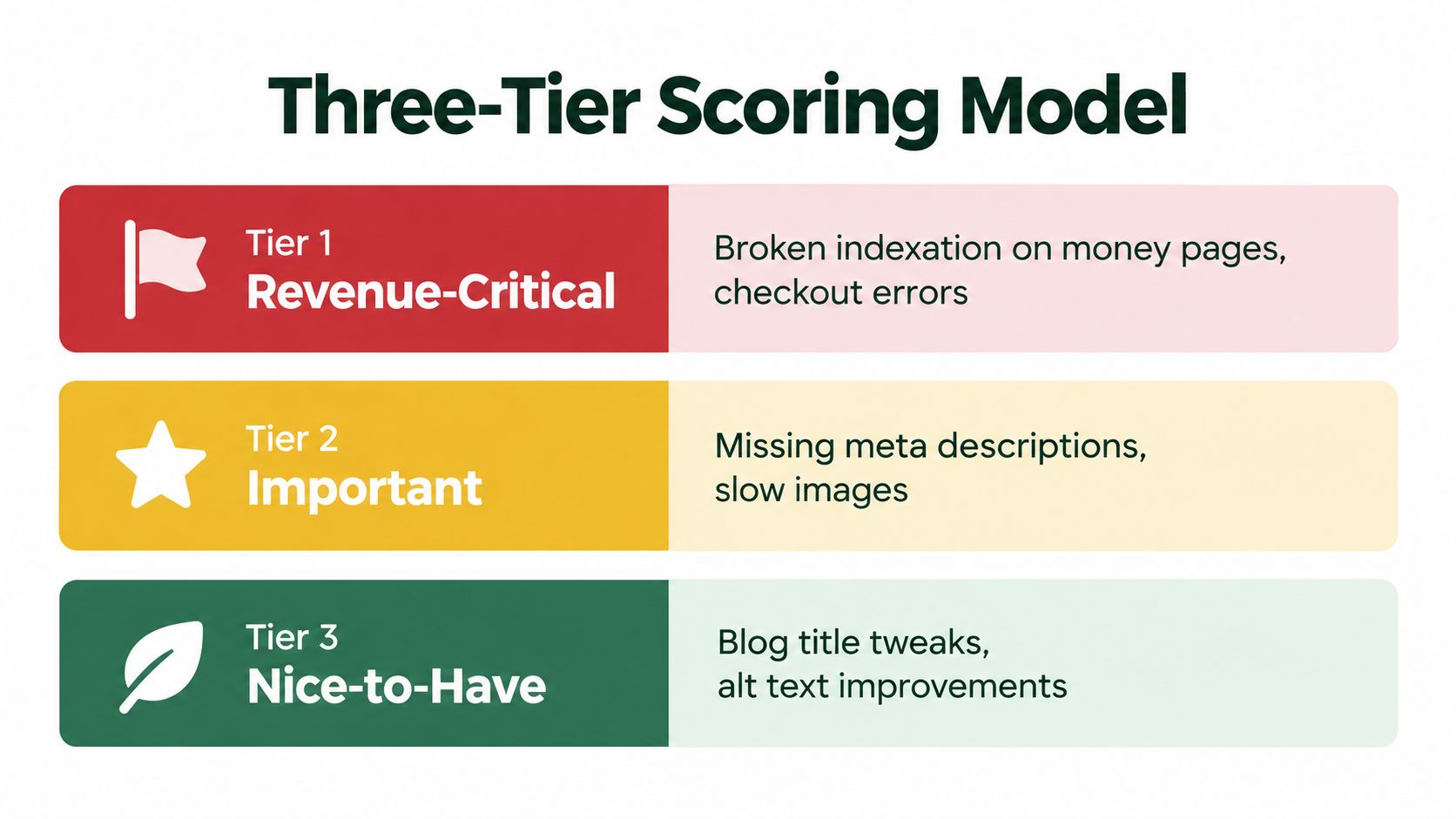
Use three tiers. Revenue critical covers anything actively blocking money. Broken indexation on a product or service page, a mobile checkout barrier, schema errors across a product template, or wrong contact details across locations. Visibility critical covers issues limiting growth on pages that already matter, such as Core Web Vitals failures on top traffic templates, missing internal links to an underperforming money page, or content cannibalization between two pages chasing one intent. Low priority is honest housekeeping. Legacy redirects, image compression on archive posts, and cosmetic metadata polish.
Pair every tier with an effort estimate and an owner. Under an hour for a founder or marketer looks very different from a developer task involving JavaScript rendering or a CMS template change, and pretending otherwise is how queues stall.
Finding Prioritization Framework
| Tier |
Impact Type |
Typical Effort |
Example Finding |
| Revenue critical |
Blocks sales or enquiries now |
Often under a day |
Top service page excluded from index |
| Visibility critical |
Limits traffic growth |
Marketer plus developer |
Slow LCP on main category template |
| Low priority |
Incremental polish |
Under an hour, batch later |
Shortened titles on old blog posts |
The most technical issue on the list is rarely the most important one. Fix the thing standing between a searcher and a sale before you perfect anything.
That contrarian point matters in practice. A flawless site wide performance project can wait. Correcting indexation on one high value page, or adding internal links to a local service page that's nearly ranking, usually returns more for less effort. Score against pages and intent, not against how impressive the fix sounds in a report.
Hold performance metrics to the same standard. LCP, INP, and CLS belong in the scorecard, but read them alongside indexed pages, rankings, conversions, and revenue. A green score that doesn't change any of those is a vanity result.
Turning the Report Into a 30-60-90 Day Action Queue
Scores only help if they turn into dated work. Convert your tiers into three horizons, and keep each horizon small enough that a non specialist can finish it.

Days 1 to 30 belong to the founder or marketer. Fix indexation errors, correct canonicals and sitemap settings, rewrite titles on priority pages, clean up contact details and hours, add LocalBusiness schema, and link internally to money pages. None of that needs a developer, and most of it ships in a week once someone owns it.
Days 31 to 60 pair the marketer with a developer. Work on Core Web Vitals for your top templates, checkout performance, JavaScript that's blocking interaction, and structured data across product templates. Days 61 to 90 are for compounding work. Content consolidation from your merge decisions, accessibility remediation on forms and checkout, and a deliberate rebuild of internal link architecture.
The walkthrough below shows what a prioritized queue looks like in practice once findings leave the spreadsheet.
Keeping that queue alive is where most small teams need help, because a static report goes stale the moment a plugin updates or a new page ships. One option is AutoSEO, whose technical audit module produces a prioritized task queue covering indexation, redirects, titles, schema, speed, and internal linking, pushes approved changes to Shopify, WordPress, Webflow, Wix, and custom sites, and pairs that with rank tracking and AI visibility monitoring so you can see which fixes moved results. Whatever tooling you choose, insist on that closed loop. Audit, fix, publish, measure.
How Often Should You Repeat This
Run a light check monthly in Search Console, and a full audit after any redesign, migration, or platform change. Assign one owner for the queue. Teams without a named owner don't have an SEO problem. They have a follow through problem, and no report fixes that.
Stop letting audit findings sit in a spreadsheet while competitors take the calls. AutoSEO turns an SEO audit for small business owners into a prioritized task queue covering indexation, schema, speed, and internal linking, then publishes approved fixes and tracks rankings and AI citations so you can prove what worked. Visit AutoSEO to run your audit and start shipping the fixes that protect revenue first.